Sample 24881: Control the shape of a 3D bar chart with PROC GCHART
This sample uses the SHAPE= option on the VBAR3D statement of PROC GCHART to specify the shape of the 3D bars.
These sample files and code examples are provided by SAS Institute
Inc. "as is" without warranty of any kind, either express or implied, including
but not limited to the implied warranties of merchantability and fitness for a
particular purpose. Recipients acknowledge and agree that SAS Institute shall
not be liable for any damages whatsoever arising out of their use of this material.
In addition, SAS Institute will provide no support for the materials contained herein.
This sample uses the SHAPE= option on the VBAR3D statement of PROC GCHART to specify the shape of the 3D bars.
The graphics output in the Results tab was produced using SAS® 9.2. Submitting the sample code with releases of SAS prior to SAS 9.2 might produce different results.
 /* Set the graphics environment */
goptions reset=all cback=white border htitle=12pt htext=10pt;

 /* Create the sample data set */
data a;
   input YEAR 4. CNT;
   datalines;
1997 25
1998 30
1999 20
2000 10
2001 60
;
run;

axis1 minor=none label=('CNT');

 /* Add a title to the graph */
title1 'Using Shape=Cylinder with VBAR3D';

 /* Use the SHAPE= option to specify a cylinder */
 /* for the shape of the bars.                  */
proc gchart data=a;
   vbar3d YEAR / sumvar=CNT discrete raxis=axis1
                 shape=cylinder
                 autoref cframe=gray
                 width=9 space=3;
run;
quit;
These sample files and code examples are provided by SAS Institute
Inc. "as is" without warranty of any kind, either express or implied, including
but not limited to the implied warranties of merchantability and fitness for a
particular purpose. Recipients acknowledge and agree that SAS Institute shall
not be liable for any damages whatsoever arising out of their use of this material.
In addition, SAS Institute will provide no support for the materials contained herein.
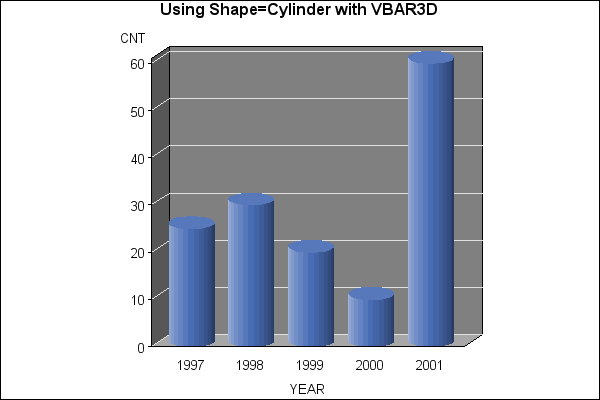
This sample uses the SHAPE= option on the VBAR3D statement of PROC GCHART to specify the shape of the 3D bars.
| Type: | Sample |
| Topic: | SAS Reference ==> Procedures ==> GCHART
Query and Reporting ==> Creating Reports ==> Graphical ==> Graph Types ==> Charts ==> Bar
|
| Date Modified: | 2018-01-30 10:16:20 |
| Date Created: | 2004-11-11 11:07:54 |
Operating System and Release Information
| SAS System | SAS/GRAPH | All | n/a | n/a |


