HTML Data Set Formatter
HTML Data Set Formatter Syntax Reference
The syntax for the HTML Data Set Formatter is
%DS2HTM(argument=value, argument=value,...);
You must include the Data Set Formatter macro call with your SAS code. You cannot call it from a SAS command line. When including the macro call in your SAS code, you can use a list of arguments that are contained within parentheses and are separated with commas. You must end the invocation with a semicolon.
When naming files, avoid using certain reserved names. Click here to view a list of reserved names.
Note: Table support varies across browsers. Some of the formatting attributes supported by the Data Set Formatter are not recognized by all browsers. In most cases, a browser will ignore HTML tags that it does not recognize; however, this may produce undesirable output.
The Data Set Formatter macro uses the following argument types:
- those that determine how the table is generated and saved
- those that determine how the table is formatted
- those that enable character transcoding
- those that enable style sheets
Arguments that determine how the table is generated and saved
Most of the following arguments are required for the macro invocation. If the argument is required only in some cases, the exceptions are noted.
data=SAS-data-set-name- specifies the SAS data set that you want to format using the Data Set Formatter. If you omit this argument, the Data Set Formatter will use the most recently created SAS data set.
htmlfile=external-filename- specifies the name of the HTML file where the
formatted output will be written. If the file you specify does
not exist, it is created for you.
Note:
HTMLFILEandHTMLFREFare mutually exclusive arguments. htmlfref=fileref- specifies the SAS fileref that points to the location
of the HTML file where the formatted output should be written. If the file you specify does
not exist, it is created for you.
Note:
HTMLFILEandHTMLFREFare mutually exclusive arguments. openmode=APPEND | REPLACE- indicates whether the new HTML output overwrites the
information currently in the specified file or if the new output
is appended to the end of the existing file. Specify
APPENDto add your new HTML-enhanced output to the end of an existing file. This argument is required only if you want to override the default setting. SpecifyREPLACEto delete the information in an existing file and replace it with the new output.Note:
OPENMODE=APPENDis not valid is you are writing your resulting HTML to a PDS on z/OS. pw=password- specifies the password needed to access a password-protected data
set. This argument is required if the data set has a
READorPWpassword. (You do not need to use this if the data set has onlyWRITEorALTERpasswords.) proploc=property-list-name- specifies the name and location of your property list. This argument is required only if you are using a property list other than the default. The property list name must be a four-level name, such as SASUSER.HTMLGEN.MYPROPS.SLIST.
runmode=I | B- specifies whether you are running the macro in batch or
interactive (window) mode. Although the default is to run the macro
in batch mode, you
should include
RUNMODE=Bwhen running in batch mode to avoid confusion. You must include the argument when running in interactive mode, which is available only with Release 6.12 of the SAS software.If you are using the Data Set Formatter with the Application Dispatcher, you must use
RUNMODE=S. UsingRUNMODE=Stells the formatter to print the HTTP header required by the Application Dispatcher before creating any output. For more information, refer to the SAS/IntrNet Application Dispatcher documentation at http://support.sas.com/documentation.
The following arguments supply information to the Data Set Formatter specifying how the data should be processed. These arguments are not required.
by=var1(options) var2(options) ...- specifies the BY variables that you want to use to group data in a
table.
When you use the BY argument with Data Set Formatter, the formatter creates a separate table for each BY group. If you want to include more than one variable, list each variable name and separate them with a space. Do not use a comma in the list of variable names.
You can specify any of the following options for a specified variable. These options are not required and can be used on some or all of the variables included on the
BYargument. If you specify more than one option for a variable, delimit the options with a comma. The available options are:order=ASCENDING | DESCENDING- applies an order to the output based on the value you supply.
You can include
ORDERon one variable only.ASCENDINGis the default, and orders the values in ascending order (lowest to highest).
DESCENDINGorders the values of the specified variable in descending order (highest to lowest). format=SAS_format_name- indicates a valid SAS format that you want to apply to the values of the specified variables. You can apply a format to any or all of the variables for which formats are valid.
style_tag=valuestyle_tagcan be eitherCLASSorCLASSFMT. For more information about using style sheet support with theBYargument, see Applying styles to variables later in this discussion.
caption=value- specifies the text that appears in the table caption.
If you do not specify this argument, the table will not
have a caption.
Note: If using any special characters (for example, % , & ) in the
CAPTIONargument, include%NRSTRin the argument in order to process these characters correctly. This example will handleA,B,& Ccorrectly:caption=%NRSTR(Appending to Examples,B,& C)
formats=Y | N- indicates whether to apply the defined formats to the values in the HTML table. By default, all formats are applied to values before they are added to the table. The formats must be stored in the data set in order for them to be applied.
labels=Y | N- indicates whether to use the SAS variable labels defined in
the data set as your column labels. The Data Set Formatter
uses the variable labels by default. If a variable does not have a SAS
label, the name of the variable is used. Specify
LABELS=Nto use variable names instead of the SAS labels as your column labels. id=var1 var2 ...- specifies which SAS variables you want represented
as the ID variables and the order in which they should be
included. If you want to include more than one variable, list each
variable name and separate them with a space. Do not use a
comma in the list of variable names.
For information about applying styles, see Applying styles to variables later in this discussion.
obsnum=Y | N- indicates whether the column containing observation numbers should be
included in the table output. By default, the observation numbers are not
included. Specify
OBSNUM=Yto include the observation numbers. round=number- rounds the values of the numeric variables to the
specified number of decimal places. If you are totaling the
values, keep in mind that rounding occurs before the values
are totaled.
Note: For better formatted output, apply a format to the appropriate data values prior to invoking the Data Set Formatter.
sum=var1 var2 ...- specifies the variables for which you want a
total. Specify only numeric variables for this argument.
If you want to include more than one variable, list each
variable name and separate them with a space. Do not use a
comma in the list of variable names.
Note that only the values in single variables are totaled. This argument does not total the sums of multiple variables.
For information about applying styles, see Applying styles to variables later in this discussion.
var=var1 var2 ...- specifies the variables that you want included in
the HTML file and the order in which they should be
included. To include all of the variables in the
data set, do not specify the argument. If you want to
include only a subset of the variables, list each variable
name and separate them with a space. Do not use a comma
in the list of variable names.
For information about applying styles, see Applying styles to variables later in this discussion.
where=where-expression- specifies a valid WHERE clause that selects observations from
the SAS data set. Using this argument subsets your data based on
the criteria you supply in
WHERE-EXPRESSION.Note: If using any special characters (for example, % , & ) in the
WHEREexpression, include%NRSTRin the argument in order to process these characters correctly. This example will handleInt%correctly:where=%NRSTR(value="Int%")
Arguments that determine how the table is formatted
The remaining arguments provide formatting information and represent the properties that you can change to create customized HTML output.
Note: The Data Set Formatter does not check for errors on fonts, colors, or sizes you specify. It simply allows any value you type. So, you should specify values that are supported on the system where the HTML page will be viewed.
General page formatting
These arguments apply to the entire page for the current invocation of the macro. So, if you append data, the attributes of existing results will not change. You may want to use these arguments only when you replace, rather than append, pages. The rendering of some formatting arguments varies per browser. Some browsers may not support some of these options.
To use the browser's attribute settings for those arguments below
where DEFAULT is an option, specify DEFAULT.
(Using DEFAULT tells the Data Set Formatter to ignore settings in the property list.)
Otherwise, specify the value, for example, the color.
bgtype=NONE | COLOR | IMAGE- specifies the type of background for your Web page. If you specify
COLORorIMAGEas the value, you must also use theBGargument. Valid values forBGTYPEareNONE- does not use a background on your Web page. This is the default.
COLOR- causes the Data Set Formatter to use the background color
specified in the
BGargument. If you specifyCOLORas the value, you must also specify the color in theBGargument. IMAGE- indicates that you want to use a custom image as a
background. If you specify
IMAGEas the value, you must also specify theBGargument to provide the name and location of the image. Some browsers may not support the use of background images.
bg=value- If you specified
BGTYPE=IMAGE, this identifies the fully-qualified path and filename of a background image that you want to use on your Web page. If you specifiedBGTYPE=COLOR, this indicates the specific background color you want to use on your page. You can specify color values using the color name or the RGB value. brtitle=value- specifies the value that appears as the title in the browser window title bar. By default, no title is displayed.
center=Y | N- determines whether all the output generated by the current
invocation of the macro is centered. (See appending information under
General Page Formatting.) The default is no center (
N). ctext=value | DEFAULT- indicates whether you use the default global text color defined
by the browser or by the color specified here. This affects all the
text generated by the current invocation of the macro. You can
override the color for an element using the color specification
arguments. For example, specifying a color for title lines in your
property list or via the
TCOLORargument overrides the value specified byCTEXT. You can specify color values using the color name or the RGB value. doctype=3.2 | value- specifies the information that is provided for the
DOCTYPEtag in the HTML file. The default value is3.2, which writes the following line to the top of your HTML file:<!DOCTYPE HTML PUBLIC "-//W3C//DTD HTML 3.2 Final//EN">
If you want something other than the default text, you can provide the exact line to be added. If you supply a blank for
value, nothing is added to the top of the file. If you supply a value other than 3.2, you must include the exact text that you want added. For example, if you want to reference a different DTD, you must provide the entire string, including!DOCTYPEand the opening and closing angle brackets. encode=Y | N- specifies whether the Data Set Formatter
replaces angle brackets with the appropriate ASCII character representation
so that the brackets display in the browser. To have the Data Set Formatter
check for the characters "<" and
">" and encode them as ASCII characters, select
Y. This will display the actual brackets in the browser. By default, the brackets will be encoded. To not encode them and have the Data Set Formatter pass the brackets to the browser (where the browser will attempt to act on them as an HTML-formatting instruction), selectN. pagepart=ALL | HEAD | BODY | FOOT- specifies which parts of the HTML page is written to the file.
You may want to write only some parts of the page if you are appending
the results to an existing file. The valid values are:
ALL- writes the HTML header information, your formatted SAS data, and the HTML footer information to the specified file. This is the default behavior and it should be used when you are not appending additional information to the file.
HEAD- writes the HTML header information and your formatted SAS data to the
HTML file. It does not include the HTML footer information.
You should use
HEADwhen you are going to append additional output from one of the Formatters to this file. BODY- writes only your formatted SAS data to the specified file.
FOOT- writes your formatted SAS data and the HTML footer information to the specified file.
For more information, see Using Page Formats.
saspower=value- adds the Powered by SAS logo to the bottom of the HTML page. You must provide the name and location of the image. This image
automatically links to the SAS Web site. The
value for this argument should be a fully-qualified pathname
or valid URL. The default is not to display any image. Omit this argument if
you do not want to use this image or have not acquired the logo.
Note: To display an image and automatically link to the SAS Web site when running in interactive mode, you must include the argument along with the
%DS2HTMmacro call. The following example shows how to include theSASPOWERargument in interactive mode:%ds2htm(runmode=i, saspower=saspower.gif);
Use of this image is by permission only. See the Powered by SAS logo guidelines and agreement. septype=NONE | RULE | IMAGE- specifies the type of separator that you want to use
between the tables in your output. The Data Set Formatter uses a
separator whenever a table is generated (or whenever a data set is formatted).
Valid values are
NONE- overrides the default value and does not include a separator between the tables in your output.
RULE- This is the default. This value causes the Data Set Formatter
to separate the tables in your output by adding the
<HR>tag (a horizontal rule) to the HTML file following the end of the table. IMAGE- indicates that you want to use a custom image as a separator.
If you specify
IMAGE, you must also specify theSEPLOCargument to provide the name and location of the image that you want to use.
seploc=image-location- specifies the location of the image that you want
to use as a separator between tables in the output. This argument
is required if you specify
SEPTYPE=IMAGE. The value for this argument should be a fully-qualified pathname or valid URL.
Table definition
Use the following attributes to define the formatting structure
of the table. These attributes contribute information to the
HTML <TABLE> tag.
border=Y | N- turns borders on or off for the table. The default value
is
Y, which turns borders on for the table. The width of the border is determined by the value of theBWIDTHargument. bwidth=value- specifies the thickness of the border. The higher the number,
the thicker the border. The default value is
1. cpad=value- specifies the space, in pixels, between the borders
of the table cell and the contents within the cell. The
default value is
1. The value specified for this argument is represented in the HTML asCELLPADDING. cspace=value- specifies the space, in pixels, between the cells in
the table. The default value is
1. The value specified for this argument is represented in the HTML asCELLSPACING. talign=LEFT | CENTER | RIGHT- indicates whether the table is aligned to the left, right, or
center of the page. The default value is
CENTER. Some browsers produce unexpected results with multiple tables and anything other thanCENTER. tbbgcolr=value | DEFAULT- specifies a background color for the entire table. You can
specify individual cell background colors using the
CLBGCOLR,
OBGCOLR, IBGCOLR, VBGCOLR
, orSBGCOLRarguments, which override the setting ofTBBGCOLR. twidth=value- specifies the width of the table. The default value is
100. The units for this value are determined by theTWUNITSargument. twunits=PERCENT | PIXELS- specifies the units used to determine the table width.
The default value is
PERCENT.
Table element formatting
The Data Set Formatter lets you change text color, fonts, and font sizes for the following elements on a table:
- TITLE lines
- BY lines
- table caption
- table column labels
- table data cells (observation numbers, ID variables, variables, and sum variables)
- FOOTNOTE lines.
In addition, the Data Set Formatter allows you to change the background for the following elements:
- column labels
- observation column
- ID variable columns
- variable columns
- variable sum cells.
The table illustrates the locations of some of these elements.
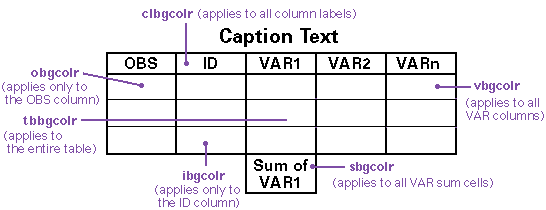
The default for each of these arguments is to use no color.
Formatting individual elements
The remainder of the arguments control the formatting of individual elements in the table output. If you specify formatting information for an element not included in your table, the information is simply ignored.
The elements include the following:
- TITLE lines
- BY lines
- table caption
- table column label cells
- observation numbers
- ID variables
- variables
- SUM variables
- FOOTNOTE lines.
To use the browser's attribute settings for those arguments below
where DEFAULT is an option, specify DEFAULT.
(Using DEFAULT tells the Data Set Formatter to ignore settings in the property list.)
Otherwise, specify the
value, for example, the color.
When you specify any of
these arguments, an HTML tag such as <FONT COLOR=value> is
added to all the appropriate lines in your HTML-formatted output.
tcolor=value | DEFAULT- specifies a color for the SAS TITLE lines. You can specify color values using the color name or the RGB value.
tface=value | DEFAULT- specifies a font for the SAS TITLE lines. Valid values are browser specific.
tsize=value | DEFAULT- specifies the size of the font used to display SAS TITLE lines.
Valid values are
N,+N, and-N, whereNis an integer. Valid values forNare browser specific. ttag=value- specifies the HTML tag name associated with the SAS TITLE lines.
The default value is
PREFORMATTED + HEADER 3.For a list of all of the valid HTML tag names that you can use with this argument, see the list of available tags provided with the Data Set Formatter.
The following discusses the syntax necessary to utilize BY-group processing. For an overview of this feature, see BY-Group Processing with the Data Set Formatter.
bcolor=value | DEFAULT- specifies a color for the SAS BY lines. You can specify color values using the color name or the RGB value.
bface=value | DEFAULT- specifies a font for the SAS BY lines. Valid values are browser specific.
bsize=value | DEFAULT- specifies the size of the font used to display SAS BY lines. Valid
values are
N,+N, and-N, whereNis an integer. Valid values forNare browser specific. btag=value- specifies the HTML tag name associated with the SAS BY lines.
The default value is
NO FORMATTING. bwrap=Y | N- specifies whether word wrapping is performed. The default
(
Y) causes each BY group heading for a table to be printed on a separate line. If you want all BY group headings for each table printed on the same line, specifyN. prtfoot=ALL | LAST- specifies where the formatter should print the footnotes for
the BY group tables.
LAST- designates that any SAS FOOTNOTE lines are printed after the last table only. This is the default value.
ALL- designates that any SAS FOOTNOTE lines are printed after every table.
prtpower=ALL | LAST- specifies where the formatter should print the Powered by SAS logo
for the BY group tables.
LAST- designates that the Powered by SAS logo is printed after the last table only. This is the default value.
ALL- designates that the Powered by SAS logo is printed after every table.
prttitle=ALL | FIRST- specifies where the formatter should print the title for the
BY group tables.
FIRST- designates that any SAS TITLE lines will be printed before the first table only. This is the default value.
ALL- designates that any SAS TITLE lines will be printed before every table.
sqlview=Y | N- indicates whether or not you are using BY processing with
an SQL view. The default value,
N, indicates that this is not an SQL view. If this is an SQL view and you are using BY processing, you must specifySQLVIEW=Y.
The table caption
ccolor=value | DEFAULT- specifies the color of the caption text. You can specify color values using the color name or the RGB value.
cface=value | DEFAULT- specifies a font for the caption text. Valid values are browser specific.
chalign=LEFT | CENTER | RIGHT- specifies the location of the caption text. The default value,
CENTER, locates the text in the center above the table. SpecifyLEFT(orRIGHT) if you want the caption text to appear to the left (or right) the table. csize=value | DEFAULT- specifies the size of the font used to display the caption text.
Valid values are
N,+N, and-N, whereNis an integer. Valid values forNare browser specific. ctag=value- specifies the HTML tag name associated with the caption. The default
value is
NO FORMATTING.For a list of all of the valid HTML tag names that you can use with this argument, see the list of available tags provided with the Data Set Formatter.
cvalign=TOP | BOTTOM- specifies the location of the caption text. The default value,
TOP, locates the text above the table. SpecifyBOTTOMif you want the caption text to appear below the table.
The table column label cells
clbgcolr=value | DEFAULT- specifies a background color for the column headers. The column headers are referred to as column labels. You can specify color values using the color name or the RGB value.
clcolor=value | DEFAULT- specifies the color of the column label text. You can specify color values using the color name or the RGB value.
clface=value | DEFAULT- specifies a font for the text used for each column label in the table. Valid values are browser specific.
clhalign=LEFT | RIGHT | CENTER- specifies the horizontal location of the column label text within the table cell. The default is to center the text within the cell.
clsize=value | DEFAULT- specifies the size of the font used to display the column label text.
Valid values are
N,+N, and-N, whereNis an integer. Valid values forNare browser specific. cltag=value- specifies the HTML tag name associated with the column labels. The default
value is
NO FORMATTING.For a list of all of the valid HTML tag names that you can use with this argument, see the list of available tags provided with the Data Set Formatter.
clvalign=TOP | BOTTOM | MIDDLE | BASELINE- specifies the vertical location of the column label text within the table cell. The default is to place the text in the middle of the cell.
clwrap=Y | N- specifies whether word wrapping is allowed within the
cell. The default (
Y) is to allow word wrapping.
obgcolr=value | DEFAULT- specifies a background color for the column that contains observation numbers. You can specify color values using the color name or the RGB value.
ocolor=value | DEFAULT- specifies the color of the observation number text. You can specify color values using the color name or the RGB value.
oface=value | DEFAULT- specifies a font for the observation number text displayed in the table. Valid values are browser specific.
ohalign=LEFT | RIGHT | CENTER- specifies the horizontal location of the observation number text within the table cell. The default is to center the text within the cell.
osize=value | DEFAULT- specifies the size of the font used to display the
observation number text.
Valid values are
N,+N, and-N, whereNis an integer. Valid values forNare browser specific. otag=value- specifies the HTML tag name associated with the observation number text. The default
value is
NO FORMATTING.For a list of all of the valid HTML tag names that you can use with this argument, see the list of available tags provided with the Data Set Formatter.
ovalign=TOP | BOTTOM | MIDDLE | BASELINE- specifies the vertical location of the observation number within the table cell. The default is to place the text in the middle of the cell.
The ID variable
ibgcolr=value | DEFAULT- specifies a background color for the columns that contain the ID variable text. You can specify color values using the color name or the RGB value.
icolor=value | DEFAULT- specifies the color of the ID variable text. You can specify color values using the color name or the RGB value.
iface=value | DEFAULT- specifies a font for the ID variable text displayed in the table. Valid values are browser specific.
ihalign=LEFT | RIGHT | CENTER- specifies the horizontal location of the ID variable text within the table cell. The default is to center the text within the cell.
isize=value | DEFAULT- specifies the size of the font used to display the ID variable text.
Valid values are
N,+N, and-N, whereNis an integer. Valid values forNare browser specific. itag=value- specifies the HTML tag name associated with the ID variable text. The default
value is
NO FORMATTING.For a list of all of the valid HTML tag names that you can use with this argument, see the list of available tags provided with the Data Set Formatter.
ivalign=TOP | BOTTOM | MIDDLE | BASELINE- specifies the vertical location of the ID variable text within the table cell. The default is to place the text in the middle of the cell.
iwrap=Y | N- specifies whether or not to allow word wrapping within the
cell. The default (
Y) is to allow word wrapping.
The variable
vbgcolr=value | DEFAULT- specifies a background color for the columns that contain the variable text. You can specify color values using the color name or the RGB value.
vcolor=value | DEFAULT- specifies the color of the variable text. You can specify color values using the color name or the RGB value.
vface=value | DEFAULT- specifies a font for the variable text displayed in the table. Valid values are browser specific.
vhalign=LEFT | RIGHT | CENTER- specifies the horizontal location of the variable text within the table cell. The default is to center the text within the cell.
vsize=value | DEFAULT- specifies the size of the font used to display the variable text.
Valid values are
N,+N, and-N, whereNis an integer. Valid values forNare browser specific. vtag=value- specifies the HTML tag name associated with the variable text. The default
value is
NO FORMATTING.For a list of all of the valid HTML tag names that you can use with this argument, see the list of available tags provided with the Data Set Formatter.
vvalign=TOP | BOTTOM | MIDDLE | BASELINE- specifies the vertical location of the variable text within the table cell. The default is to place the text in the middle of the cell.
vwrap=Y | N- specifies whether to allow word wrapping within the
cell. The default (
Y) is to allow word wrapping.
The variable sums
sbgcolr=value | DEFAULT- specifies a background color for each of the table cells that contain a column sum. You can specify color values using the color name or the RGB value.
scolor=value | DEFAULT- specifies the color of the variable sum text. You can specify color values using the color name or the RGB value.
sface=value | DEFAULT- specifies a font for the variable sum text. Valid values are browser specific.
shalign=LEFT | RIGHT | CENTER- specifies the horizontal location of the variable sum text within the table cell. The default is to center the text within the cell.
ssize=value | DEFAULT- specifies the size of the font used to display the
variable sum text.
Valid values are
N,+N, and-N, whereNis an integer. Valid values forNare browser specific. stag=value- specifies the HTML tag name associated with the variable sum text. The default
value is
NO FORMATTING.For a list of all of the valid HTML tag names that you can use with this argument, see the list of available tags provided with the Data Set Formatter.
svalign=TOP | BOTTOM | MIDDLE | BASELINE- specifies the vertical location of the variable sum text within the table cell. The default is to place the text in the middle the cell.
fcolor=value | DEFAULT- specifies a color for the SAS FOOTNOTE lines. You can specify color values using the color name or the RGB value.
fface=value | DEFAULT- specifies a font for the SAS FOOTNOTE lines. Valid values are browser specific.
fsize=value | DEFAULT- specifies the default size of the font used to display the SAS FOOTNOTE lines.
Valid values are
N,+N, and-N, whereNis an integer. Valid values forNare browser specific. ftag=value- specifies the HTML tag name associated with the SAS FOOTNOTE lines. The default
value is
PREFORMATTED + HEADER 3.For a list of all of the valid HTML tag names that you can use with this argument, see the list of available tags provided with the Data Set Formatter.
Arguments that enable character transcoding
tranlist=transcoding-list-namecharset=character-set-name
For a description of these arguments and an explanation about how to use them, see Implementing Character Transcoding in "Character Transcoding and National Language Support."
Arguments that enable style sheets
Arguments that embed or link to your style sheets
Use the following arguments to specify the location of your style sheets. These arguments are valid for all formatters and are described in Syntax for Including Style Sheets:
sshref1-sshref5=valuesstype1-sstype5=valuessrel1-ssrel5=valuessrev1-ssrev5=valuesstitle1-sstitle5=valuessmedia1-ssmedia5=valuessfile1-ssfile5=valuessfref1-ssfref5=value
Arguments that enable you to specify the CLASS and ID information
Applying styles to page elements
bclass=value- specifies the name of the style sheet class that should be applied to all bylines. The style acts on the entire byline. See Applying styles to variables for information about how to apply a style to only the BY variable.
bdclass=value- specifies the name of the style sheet class to be used for the document body.
fclass=value- specifies the name of the style sheet class to be used for footnote lines.
sepclass=value- specifies the name of the style sheet class to be used for the page
separator. If the separator type is
RULE, the supplied value is used on theCLASSattribute of theHRtag. For anIMAGEseparator, the supplied value is used on theCLASSattribute of theIMGtag. spclass=value- specifies the name of the style sheet class to be used for the Powered by SAS logo.
tclass=value- specifies the name of the style sheet class to be used for title lines
Applying styles to table elements
cclass=value- specifies the name of the style sheet class to be used for the table caption.
clclass=value- specifies the name of the style sheet class to be used for the column label cells.
oclass=value- specifies the name of the style sheet class to be used for the observation number cells.
rowssvar=value- identifies the variable in the data set that you want to
use to control formatting. The format associated with the
variable is applied to the
TRtag of the row that contains the variable.For more information about
ROWSSVARandROWSSFMT, see Formatting rows based on the variable. rowssfmt=value- specifies the SAS format that you created to be
used along with
ROWSSVAR. You cannot use this argument unless you are also usingROWSSVAR.For more information about
ROWSSVARandROWSSFMT, see Formatting rows based on the variable. tbclass=value- specifies the name of the style sheet class to be used for the table.
In order to support styles for the variable arguments
BY, ID, SUM, and VAR, we have enhanced
these arguments. You can continue to use them as you have in
the past (as they are described earlier in this document). The
usage described in this section explains how to utilize style
sheets with these variables.
Each of the variable arguments now accepts style tags. If you are applying styles to any of these variables, they appear as follows:
by=var1(style-tags) var2(style-tags) ...id=var1(style-tags) var2(style-tags) ...sum=var1(style-tags) var2(style-tags) ...var=var1(style-tags) var2(style-tags) ...
Each of the variable arguments now accepts the following
style tags: (CLASS=value) or
CLASSFMT=value).
value must be a valid CLASS defined in your style sheet.
See Formatting table cells based on the
variable for examples that use CLASSFMT.
class=value- Use this tag to specify a class that is defined in your
style sheet. When you use the
CLASSargument, the same HTML formatting instruction is applied to every cell in the column that contains the variable.You cannot use
CLASSandCLASSFMTtogether with an argument. classfmt=value- Use this tag to specify a valid SAS format. You must include
a CLASS element in your style sheet that matches the value
produced when the format is applied. The
CLASSFMTargument enables you to apply a specific HTML formatting instruction to each cell that contains the variable.You cannot use
CLASSandCLASSFMTtogether on an argument.
Note: z/OS is the successor to the OS/390 and MVS operating systems. SAS/IntrNet 9.1 for z/OS is supported on the MVS, OS/390, and z/OS operating systems and, throughout this document, any reference to z/OS also applies to OS/390 and MVS, unless otherwise stated.