Problem Note 69768: The SASSearchService.log file can get very large
 |  |  |  |
The SASSearchService.log can get very large (over 50 GB), which fills the hard drive space. When this issue occurs, the SASSearchService.log, located by default in the SAS-configuration-directory/LevN/Web/Logs/SASServer12_1 directory, shows the following error:
com.sas.searchsas.SASSearchServiceException: Unable to find search application from configuration service
at com.sas.svcs.search.util.SearchServiceManager.loadAppConfigProperties(SearchServiceManager.java:482)
at com.sas.svcs.search.util.SearchServiceManager.loadCache(SearchServiceManager.java:461)
at com.sas.svcs.search.util.SearchServiceManager.<init>(SearchServiceManager.java:109)
at com.sas.svcs.search.util.SearchServiceManager.<clinit>(SearchServiceManager.java:91)
at com.sas.svcs.search.util.TextStorePropertiesUtil.getHostIdentifier(TextStorePropertiesUtil.java:324)
at com.sas.svcs.search.util.TextStorePropertiesUtil.getIndexStatus(TextStorePropertiesUtil.java:79)
at com.sas.svcs.search.impl.SearchIndexServiceImpl.indexSASContent(SearchIndexServiceImpl.java:356)
at com.sas.svcs.search.impl.SearchIndexServiceImpl.indexSASContent(SearchIndexServiceImpl.java:340)
at com.sas.svcs.search.impl.SearchIndexServiceImpl.indexSASContent(SearchIndexServiceImpl.java:274)
at sun.reflect.NativeMethodAccessorImpl.invoke0(Native Method)
To circumvent this issue, ensure that the Search Interface To SAS Content version in SAS® Management Console matches the version set in the sas.searchsas.softwarecomponent setting in the search_service_config.properties file.
Note: The directories referenced are for UNIX, but the paths are similar for Microsoft Windows systems.
Check the Search Interface To SAS Content Version
You must check the Search Interface To SAS Content version in SAS Management Console and in the search_service_config.properties file.
In SAS Management Console
To check the Search Interface To SAS Content version in SAS Management Console, complete these steps:
- Log on to SAS Management Console using a SAS administrator account such as sasadm@saspw.
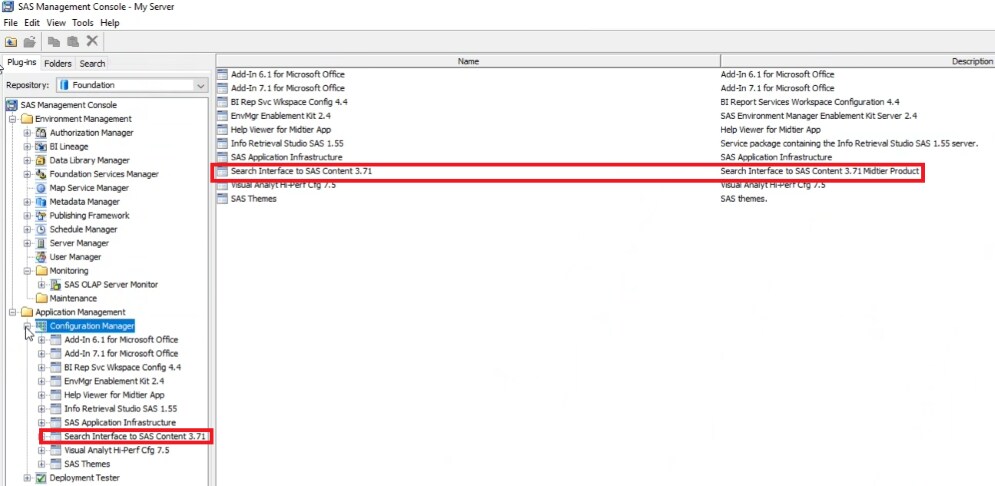
- On the Plug-ins tab, go to Application Manager ► Configuration Manager.
- Expand Configuration Manager. Note the Search Interface To SAS Content version. For example, the following shows the Search Interface To SAS Content version is 3.71.
In the search_service_config.properties File
Complete these steps to check the Search Interface To SAS Content version in the search_service_config.properties file, on each middle-tier system, with its own SASHome directory:
- Go to the <SASHome>/SASVersionedJarRepository/eclipse/plugins directory.
- Locate the sas.searchsas_105000.0.0.20190417194610_d4srchr7 directory.
- Copy the sas.searchsas.jar file in this directory to sas.searchsas.jar.orig to back it up.
- Copy the the sas.searchsas.jar file to a temporary work directory (such as /temp), and complete these steps:
- Extract the contents of the JAR file to the temporary directory:
- For UNIX systems, use a command such as unzip to extract the contents of the JAR file. For example, running the following from the /temp directory extracts the contents of the JAR file to the directory: unzip sas.searchsas.jar
- For Windows, rename the unzip sas.searchsas.jar file to unzip sas.searchsas.zip file and use your favorite file compression and management utility such as WinZip to extract the contents of the ZIP file.
- Go to the /temp/config directory and open the search_service_config.properties file:
- Search for the following property and note the version: sas.searchsas.softwarecomponent
- If the version for sas.searchsas.softwarecomponent is different from the results in step 3 in the Using SAS Management Console section, go to the Make the Search Interface To SAS Content Versions Match section.
- If the version for sas.searchsas.softwarecomponent is the same as the results in step 3 in the Using SAS Management Console section, contact SAS Technical Support.
Make the Search Interface To SAS Content Versions Match
If the versions of Search Interface To SAS Content in SAS Management Console and the search_service_config.properties file do not match, complete these steps:
- Change the version in the search_service_config.properties file to match the version in SAS Management Console.
For example, the following setting is different from the SAS Management Console screen capture provided above: sas.searchsas.softwarecomponent = Search Interface to SAS Content 3.7
So, in this example, you should change this setting to: sas.searchsas.softwarecomponent = Search Interface to SAS Content 3.71. Then, it will match the version in SAS Management Console. - Save the change.
- Put the file into the sas.searchsas.jar file. In UNIX, for example, run the following from the /temp directory: zip sas.searchsas.jar "/temp/config/search_service_config.properties"
- Put the JAR file in the <SASHome>/SASVersionedJarRepository/eclipse/plugins/sas.searchsas_105000.0.0.20190417194610_d4srchr7 directory.
- Stop SASServer12_1 on each middle-tier node.
Note: If you only have one SAS web application server instance, SASServer12_1 is replaced with SASServer1_1 in these instructions. For UNIX systems, run ./tcruntime-ctl.sh stop from the SAS-configuration-directory/LevN/Web/WebAppServer/SASServer12_1/bin directory. For Windows systems, go to the Windows Services dialog box to stop the server. - Delete the SASSearchService.log from the SAS-configuration-directory/LevN/Lev1/Web/Logs/SASServer12_1 directory on each middle-tier node.
- Restart SASServer12_1 on each middle-tier node. For UNIX systems, run ./tcruntime-ctl.sh start from the SAS-configuration-directory/LevN/Web/WebAppServer/SASServer12_1/bin directory. For Windows systems, go to the Windows Services dialog box to start the server.
- After one hour, check the SAS-configuration-directory/LevN/Lev1/Web/Logs/SASServer12_1/SASSearchService.log for an entry similar to the following: INFO [sasadm] com.sas.svcs.search.util.SearchServiceManager - AdminClientForBird - IRSTUDIO Configured for SearchService......
Also, there should be an entry showing indexing taking place with no errors similar to the following: INFO [sasadm] com.sas.svcs.search.impl.SearchIndexServiceImpl - 2 records extracted for indexing in irstudio engine in 283 ms
Operating System and Release Information
| Product Family | Product | System | Product Release | SAS Release | ||
| Reported | Fixed* | Reported | Fixed* | |||
| SAS System | Search Interface to SAS Content | Microsoft® Windows® for x64 | 3.71 | 9.4 TS1M7 | ||
| Linux for x64 | 3.71 | 9.4 TS1M7 | ||||
| Type: | Problem Note |
| Priority: | medium |
| Date Modified: | 2023-03-24 17:01:58 |
| Date Created: | 2022-12-16 00:36:03 |