Sample 35784: Creating cascading prompted filters in SAS® Web Report Studio
 |  |  |  |
Overview
One of major new features in SAS Web Report Studio 4.2 is the ability to create cascading prompted filters. Cascading, prompted filters provide different filter choices depending on a previously selected filter value.
For example, if you select Clothing as the value for a Product Category filter, then the subsequent filter for Product Name might be restricted to choices such as Eclipse Sportswear, Tracker T-shirts, and Green Tomato Knitwear. However, if you select Camping Gear as the value for the Product Category filter, then the Product Name filter might be restricted to choices such as Orion Trekking Poles, Eclipse Sleeping Bags, and Tracker Backpacks.
This sample shows you how to create cascading prompted filters. The sample data source is the SASHELP.PRDSALE table, which is shipped with SAS.
Prepare the Data Items to Support Cascading Prompting
To use a data item in a cascading prompted filter, the data item must support dynamic lists. Following are the steps to set this property in SAS® Information Map Studio. For this sample, the PRDSALE table has been selected and its columns have been inserted as data items.
- On the Information Map tab, select both the Product Type and Product data items.
- Right-click on the selected data items, and then select Properties.
- For the Value-Generation Method, select User selects values from a dynamic list, and then click OK.
- Save the information map.
Create the Cascading Prompt
For this sample, the information map that is based on the PRDSALE table is already selected as the data source for the report.
- In SAS Web Report Studio, open the report in Edit mode.
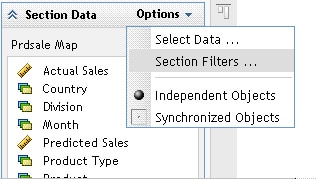
- In the Section Data pane, select Options ► Section Filters.
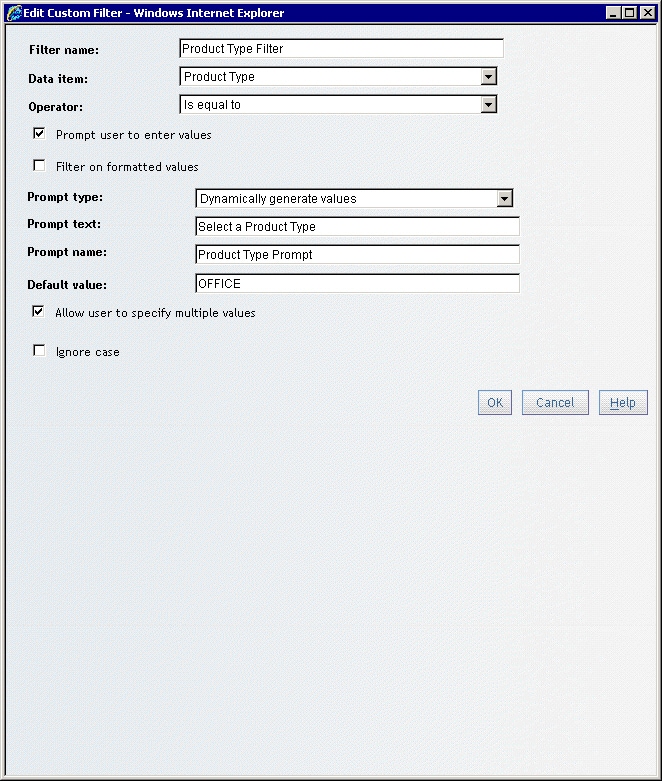
- Click New to open the Create a Custom Filter dialog box, where you will define a custom filter for Product Type as shown in the following display.
- Click OK to return to the Section Filters dialog box, and then repeat step 3 to create a custom filter for Product.
- Click OK to return to the Section Filters dialog box.
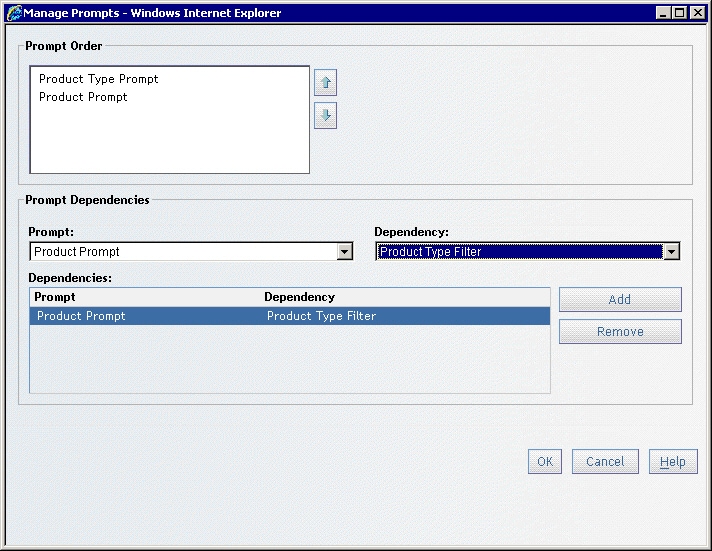
- Click Manage Prompts to open the Manage Prompts dialog box.
- Select Product Prompt from the Prompt drop-down list, and select Product Type Filter from the Dependency drop-down list, as shown in the following display.
- Click OK twice to exit all of the dialog boxes and return to Edit mode.
- Click the View tab to display the prompt window.
- Select OFFICE as the value for the Product Type Prompt, and then click Apply. Notice that the Product Prompt is now populated with only those values that are relevant to the OFFICE Product Type.
- Select a value for the Product Prompt, and then click View Report.
Additional Resources
For more information about SAS Web Report Studio, see the SAS Web Report Studio documentation page.
For more information about SAS Information Map Studio, see the SAS Information Map Studio documentation page.
For information about creating a cascading prompt for a stored process, see SAS Note 35107.
These sample files and code examples are provided by SAS Institute Inc. "as is" without warranty of any kind, either express or implied, including but not limited to the implied warranties of merchantability and fitness for a particular purpose. Recipients acknowledge and agree that SAS Institute shall not be liable for any damages whatsoever arising out of their use of this material. In addition, SAS Institute will provide no support for the materials contained herein.
These sample files and code examples are provided by SAS Institute Inc. "as is" without warranty of any kind, either express or implied, including but not limited to the implied warranties of merchantability and fitness for a particular purpose. Recipients acknowledge and agree that SAS Institute shall not be liable for any damages whatsoever arising out of their use of this material. In addition, SAS Institute will provide no support for the materials contained herein.
| Type: | Sample |
| Date Modified: | 2009-06-10 11:47:47 |
| Date Created: | 2009-05-04 11:16:45 |
Operating System and Release Information
| Product Family | Product | Host | Product Release | SAS Release | ||
| Starting | Ending | Starting | Ending | |||
| SAS System | SAS Web Report Studio | 64-bit Enabled Solaris | 4.2 | 9.2 TS2M0 | ||
| Windows Vista | 4.2 | 9.2 TS2M0 | ||||
| 64-bit Enabled AIX | 4.2 | 9.2 TS2M0 | ||||
| Microsoft Windows XP Professional | 4.2 | 9.2 TS2M0 | ||||
| Microsoft® Windows® for x64 | 4.2 | 9.2 TS2M0 | ||||
| z/OS | 4.2 | 9.2 TS2M0 | ||||
| Microsoft Windows Server 2003 Standard Edition | 4.2 | 9.2 TS2M0 | ||||
| Microsoft Windows Server 2003 Enterprise Edition | 4.2 | 9.2 TS2M0 | ||||
| Microsoft Windows Server 2003 Datacenter Edition | 4.2 | 9.2 TS2M0 | ||||
| HP-UX IPF | 4.2 | 9.2 TS2M0 | ||||
| Linux | 4.2 | 9.2 TS2M0 | ||||
| Linux for x64 | 4.2 | 9.2 TS2M0 | ||||
| Solaris for x64 | 4.2 | 9.2 TS2M0 | ||||