Usage Note 33876: There is no utility file to re-register SAS® 9.2 on Windows Vista
 |  |  |  |
The utility file fileextensionmanager.exe, which re-registers SAS 9.2, will not work on the Windows Vista operating system. If you run it on Windows Vista you might get the following error:
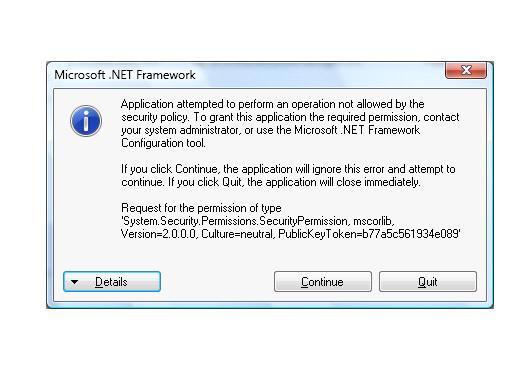
The following information from the Windows Vista Help gives you additional information for changing the program that opens a type of file. If you double-click a SAS file in Windows Vista and it opens in the wrong software program, follow these steps to choose the program that you prefer that the file use. You can change this setting for an individual file, or you can tell Windows Vista to open all files of that same type in the software program you choose.
- Open the folder that contains the file you want to change.
- Right-click the file that you want to change and then, depending on the type of file, either click Open With or point to Open With, and then click Choose Default Program.
- Click the program that you want to use to open this file.
- Do one of the following:
- If you want all files of that type to open in the same software program, check
Always use the selected program to open this kind of file,
and then click OK.
- If you want only that file to open in the software program this one time, clear the Always use the selected program to open this kind of file check box, and then click OK.
- If you want all files of that type to open in the same software program, check
Always use the selected program to open this kind of file,
and then click OK.
If you have both SAS 9.1 and SAS 9.2 installed and are having file type registration issues, see SAS Note 32558, "Installing SAS® 9.2 after SAS 9.1 removes SAS 9.1 file type registrations such as Open with SAS 9.1."
Operating System and Release Information
| Product Family | Product | System | SAS Release | |
| Reported | Fixed* | |||
| SAS System | N/A | Windows Vista | 9.2 TS1M0 | |
| Type: | Usage Note |
| Priority: |
| Date Modified: | 2009-02-10 15:06:06 |
| Date Created: | 2008-11-10 11:36:06 |