Usage Note 12961: Changing the maximum number of rows and columns displayed in a table before scrolling is enabled in SAS® Web Report Studio
 |  |  |  |
In SAS Web Report Studio, if a table has more columns and rows than the currently set maximums, then scrolling is enabled. You can change the maximum number of columns and rows to display before scrolling by using the Table Properties dialog box for an individual table. You also can change these settings globally for all users, as explained in this SAS Note.
- Log on to SAS® Management Console with an unrestricted account such as sasadm@saspw.
- Navigate to Application Management ► Configuration Manager ► SAS Application Infrastructure ► Web Report Studio 4.4.
- Right-click Web Report Studio 4.4 and select Properties.
- Click the Advanced tab.
- For each property that you want to set, click the Add button and enter the Property Name and Property Value, as explained next.
- These properties can used to change the default number of rows and columns displayed for each table before scrolling is enabled. Enter -1 to specify the system limit.
com.sas.apps.citation.util.userpreferences.previewDataMaxCols
com.sas.apps.citation.util.userpreferences.viewReportMaxRows
com.sas.apps.citation.util.userpreferences.viewReportMaxCols
- The following properties can be used to change the absolute maximum number of rows or columns that can be displayed for the entire table. So, the com.sas.apps.citation.util.userpreferences.viewReportMaxRows might be set to 50 and the absolute maximum number of rows might be set to 1000.
CAUTION: System-wide memory could be compromised if these properties are raised arbitrarily high.
com.sas.apps.citation.util.userpreferences.absoluteMaxVisibleCols
- To enforce the changes, restart the web application server .
Here is an example that sets the absolute maximum number of visible rows to 10:
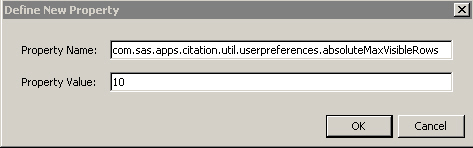
Note: Property names that are more than 60 characters display only up to 60 characters when you reopen the Advanced tab. For example, com.sas.apps.citation.util.userpreferences.absoluteMaxVisibleCols displays as com.sas.apps.citation.util.userpreferences.absoluteMaxVisibl However, the property setting is still applied.
Note: These global settings should also apply to stored process output that is displayed in a table.
Operating System and Release Information
| Product Family | Product | System | Product Release | SAS Release | ||
| Reported | Fixed* | Reported | Fixed* | |||
| SAS System | SAS Web Report Studio | Solaris for x64 | 4.4 | 9.4 TS1M0 | ||
| Linux for x64 | 4.4 | 9.4 TS1M0 | ||||
| Microsoft® Windows® for x64 | 4.4 | 9.4 TS1M0 | ||||
| 64-bit Enabled AIX | 4.4 | 9.4 TS1M0 | ||||
| 64-bit Enabled Solaris | 4.4 | 9.4 TS1M0 | ||||
| HP-UX IPF | 4.4 | 9.4 TS1M0 | ||||
| Type: | Usage Note |
| Priority: | medium |
| Date Modified: | 2020-01-24 10:35:14 |
| Date Created: | 2004-07-30 16:14:03 |