
| Random and Exogenous Variation in the Model |
Random Sources of Variation
The random sources of variation are generated using pseudo-random number generators. The QSIM application provides a set of standard generators. These include:
- Exponential, with parameter
 and
density function
and
density function

- Nonhomogeneous Poisson, with rate parameter
 and
density function
is cyclic and continuous for all
and
density function
is cyclic and continuous for all  with
with
- Gamma, with parameters and
 and
density function
and
density function
- Erlang, with parameters and and
density function
- Uniform, with parameter
 and density function
- IUniform, with parameter and density function
- Deterministic, with parameter and density function







Each of these generators has a control panel for setting parameters.
For example, if you pick Exponential from the list box
in Figure 7.1 and then click the Parameters
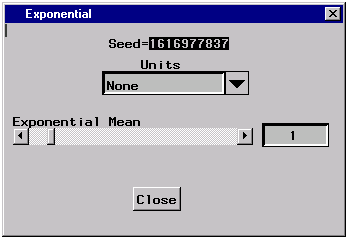
button, the exponential control panel
in Figure 7.2
will be displayed.
In this window, you set the initial seed value and
the mean  .
.
|
Figure 7.2: The Exponential Control Panel
The seed value for each distribution is initialized automatically. You have the capability of changing this value. The next section tells you how you can control seed values.
Note that, by default, the Exponential mean in Figure 7.2, is set to 1. You can change the mean with the slider. The slider has a range of 0 to 10 for this parameter. If 10 is not large enough for the mean, you simply click in the display and type the mean that you want.
Controlling the Seed Values
Controlling Time Units
Copyright © 2008 by SAS Institute Inc., Cary, NC, USA. All rights reserved.