Initialization Jobs
Overview
The initialization jobs
are listed in the following sections. The job descriptions and figures
provide a high-level overview of the SAS IT Resource Management interface
and how to work with the jobs. 0010 Step 1 Select SAP Servers is the
only initialization job to select the required SAP libraries to extract
the performance data from the SAP systems. The rest of the other initialization
jobs are required to run in both the indirect as well as the direct
extraction method.
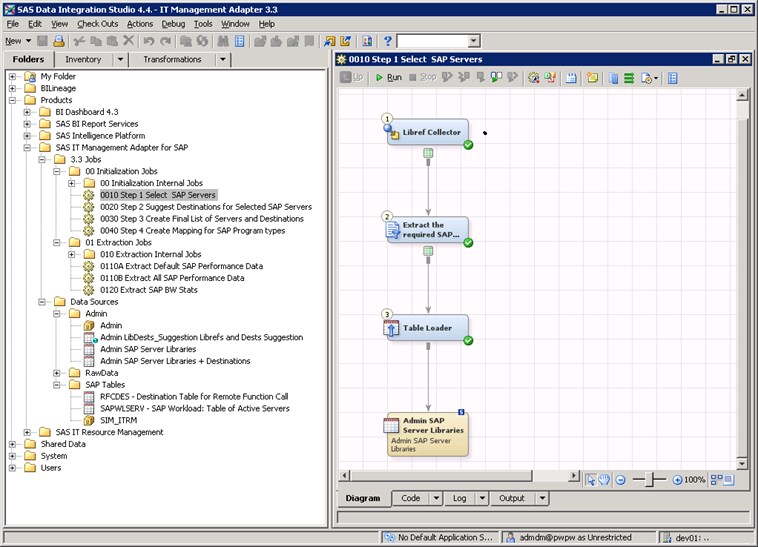
0010 Step 1 Select SAP Servers
This job lists the servers
that are monitored. The job appends the attributes of the source SAP
servers to the Admin SAP Server Libraries table. The job uses the Libref
Collector transformation, which extracts the details
of all the SAP libraries registered in the SAS Metadata Server. You
need to apply a filter if you want to restrict some libraries, otherwise,
you can leave the job as it is shipped. (In the previous release,
this was a customization job where you needed to drag and drop the
relevant libraries for data extraction.)

0020 Step 2 Suggest Destinations for Selected SAP Servers: Extracts Destinations
This job takes the output
table Admin.SAP Server Libraries of the previous job as input. The
job then reads destinations from the selected SAP servers and creates
an output table named Admin LibDests_Suggestion Librefs and Dests
Suggestion, with destinations for indirect extraction. By default,
performance data is extracted directly from a single SAP system. If
you need indirect extraction via RFC-connected SAP systems, then additional
data has to be supplied for the extraction. Indirect extraction is
not supported for the statistic tables specific to the SAP Business
Warehouse.
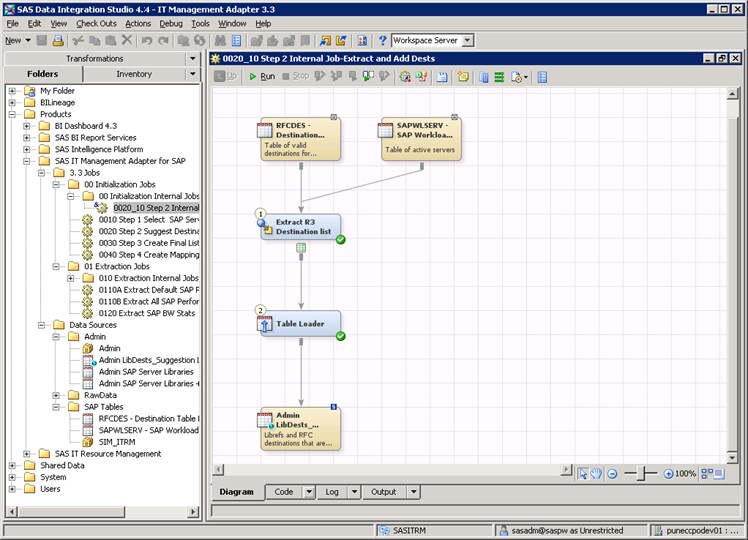
This job has an internal
job named 0020_10 Step 2 Internal Job-Extract and Add Dests. This
job collects the attributes of all the libraries and saves the attributes
in a table. This internal job takes the tables RFCDES and SAPWLSERV
as input. These SAP tables are assigned by the import process to an
SAP server through the SAP sample library mapping. The job reads these
tables from the SAP server that is used in job 0010A Step 1 Select
single SAP Server. The tables RFCDES and SAPWLSERV serve rather as
templates than real tables.
0030 Step 3 Create Final List of Servers and Destinations
This job lists the SAP
systems connected via RFC to the selected SAP hub server. There are
two tasks that you need to perform:
0040 Step 4 Create Mapping for SAP Program Types
The SAS IT Resource
Management solution does not require an output table from this job.
Therefore, this job is optional for both direct and indirect extraction
methods.
This job extracts objects
from SAP servers and maps them to SAP programs, provided you extract
performance data via the hub server. The job uses the table Admin.SAP_Server_dests
as input and generates the table RAWDATA.PROGRAM_MAP as output.
Note: If you want to run this
job and the SAP system is Unicode, then you need to set a Unicode
encoding option. For
information about this topic, seeCustomization for Internationalization (I18N).