This configuration step
is optional. SAS IT Resource Management does not extract any text
tables from SAP. Therefore, you can use the default language encoding
even if your customer requires your SAP system to be a Unicode system.
To configure the Adapter in an Internationalization Environment:
-
Configure SAS Unicode
Server, if your SAP system is a Unicode system.
SAP data is on Unicode
pages. You therefore need to use appropriate transcoding while extracting
the SAP data using the SAS Data Surveyor for SAP. Configure SAS environment
to point to the SAS Unicode Server.
-
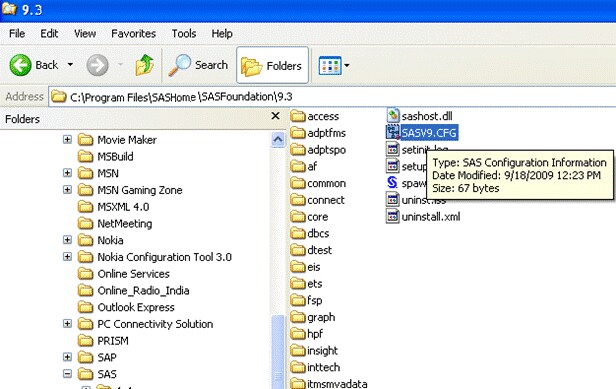
Modify the SASV9.CFG
file to access the SAS Unicode server. The default path for SASV9.CFG
is
C:\Program Files\SASHome\SASFoundation\9.3.
-
Change the following
code snippet in the SASV9.CFG file to replace “en” by
“u8”
-CONFIG
"C:\ProgramFiles\SASHome\SASFoundation\9.3\nls\u8\SASV9.CFG"
In a UNIX environment,
replace “en” by “u8”, in the sas file,
under the
/SASFoundation/9.3 folder. Here is the code that appears in the UNIX
environment after you replace “en” with “u8”.
# Environmental variable to define config file lookthrough
if [ "$SASCFGPATH" ] ; then
SASCFGPATH="!SASROOT/sasv9.cfg, !SASROOT/nls/u8/sasv9.cfg,
!SASROOT/sasv9_local.cfg, $SASCFGPATH"
else
SASCFGPATH="!SASROOT/sasv9.cfg, !SASROOT/nls/u8/sasv9.cfg,
!SASROOT/sasv9_local.cfg"
-
Restart the SAS Services
after the code changes are complete. Change the SASV9.CFG file to
point to the appropriate encoding, based on your encoding requirement.
Note: The preceding example is
for a Windows environment. Apply the above changes appropriately,
as per the host at your site. For further details about SAS Unicode
server, see the SAS support site.
Note: Steps 1-4 are not applicable
for
z/OS, as there is no Unicode server in a
z/OS environment.