 |
|
| The SHEWHART Procedure |
Reading Preestablished Control Limits
[See SHWXR1 in the SAS/QC Sample Library]In a previous example, the OUTLIMITS= data set saved control limits computed from the measurements in Wafers. This example shows how these limits can be applied to new data provided in the following data set:
data Wafers2;
   input Batch @;
   do i=1 to 5;
      input Diameter @;
      output;
      end;
   drop i;
   datalines;
26 34.99 34.99 35.00 34.99 35.00
27 34.99 35.01 34.98 34.98 34.97
28 35.00 34.99 34.99 34.99 35.01
29 34.98 34.96 34.98 34.98 34.99
30 34.98 35.00 34.98 34.98 34.99
31 35.00 35.00 34.99 35.01 35.01
32 35.00 34.99 34.98 34.98 35.00
33 34.98 35.00 34.99 35.00 35.01
34 35.00 34.97 35.00 34.99 35.01
35 34.99 34.99 34.98 34.99 34.98
36 35.01 34.98 34.99 34.99 35.00
37 35.01 34.99 34.97 34.98 35.00
38 34.98 34.99 35.00 34.98 35.00
39 34.99 34.99 34.99 34.99 35.01
40 34.99 35.01 35.00 35.01 34.99
41 34.99 35.00 34.99 34.98 34.99
42 35.00 34.99 34.98 34.99 35.00
43 34.99 34.98 34.98 34.99 34.99
44 35.00 35.00 34.98 35.00 34.99
45 34.99 34.99 35.00 34.99 34.99
;
run;
The following statements use the control limits in Waferlim to create  and
and  charts for the data in Wafers2:
ods graphics on;
proc shewhart data=Wafers2 limits=Waferlim;
   xrchart Diameter*Batch;
run;
ods graphics off;
The ODS GRAPHICS ON statement specifies that the and charts are produced using ODS Graphics. The LIMITS= option in the PROC SHEWHART statement specifies the data set containing the control limits. By default,1 this information is read from the first observation in the LIMITS= data set for which
the value of _VAR_ matches the process name Diameter
the value of _SUBGRP_ matches the subgroup-variable name Batch
The charts are shown in Figure 13.37.10.
and Charts for Second Set of Wafer Data (ODS Graphics)
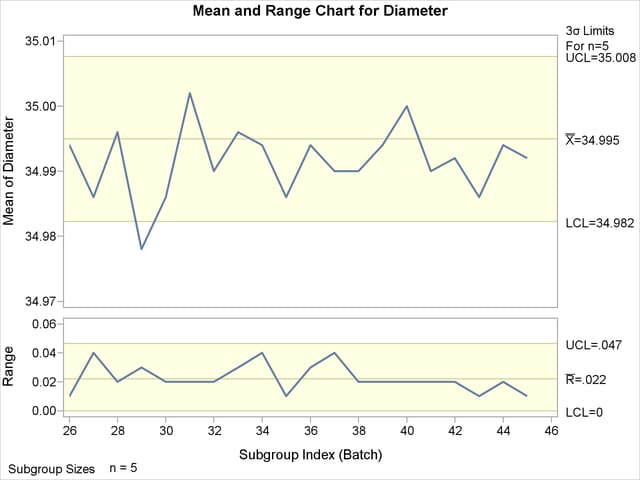
Note that the mean diameter of the  th batch lies below the lower control limit in the chart, signaling a special cause of variation.
In this example, the LIMITS= data set was created in a previous run of the SHEWHART procedure. You can also create a LIMITS= data set with the DATA step. See LIMITS= Data Set for details concerning the variables that you must provide.
|
|
Copyright © SAS Institute, Inc. All Rights Reserved.