 |
|
| The SHEWHART Procedure |
Constructing Charts for Numbers of Nonconformities (c Charts)
The following notation is used in this section:
|
expected number of nonconformities per unit produced by the process |
||||
|
number of nonconformities per unit in the |
||||
|
total number of nonconformities in the |
||||
|
number of inspection units in the |
||||
|
average number of nonconformities per unit taken across subgroups. The quantity
|
||||
|
number of subgroups |
||||
|
has a central |
 and
and  for
for 


 distribution with
  degrees of freedom
 Plotted Points
Each point on a  chart represents the total number of nonconformities (
 ) in a subgroup. For example, Figure 13.7.13 displays three sections of pipeline that are inspected for defective welds (indicated by an X). Each section represents a subgroup composed of a number of inspection units, which are 1000-foot-long sections. The number of units in the
  th subgroup is denoted by
  , which is the subgroup sample size. The value of can be fractional; Figure 13.7.13 shows
  units in the third subgroup.
Charts and  Charts
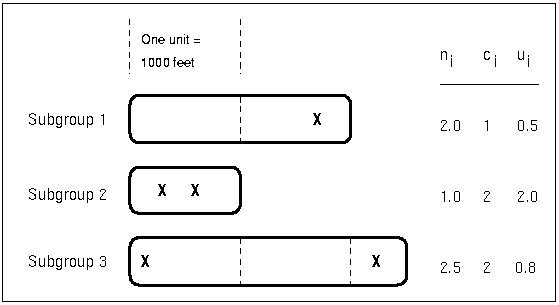
The number of nonconformities in the th subgroup is denoted by . The number of nonconformities per unit in the th subgroup is denoted by  . In Figure 13.7.13, the number of welds per inspection unit in the third subgroup is
  .
.
A chart created with the UCHART statement plots the quantity  for the th subgroup (see UCHART Statement). An advantage of a chart is that the value of the central line at the th subgroup does not depend on . This is not the case for a chart, and consequently, a chart is often preferred when the number of units is not constant across subgroups.
Central Line
On a chart, the central line indicates an estimate for  , which is computed as
  . If you specify a known value (
 ) for , the central line indicates the value of
  .
.
Note that the central line varies with subgroup sample size . When  for all subgroups, the central line has the constant value
  .
.
Control Limits
You can compute the limits in the following ways:
as a specified multiple (
 ) of the standard error of above and below the central line. The default limits are computed with
  (these are referred to as
  limits).
 as probability limits defined in terms of
 , a specified probability that exceeds the limits
The lower and upper control limits, LCLC and UCLC respectively, are given by
 |
 |
 |
|||
 |
|
 |
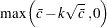
The upper and lower control limits vary with the number of inspection units per subgroup . If  for all subgroups, the control limits have constant values.
|
|
 |
|||
|
|
 |
An upper probability limit UCLC for can be determined using the fact that
 |
The upper probability limit UCLC is then calculated by setting
 |
and solving for UCLC.
A similar approach is used to calculate the lower probability limit LCLC, using the fact that
 |
The lower probability limit LCLC is then calculated by setting
 |
and solving for LCLC. This assumes that the process is in statistical control and that has a Poisson distribution. For more information, refer to Johnson, Kotz, and Kemp (1992). Note that the probability limits vary with the number of inspection units per subgroup ( ) and are asymmetric about the central line.
If a standard value is available for , replace  with
with  in the formulas for the control limits. You can specify parameters for the limits as follows:
Specify
with the SIGMAS= option or with the variable _SIGMAS_ in a LIMITS= data set. Specify
with the ALPHA= option or with the variable _ALPHA_ in a LIMITS= data set. Specify a constant nominal sample size
 for the control limits with the LIMITN= option or with the variable _LIMITN_ in a LIMITS= data set.
 Specify
with the U0= option or with the variable _U_ in a LIMITS= data set.
|
|
Copyright © SAS Institute, Inc. All Rights Reserved.