Example Program and Statement Details
A block plot contains information about X locations
and text values to be associated with corresponding intervals along
the X axis. There is no Y axis information in this plot.
BlockPlot Overlaid with SeriesPlot
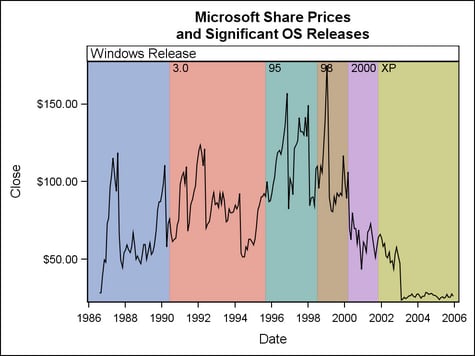
When overlaid with plots
that have a Y axis (a series plot for example), a block plot expands
vertically to fill the Y axis range. In the BLOCKPLOT statement, the
BLOCK= argument can be used to reference text values from a column.
The resulting graph displays those values within the plot wall.
The following example
shows how a block plot can be specified with a series plot within
an OVERLAY layout. To prepare data for the graph, “event”
information is added to existing data for stock prices. Notice that
the first DATA step creates a RELEASE column. That column is later
specified on the BLOCK= argument to display text values on the wall
of the block plot.
data MSevents;
  input Date date9. Release $5.;
  label Release="Windows Release";
datalines;
01jun1990 3.0
01sep1995 95
01jul1998 98
01mar2000 2000
01nov2001 XP
;
proc sort data=sashelp.stocks(keep=date stock close)
  out=MSstock;
  where stock="Microsoft";
  by date;

data events;
  merge MSstock MSevents;
  by date;
run;
In the combined input
data set, notice that the RELEASE value is missing for each observation
until the first defined “event” occurs on
01JUN90.
The RELEASE value is missing again for subsequent observations and
will not have another value until the next event occurs on 01SEP95,
when the MSEVENTS data supplies the value 95.Obs Date Close Release ... 45 02APR90 $58.00 46 01MAY90 $73.00 47 01JUN90 $76.00 3.0 48 02JUL90 $66.50 49 01AUG90 $61.50 50 04SEP90 $63.00 ...
In the following GTL
template code, BLOCK=RELEASE is specified in the BLOCKPLOT statement
so that the RELEASE values are displayed on the wall of the resulting
block plot. The BLOCKPLOT statement sets EXTENDBLOCKONMISSING=TRUE so that missing values in the
data revert to the previous nonmissing value in the block plot. Thus,
in the block plot, values are missing until
01JUN90,
when the value changes from missing to 3.0.
The block plot retains that 3.0 value for
subsequent observations until the next nonmissing value replaces it
(in this case, the value95 on 01SEP95).
proc template;
  define statgraph blockplot1;
    begingraph;
      entrytitle "Microsoft Share Prices";
      entrytitle "and Significant OS Releases";
       layout overlay;
         blockplot x=date block=release /
           datatransparency=.3 valuevalign=top
           labelposition=top display=(fill values label)
           extendblockonmissing=true ;
        seriesplot x=date y=close;
      endlayout;
    endgraph;
  end;
run;

proc sgrender data=events template=blockplot1;
run;
Stand-alone BlockPlot in Lattice Layout
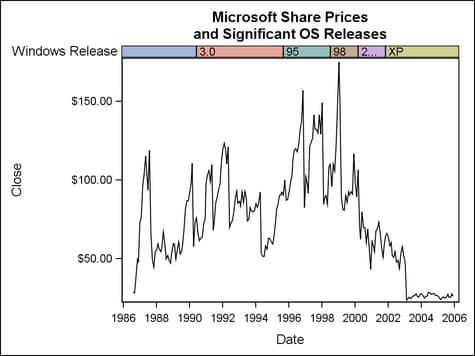
When used as a stand-alone
plot in a lattice layout, the block plot’s height can be controlled.
Here the lattice ROWWEIGHTS=(.04 .96) option apportions 4% of the
vertical space to the block plot. Using this technique, it is possible
to include two or more “event” strips in a plot.
proc template;
  define statgraph blockplot2;
    begingraph;
      entrytitle "Microsoft Share Prices";
      entrytitle "and Significant OS Releases";
      layout lattice / rowweights=(.04 .96);
        blockplot x=date block=release / datatransparency=.3
          valuefitpolicy=shrink  labelposition=left
          display=(fill label outline values)
          extendblockonmissing=true;
        seriesplot x=date y=close;
      endlayout;
    endgraph;
  end;
run;

proc sgrender data=events template=blockplot2;
run;
Arguments
Options
specifies the appearance
of alternate fills. This option in conjunction with the FILLATTRS= option controls fill appearance when
FILLTYPE=ALTERNATE. See General Syntax for Attribute Options for the syntax
on using a style-element and Fill Options for available fill-options.
Interaction: For
this option to have any effect, the fill must be enabled by the ODS
style or the DISPLAY= option.
To make all block
fill areas the same color, set the FILLATTRS= and ALTFILLATTRS= options to the same value.
Tip: The DATATRANSPARENCY= option sets the transparency for
the block fills and the outlines. You can combine this option with
DATATRANSPARENCY= to set one transparency for the outlines but a
different transparency for the alternate block fills. Example:
datatransparency=0.2 altfillattrs=(transparency=0.6)
specifies indices for
remapping the assignment of the color of the block fills.
Interaction: All
of the indexes for a specific block value must be the same. Otherwise,
the results are unpredictable.
creates a separate
block plot for each unique value of the specified column or expression.
Each block plot is labeled externally by the class value.
The font and color
attributes for the external labels are specified by the LABELATTRS= option.
specifies the degree
of the transparency of the block fill and outline. It does not affect
block values or label.
Tip: The ALTFILLATTRS= option can be used to set transparency
for just the alternate block fills. The FILLATTRS= option can be used to specify transparency
for the block fills. You can combine this option with ALTFILLATTRS=
and with FILLATTRS= to set one transparency for the outlines but a
different transparency for the block fills. Example:
datatransparency=0.2
altfillattrs=(transparency=0.6) fillattrs=(transparency=0.6)
specifies whether to
display an outlined, a filled, or an outlined and filled block area.
Values and a label can also be added or suppressed.
Use the OUTLINEATTRS=, FILLATTRS=, ALTFILLATTRS=, and BLOCKINDEX= options to control the appearance
of the blocks.
specifies whether a
missing value in the BLOCK column starts a new block or reverts to
the previous nonmissing value.
Tip: When
EXTENDBLOCKONMISSING = TRUE, you can set up the input data for the
BLOCK= column with nonmissing values where you expect the blocks to
change and leave the remaining block values missing. For an example,
see BlockPlot Overlaid with SeriesPlot.
specifies the appearance
of the block fills. This option in conjunction with the ALTFILLATTRS= option controls fill appearance when FILLTYPE=ALTERNATE. See General Syntax for Attribute Options for the syntax
on using a style-element and Fill Options for available fill-options.
Interaction: For
this option to have any effect, the fill must be enabled by the ODS
style or the DISPLAY= option.
To make all block
fill areas the same color, set the FILLATTRS= and ALTFILLATTRS= options to the same value.
Tip: The DATATRANSPARENCY= option sets the transparency for
the block fills and the outlines. You can combine this option with
DATATRANSPARENCY= to set one transparency for the outlines but a
different transparency for the block fills. Example:
datatransparency=0.2 fillattrs=(transparency=0.6)
specifies how the blocks
are filled.
blocks are filled with
the COLOR attribute of the style elements GraphData1–GraphDataN
or the style elements indicated by the BLOCKINDEX= column.
blocks are filled alternating
between the colors specified by the FILLATTRS= and ALTFILLATTRS= options.
Interaction: For
this option to have any effect, the fill must be enabled by the ODS
style or the DISPLAY= option.
specifies an external
label for a single block plot.
-
The variable label of the BLOCK= column.
The font and color
attributes for the external label are specified by the LABELATTRS= option.
specifies the color
and font attributes of the external block label(s). See General Syntax for Attribute Options for the syntax
on using a style-element and Text Options for available text-options.
specifies the appearance
of the block outlines. See General Syntax for Attribute Options for the syntax
on using a style-element and Line Options for available line-options.
Interaction: For
this option to have any effect, the outlines must be enabled by the
ODS style or the DISPLAY= option.
specifies the appearance
of the text values. See General Syntax for Attribute Options for the syntax
on using a style-element and Text Options for available text-options.
specifies how text
values are adjusted to fit within the containing block.
specifies the horizontal
alignment of the value text within the blocks.
Interaction: When REPEATEDVALUES=TRUE and X values are numeric, only
CENTER and START can be used for a discrete axis. In addition, only
LEFT and START can be used for a linear or log axis. For example,
if REPEATEDVALUES=TRUE and the axis is discrete, a setting of RIGHT
for this option is ignored and LEFT is used instead.
specifies whether data
are mapped to the primary X (bottom) axis or to the secondary X2 (top)
axis.
Interaction: The
overall plot specification and the layout type determine the axis
display. For more information, see How Axis Features Are Determined