Row-Level Security
Introduction
SELECT
                     * FROM T1
, the query is effectively transformed to SELECT
* FROM T1 WHERE SALES_REGION = 'NORTHEAST'.
SELECT * FROM
                     T1
, the query is transformed to:
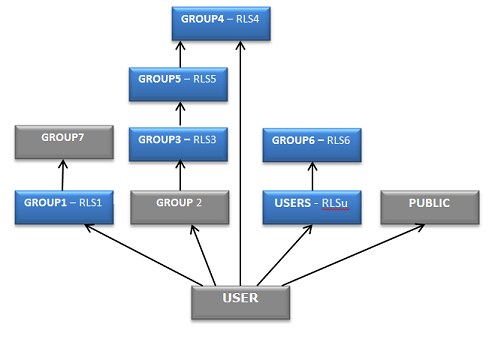
Row-Level Security Privilege Assembly Rules
Overview
Example: RLS Predicate Union
The RLS Library and Library Reference
RLS Functions
SYSCAT.RLS.RLS_function.
Following are the callable functions for row-level security.
auth_id
Returns the authentication provider identifier for the specified user or group name.
current_user
Returns the name of the current user.
current_id
Returns an opaque authentication provider specific user identifier.
domain
Returns the name of the domain in which the current user is authenticated.
group_id
Returns the authentication provider group identifier for the specified group name.
login
Returns the domain-qualified user id that is used to authenticate the current user.
userid
Returns the SANs domain user id that is used to authenticate the current user. Note that the userid function is similar to the login function, but it is not domain-qualified.
ip_addr
Returns the client IP address of the current user’s session.
is_admin
Returns TRUE or FALSE indicating if the current user is an administrator.
is_process_user
Returns TRUE or FALSE indicating if the current user is the process user.
member_of
Returns TRUE or FALSE indicating if the current user is a member of the specified group.
groups
Returns a single group name or result set identifying the group memberships of the current user.
current_user and member_of to
qualify users for SELECT on specific rows in the HR.EMPLOYEES table. grant SELECT on HR.EMPLOYEES to USERS
where (syscat.rls.current_user() in ("Name","MgrName"))
or syscat.rls.member_of("Payroll",'DEEP')-
The name of the current user matches that of the “Name” column (the row pertains to the current user).
-
or the name of the current user matches that of the “MgrName” column (the row pertains to the manager of the current user).
-
or the current user is a direct or indirect (DEEP) member of the “Payroll” group.
RLS Library Reference
WVARCHAR(n) auth_id(WVARCHAR(n) [[authorization])
Returns an authentication identifier as defined by the authentication provider, as a result of passing input for user name.
WVARCHAR(n) current_user()
Returns the name of the current user. This is the authorization identifier of the currently authenticated user, rather than the login used.
WVARCHAR(n) current_id()
Returns a user identifier as defined by the authentication provider. Typically, this is a static identifier by which the current user is known. Applications can associate this identifier with an internal organization user identifier such as an employee number or account number.
WVARCHAR(n) domain()
The name of the domain in which the current user is authenticated.
WVARCHAR(n) group_id(WVARCHAR(n) [[authorization])
Returns a group identifier as defined by the authentication provider, as a result of passing input for group name
WVARCHAR(n) login()
The login used to authenticate the current user.
WVARCHAR(n) userid( BITupn )
The domain qualified user ID. If the upn parameter is TRUE, the format of the returned user ID is user@domain. Otherwise, the format is domain\user on Windows systems and just userid on all other systems. The userid function returns the authenticated user ID as specified by the authentication service. The authentication service can reside on a different host
WVARCHAR(n) ip_addr()
Returns the client IP address of the current user’s session.
BIT is_admin()
Returns TRUE or FALSE if the current user is or is not an administrator.
BIT is_process_user()
Returns TRUE or FALSE if the current user is, or is not the process user.
BIT member_of( WVARCHAR(n) group [, WVARCHAR(n) options] )
Returns TRUE or FALSE if the current user is, or is not a member of the specified group. Can assert direct or indirect membership. The group parameter is a group name by default and a group identifier if the ‘ID’ or 'DEEP' option is present in the options string. The options string is a blank or comma separated string consisting of one or more of ‘ID’ and ‘DEEP’ option keywords. The current user must be a direct member of the specified group unless the ‘DEEP’ keyword is specified. ‘DEEP’ checks for both direct and indirect group membership. Direct membership is tested by default.
TABLE(WVARCHAR(n) group) groups( WVARCHAR(n) [[authorization] WVARCHAR(n) [, options]]
Returns a single group name or identifier column result set containing the current user’s group memberships. The available options are ‘ID’ or ‘DEEP’. Can be restricted to direct memberships only. The authorization parameter is a user or group name by default and a user or group identifier if the 'ID' option is present in the options string. The options string is a blank or comma separated string consisting of one or more of ‘ID’ and ‘DEEP’ option keywords. A deep group membership listing is returned if the ‘DEEP’ keyword is specified, the default being a shallow listing.
Using the ‘ID’ and ‘DEEP’ Options
member_of and groups RLS
functions. Consider the following queries:
-
optionsreturns a string literal containing 'GROUP', 'ID', or both ( 'GROUP, ID'). If multiple options are specified, they can be separated in the string by a blank in single quotation marks (' ') or comma in single quotation marks (','). Ifoptionscontains 'ID' the argument is treated as an ID rather than a name. Ifoptionscontains ‘DEEP’, group membership is checked for direct and indirect membership.