SAS Code Node

Overview of the SAS Code Node
The SAS Code node enables
you to incorporate new or existing SAS code into process flow diagrams
that were developed using Enterprise Miner. The SAS Code node extends
the functionality of Enterprise Miner by making other SAS System procedures
available for use in your data mining analysis. You can also write
SAS DATA steps to create customized scoring code, conditionally process
data, or manipulate existing data sets. The SAS Code node is also
useful for building predictive models, formatting SAS output, defining
table and plot views in the user interface, and for modifying variables
metadata. The SAS Code node can be placed at any location within an
Enterprise Miner a process flow diagram. By default, the SAS Code
node does not require data. The exported data that is produced by
a successful SAS Code node run can be used by subsequent nodes in
a process flow diagram.
SAS Code Node Properties
SAS Code Node General Properties
SAS Code Node Train Properties
-
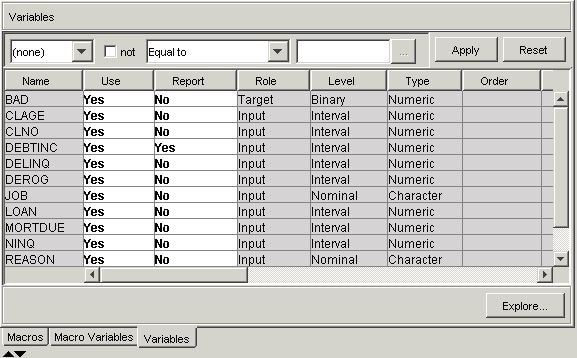
Variables — Use the Variables table to specify the status for individual variables that are imported into the SAS Code node. Select the
 button to open a window containing the variables
table. You can set the Use and Report status for individual variables,
view the columns metadata, or open an Explore window to view a variable's sampling information, observation values,
or a plot of variable distributions. You can apply a filter based
on the variable metadata column values so that only a subset of the
variables is displayed in the table.
button to open a window containing the variables
table. You can set the Use and Report status for individual variables,
view the columns metadata, or open an Explore window to view a variable's sampling information, observation values,
or a plot of variable distributions. You can apply a filter based
on the variable metadata column values so that only a subset of the
variables is displayed in the table.
-
Code Editor — Select the button to open the Code Editor. You can use the Code
Editor to edit and submit code interactively while viewing the SAS
log and output listings. You can also run a process flow diagram path
up to and including the SAS Code node and view the Results window without closing the programming interface. For more details,
see the Code Editor section below.
-
The default setting for the Tool Type property is Utility. When the Tool Type is set to Model, Enterprise Miner creates a target profile for the node is none exists. It will also create a report data model that is appropriate for a modeling node. Doing so allows SAS Enterprise Miner to automatically generate assessment results provided certain variables are found in the scored data set (P_, I_, F_, R_ (depending on the target level)). See Predictive Modeling for more details about these variables and other essential information about modeling nodes.
SAS Code Node Score Properties
-
Advisor Type — specifies the type of Enterprise Miner input data advisor to be used to set the initial input variable measurement levels and roles. Valid values areThe default setting for the Advisor Type property is Basic. You can also control the metadata programmatically by writing SAS code to the file CDELTA_TRAIN.sas. There is also a feature that permits a user to create a data set that predefines metadata for specific variable names. This data set must be named COLUMNMETA and it must be stored in the EMMETA library.
-
Publish Code — specifies the file that should be used when collecting the scoring code to be exported. Valid values areThe default setting of the Publish Code property is Publish. It is possible to have scoring code that is used within the process flow (Flow code) and different code that is used to score external data (Publish code). For example, when generating Flow code for modeling nodes, the scoring code can reference the observed target variable and you can generate residuals from a statistical model. Since Publish code is destined to be used to score external data where the target variable is unobserved, residuals from a statistical model cannot be generated.
-
The default setting for the Code Format property is DATA step. It is necessary to make the distinction because nodes such as the Ensemble node and the Score node collect score code from every predecessor node in the process flow diagram. If all of the predecessor nodes generate only DATA step score code, then the score code from all of the nodes in the process flow diagram can simply be appended together. However, if PROC step statements are intermixed in the score code in any of the predecessor nodes, a different algorithm must be used.
Code Editor Overview
You use the Code Editor
to enter SAS code that executes when you run the node. The editor
provides separate panes for Train, Score, and Report code. You can
edit and submit code interactively in all three panes while viewing
the SAS log and output listings. You can also run the process flow
diagram path up to and including the SAS Code node and view the Results window without closing the programming interface.
The Code Editor provides
tables of macros and macro variables that you can use to integrate
your SAS code with the Enterprise Miner environment. You use the macro
variables and the variables macros to reference information about
the imported data sets, the target and input variables, the exported
data sets, the files that store the scoring code, the decision metadata,
and so on. You use the utility macros, which typically accept arguments,
to manage data and format output. You can insert a macro variable,
a variables macro, or a utility macro into your code without having
to type its name; you simply select an item from the macro variables
list or macros table and drag it to the active code pane.
Code Editor User Interface
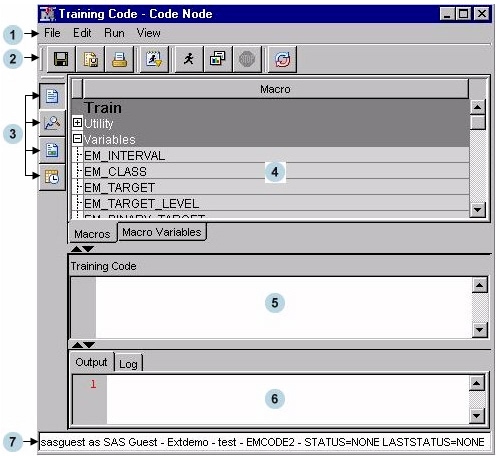


Tables Pane
-
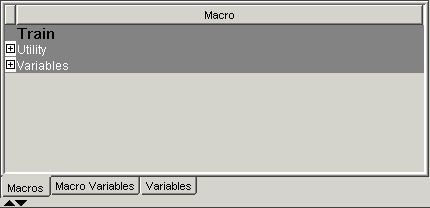
Macros — Click the Macros tab to view a table of macros in the Tables pane. The macro variables are arranged in two groups: Utility and Variables. Click on the plus or minus sign on the left of the group name to expand or collapse the list, respectively. You can insert a macro into your code without typing its name by selecting an item from the macros table, and dragging it to the code pane.
-
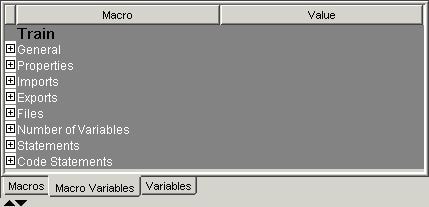
Macro Variables — Click the Macro Variables tab to view a table of macro variables in the Tables pane. You can use the split bar to adjust the width of the columns in the table. For many of the macro variables, you will see the value to which it resolves in the Value column, but in some cases, the value cannot be displayed in the table since those macro variables are populated at run time.
Code Pane
Click on the  (Training),
  (Score), or
  (Report) icons on the toolbar to choose the pane
in which you want to work.
(Report) icons on the toolbar to choose the pane
in which you want to work.
(Training), (Score), or (Report) icons on the toolbar to choose the pane
in which you want to work.
The code from the three
panes is executed sequentially when you select Run Node ( ). Training code is executed first, followed by
Score code, and then Report code. If you select Run Code (
). Training code is executed first, followed by
Score code, and then Report code. If you select Run Code (  ), only the code in the visible code pane is executed.
For more details, see the Code Pane section.
), only the code in the visible code pane is executed.
For more details, see the Code Pane section.
). Training code is executed first, followed by
Score code, and then Report code. If you select Run Code ( ), only the code in the visible code pane is executed.
For more details, see the Code Pane section.


Results Pane
The Results pane has
two tabs: Output and Log. Click the Output tab to view the output
generated by your code or click the Log tab to view the SAS Log that
was generated by your code. If you run the node (), rather than just your code (), the output and log must be viewed from the SAS
Code node's Results window ( ) and not from the Code Editor's Results pane.
), rather than just your code (), the output and log must be viewed from the SAS
Code node's Results window () and not from the Code Editor's Results pane.

Code Editor Macros
Overview
The Macros table lists
the SAS macros that are used to encode multiple values, such as a
list of variables, and functions that are already programmed in Enterprise
Miner. The macro variables are arranged in two groups: Utility and
Variables. Utility macros are used to manage data and format output
and Variables macros are used to identify variable definitions at
run time. The macros discussion below is organized as follows:
Utility Macros
Use utility macros to
manage data and format output.
-
%EM_REGISTER — Use the %EM_REGISTER macro to register a unique file key. When you register a key, Enterprise Miner generates a macro variable named &EM_USER_key. You then use &EM_USER_key in your code to associate a file with the key. Registering a file allows Enterprise Miner to track the state of the file, avoid name conflicts, and ensure that the registered file is deleted when the node is deleted from a process flow diagram.
-
ACTION = < TRAIN | SCORE | REPORT > — associates the registered CATALOG, DATA, FILE, or FOLDER with an action. If the registered object is modified, the associated action is triggered to execute whenever the node is run subsequently. The default value is TRAIN. This is an optional argument. The argument has little use in the SAS Code node but can be of significant value to extension node developers.
For example, if you want to use the data set Class from the SASHELP library, register the key Class:%em_register(key=Class, type=data);
data &em_user_Class;
set Sashelp.Class;
-
-
%EM_REPORT — Use the %EM_REPORT macro to specify the contents of a results window display created using a registered data set. The display contents, or view, can be a data table view or a plot view. Examples of plot types are histogram, bar chart, and line plots. The views (both tables and plots) appear in the results window of the SAS Code node and in any results package files (SPK files).
-
%EM_MODEL — The %EM_MODEL macro enables you to control the computations that are performed and the score code that is generated by the Enterprise Miner environment for modeling nodes.For example, suppose you have a binary target variable named BAD and your code only generates posterior variables. You can use the %EM_MODEL macro to indicate that you want Enterprise Miner to generate fit statistics, assessment statistics, and to generate score code that computes classification, residual, and decision variables.
%em_model(
   target=BAD,
   assess=Y,
   decscorecode=Y,
   fitstatistics=Y,
   classification=Y,
   residuals=Y,
   predicted=Y);
-
%EM_DATA2CODE — The %EM_DATA2CODE macro converts a SAS data set to SAS program statements. For example, it can be used to embed the parameter estimates that PROC REG creates directly into scoring code. The resulting scoring code can be deployed without need for an EST data set. You must provide the code to use the parameter estimates to produce a model score.
-
%EM_PROPERTY — Use %EM_PROPERTY in the CREATE action to initialize the &EM_PROPERTY_name macro variable for the specified property. The macro enables you to specify the initial value to which &EM_PROPERTY_name will resolve. You can also associate the property with a specific action (TRAIN, SCORE, or REPORT).
Macro Variables
Overview
Imports
Exports
Files
Number of Variables
Statements
Code Pane
The code pane is where
you write new SAS code or where you import existing code from an external
source. Any valid SAS language program statement is valid for use
in the SAS Code node with the exception that you cannot issue statements
that generate a SAS windowing environment. The SAS windowing environment
from Base SAS is not compatible with Enterprise Miner. For example,
you cannot execute SAS Lab from within an Enterprise Miner SAS Code
node.
The code pane has three
views: Training Code, Score Code, and Report Code. You can use either
the icons on the toolbar or the View menu to select the editor in
which you want to work.
When you enter SAS code
in the code pane, DATA steps and PROC steps are presented as collapsible
or expandable blocks of code. The code pane itself can be expanded
or contracted using the  icons located at the bottom left-side of the pane.
icons located at the bottom left-side of the pane.
You can drag and drop
macros and macro variables from their respective tables into the code
pane. This speeds up the coding process and prevents spelling errors.
You can import SAS code that is stored as a text file or a source
entry in a SAS catalog. If your code is in an external text file,
then follow this example:
The code in the three
views is executed sequentially at when the node is run. Training code
is executed first, followed by Score code, and finally, Report code.
Suppose, for example, that you make changes to your Report code but
do not change your Training and Score code. When you run your node
from within the Code Editor, Enterprise Miner does not have to rerun
the Training and Score code; it just reruns the Report code. This
can save considerable time if you have complex code or very large
data sets.
-
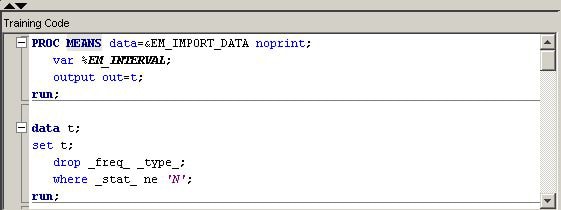
Training Code — Write code that passes over the input training or transaction data to produce some result in the Training Code pane. For example:
proc means data=&em_import_data;
output out=m;
run;
You should also write dynamic scoring code in the training code pane. Scoring code is code that generates new variables or transforms existing variables. Dynamic scoring code, as opposed to static scoring code, is written such that no prior knowledge of the properties of any particular data set is assumed. That is, the code is not unique to a particular process flow diagram. For example, suppose that you begin your process flow diagram with a particular data source and it is followed by a SAS Code node that contains dynamic scoring code. If you changed the data source in the diagram, the dynamic scoring code should still execute properly. Dynamic scoring code can make use of SAS PROC statements and macros, whereas static scoring code cannot. -
Score Code — Write code that modifies the train, validate, test, or transaction data sets for the successor nodes. The Score view is, however, reserved for static scoring code. Static scoring code makes references to properties of a specific data set, such as variable names, so the code is unique for a particular process flow diagram. For example,
logage= log(age);
-
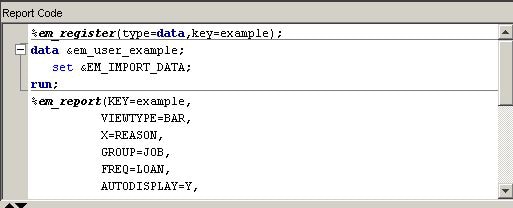
Report Code — code that generates output that is displayed to the user. The output can be in the form of graphs, tables, or the output from SAS procedures. For example, statements such as
proc print data=m;
run;
Calls to the macro %EM_REPORT, which are illustrated in Examples Using %EM_REPORT, are the most common form of Report code.
You can execute your
code in two modes.
-
Run Code () — Code will be executed immediately in the
current SAS session. Only the code in the active code pane is executed.
The log and output will appear in the Code Editor's Results pane.
If a block of code is highlighted, only that code is executed. No
pre-processing or post-processing will occur. Use this mode to test
and debug blocks of code during development.
-
Run Node () — The code node and all predecessor nodes
will be executed in a separate SAS session, exactly as if the user
has closed the editor and run the path. All normal pre-processing
and post-processing will occur. Use the Results window to view the log, output, and other results generated by your
code.
Most nodes generate
permanent data sets and files. However, before you can reference a
file in your code, you must first register a unique file key using
the %EM_REGISTER macro and then associate a file with that key. When
you register a key, Enterprise Miner generates a macro variable named
&EM_USER_key. You use that macro variable in your code to
associate the file with the key. Registering a file allows Enterprise
Miner to track the state of the file and avoid name conflicts.
Use the %EM_GETNAME
macro to reinitialize the macro variable &EM_USER_key when referring
to a file's key in a code pane other than the one in which it was
registered. Using Run Code causes the code in the active code pane
to execute in a separate SAS session. If the key was registered in
a different pane, &EM_USER_key will not get initialized. The registered
information is stored on the server, so you don't have to register
the key again, but you must reinitialize &EM_USER_key.
SAS Code Node Results
To view the SAS Code
node's Results window from within the Code
Editor, click the icon. Alternatively, you can view the Results window from the main Enterprise Miner workspace
by right-clicking the SAS Code node in the diagram and selecting Results. For general information about the Results window, see Using the Results Window in the
Enterprise Miner Help.
icon. Alternatively, you can view the Results window from the main Enterprise Miner workspace
by right-clicking the SAS Code node in the diagram and selecting Results. For general information about the Results window, see Using the Results Window in the
Enterprise Miner Help.
SAS Code Node Examples
Example 1A: Writing New SAS Code
Follow these steps to
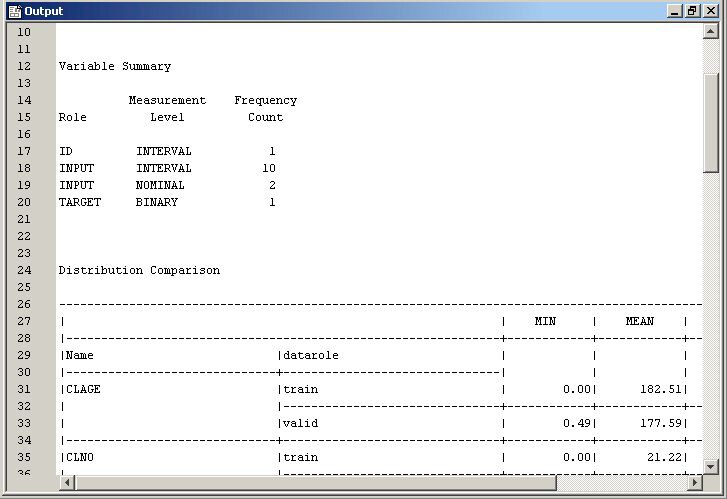
write SAS code to compare the distributions of interval variables
in the training and validation data sets.
-
/* perform PROC MEANS on interval variables in training data */
/* output the results to data set named t                    */

proc means data=&em_import_data noprint;
   var %em_interval;
   output out=t;
run;

/* drop unneeded variables and observations  */

data t;
set t;
   drop _freq_ _type_;
   where _stat_ ne 'N';
run;

/* transpose the data set  */

proc transpose data=t out=tt;
     id _stat_;
run;

/* add a variable to identify data partition */

data tt;
set tt;
   length datarole $8;
   datarole='train';
run;

/* perform PROC MEANS on interval variables in validation data */
/* output the results to data set named v                    */

proc means data=&em_import_validate noprint;
     var %em_interval;
     output out=v;
run;

/* drop unneeded variables and observations  */

data v;
set v;
   drop _freq_ _type_;
   where _stat_ ne 'N';
run;

/* transpose the data set  */

proc transpose data=v out=tv;
   id _stat_;
run;

/* add a variable to identify data partition */

data tv;
set tv;
   length datarole $8;
   datarole='valid';
run;

/* append the validation data results */
/* to the training data results       */

proc append base=tt data=tv;
run;

/* register the key Comp and      */
/* create a permanent data set so */
/* that the data set can be used  */
/* later in Report code           */

%em_register(key=Comp, type=data);

data &em_user_Comp;
  length _name_ $12;
  label _name_ = 'Name';
  set tt;
  cv=std/mean;
run;

/* tabulate the results */

proc tabulate data=&em_user_Comp;
   class _name_ datarole;
   var min mean max std vc;
   table _name_*datarole, min mean max std cv;
   keylabel sum=' ';
   title 'Distribution Comparison';
run;

Example 1B: Adding Logical Evaluation
The SAS code in Example
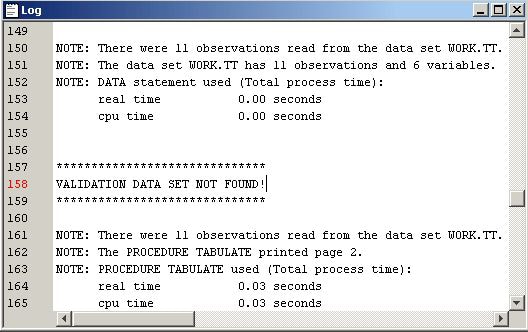
1A generates error messages if no validation data set exists. You
use conditional logic within a macro to make the program more robust.
To do so, follow these steps.
-
Add the following code shown in blue in the Training Code pane. The %EVAL function evaluates logical expressions and returns a value of either 1(for true) or 0 (for false). In this example, it checks whether a value has been assigned to the macro variable &EM_IMPORT_VALIDATE . If a validation data set exists, &EM_IMPORT_VALIDATE will be assigned a value of the name of the validation data set, and the macro variable, &cv, is set to 1. The new code checks the existence of a validation data set before it calculates the values of minimum, mean, max, and standard deviation of variables. If no validation data set exists, it writes a note to the Log window.
%macro intcompare();
   %let cv=0;
   %if "em_import_validate" ne "" and
       (%sysfunc(exist(&em_import_validate)) or
        %sysfunc(exist(&em_import_validate, VIEW))) %then
        %let cv=1;

   proc means data=&em_import_data noprint;
      var %em_interval;
      output out=t;
   run;

   data t;
      set t;
      drop _freq_ _type_;
      where _stat_ ne 'N';
   run;

   proc transpose data=t out=tt;
      id _stat_;
   run;

   data tt;
      set tt;
      length datarole $8;
      datarole='train';
   run;

   %if &cv %then %do;

      proc means data=&em_import_validate noprint;
         var %em_interval;
         output out=v;
      run;

      data v;
         set v;
         drop _freq_ _type_;
         where _stat_ ne 'N';
      run;

      proc transpose data=v out=tv;
         id _stat_;
      run;

      data tv;
         set tv;
         length datarole $8;
         datarole='valid';
      run;

      proc append base=tt data=tv;
      run;

      %em_register(key=Comp, type=data);

      data &em_user_Comp;
         length _name_ $12;
         label _name_ = 'Name';
         set tt;
         cv=std/mean;
      run;

   %end;

   %else %do;

      %put &em_codebar;
      %put %str(VALIDATION DATA SET NOT FOUND!);
      %put &em_codebar;

   %end;

   proc tabulate data=&em_user_Comp;
      class _name_ datarole;
      var min mean max std cv;
      table _name_*datarole, min mean max std cv;
      keylabel sum=' ';
      title 'Distribution Comparison';
   run;

%mend intcompare;
%intcompare();
Example 1C: Adding Report Elements
In parts 1A and 1B,
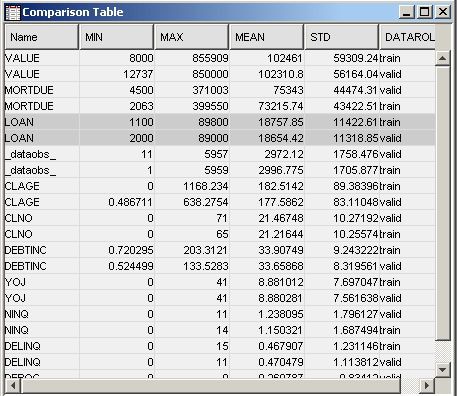
the comparison of variables distributions is displayed in the Output window. In addition, you might also want to include
the tabulated comparison in a SAS table view and to create a plot
of some of the statistics. To do so, follow the steps below.
-
/* initialize the &em_user_Comp macro variable  */

%em_getname(key=Comp, type=data);

/*** Save Results with EM Name ***/

proc sort
data=&em_user_Comp
out=&em_user_Comp;
	by descending cv;
run;

/*** Add to EM Results ***/

%em_report(key=Comp,
	   viewtype=Data,
	   block=Compare,
	   description=Comparison Table);

%em_report(key=Comp,
	   viewtype=Bar,
	   x=_name_,
	   freq=cv,
	   block=Compare,
	   where= datarole eq 'train',
	   autodisplay=Y,
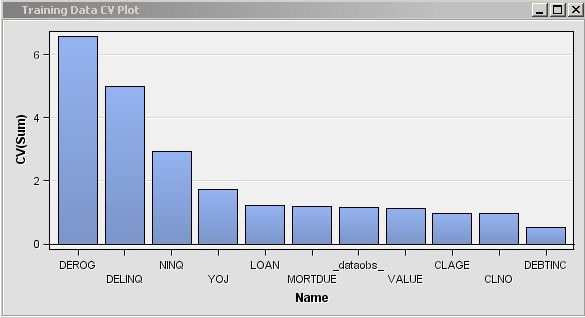
	   description=Training Data CV Plot);

%em_report(key=Comp,
	   viewtype=Bar,
	   x=_name_,
	   freq=cv,
	   block=Compare,
	   where= datarole eq 'valid',
	   autodisplay=Y,
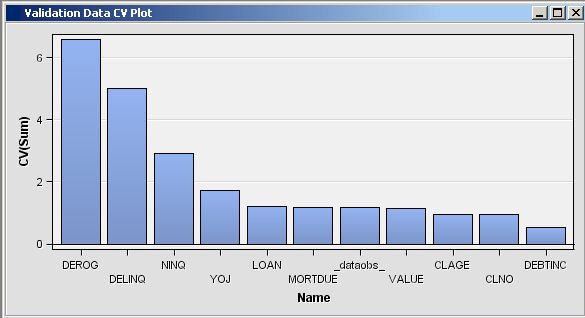
	   description=Validation Data CV Plot);

run;
-
In the Results window, select View
 CompareTraining Data CV Plot from the main menu. The following Training Data CV Plot window appears. The plot displays
a bar chart of the coefficient of variation for each variable in the
training data set.
CompareTraining Data CV Plot from the main menu. The following Training Data CV Plot window appears. The plot displays
a bar chart of the coefficient of variation for each variable in the
training data set.
Example 1D: Adding Score Code
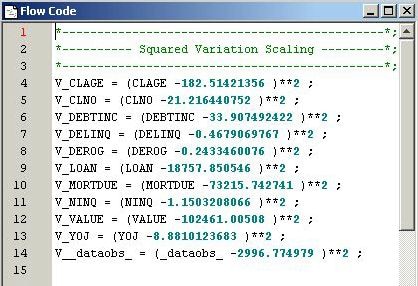
Suppose you want to
generate scoring code to rescale the variables to their deviation
from the mean. Enterprise Miner recognizes two types of SAS scoring
code, Flow scoring code and Publish scoring code. Flow scoring code
is used to score SAS data tables inside the process flow diagram.
Publish scoring code is used to publish the Enterprise Miner model
to a scoring system outside the process flow diagram. To generate
both types of scoring code, follow the steps below.
-
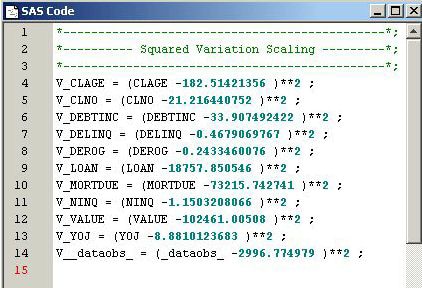
/* Add Score Code */

%macro scorecode(file);
data _null_;
   length var $32;
   filename X "&file";
   FILE X;
   set &em_user_Comp(where=(datarole eq 'train'));

if _N_ eq 1 then do;
   put '*----------------------------------------------*;';
   put '*---------- Squared Variation Scaling ---------*;';
   put '*----------------------------------------------*;';
end;

var=strip('V_' !! _name_);
put var '= (' _name_ '-' mean ')**2 ;' ;
run;

%mend scorecode;
%scorecode(&em_file_emflowscorecode);
%scorecode(&em_file_empublishscorecode);
Example 1E: Modifying Variables Metadata
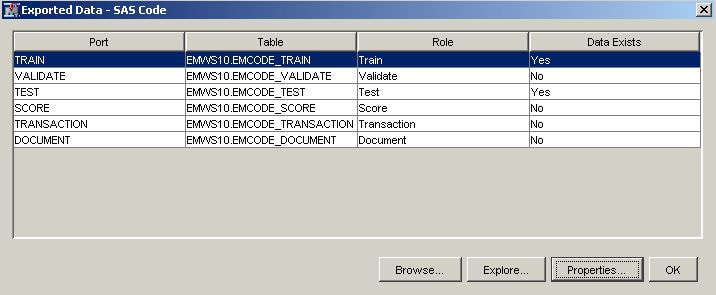
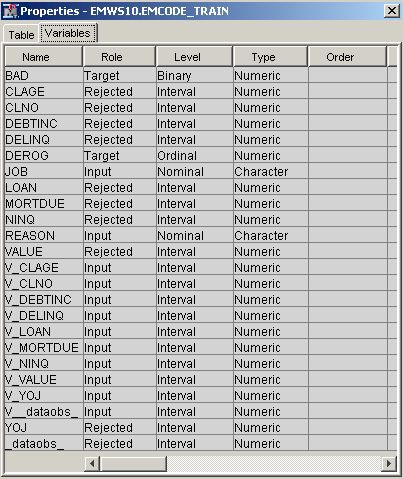
New variables have been
added to the model and the original variables need to be removed to
avoid duplicating terms in the final model. The variables can be dropped
from the incoming tables or they can be given a Role of REJECTED in
the exported metadata. You follow these steps to generate SAS code
to modify the exported metadata tables. SAS code is used to create
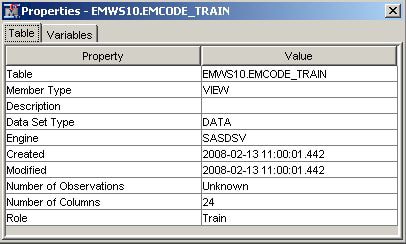
rules that can have more than one condition. Even though the training,
validation, and test data sets are processed in the flow, you need
to modify only the metadata for the exported training data set. You
modify the metadata for the validation and test data sets only when
different variables are created on the validation or test data set.
-
/* Modify Exported Training Metadata */

data _null_;
length string $34;
filename X "&em_file_cdelta_train";
FILE X;
set &em_user_Comp(
   where=(datarole eq 'train'));

/* Reject Original Variable */

string = upcase('"'!!strip(_NAME_)!!'"');
put 'if upcase(NAME) eq ' string ' then role="REJECTED" ;' ;


/* Modify New Variables */

var=upcase(strip('V_' !! _name_ ));
string = '"'!!strip(var)!!'"';
put 'if upcase(NAME) eq ' string ' then do ;' ;
put '     role="INPUT" ;' ;
put '     level= "INTERVAL" ;' ;
put '     comment= "Squared Variation" ;' ;
put 'end ;' ;
run;
Example 2: Writing SAS Code to Create Predictive Models
-
/* Register User Files */ %em_register( key=Fit, type=Data); %em_register( key=Est, type=Data); /* Training Regression Model */ /* Create a DMDB database */ %em_dmdb(out=1); /* Fit logistic regression model */ /* using macro %em_dmreg from the */ /* sashelp.emutil catalog */ %em_dmreg( selection=Stepwise, outest=&em_user_Est, outselect=Work.Outselect); /* Work.Outselect contains the names of REJECTED variables */ /* &em_user_Est contains parameter estimates and t statistics */ /* for each of the stepwise models */ /* Modify Exported Metadata */ data _null_; length string $34; filename X "&em_file_cdelta_train"; FILE X; if _N_=1 then do; put "if ROLE in ('INPUT','REJECTED') then do;"; put "if NAME in ("; end; set Work.Outselect end=eof; string = '"'!!trim(left(TERM))!!'"'; put string; if eof then do; put ') then role="INPUT";'; put 'else role="REJECTED";'; put 'end;'; end; run; -
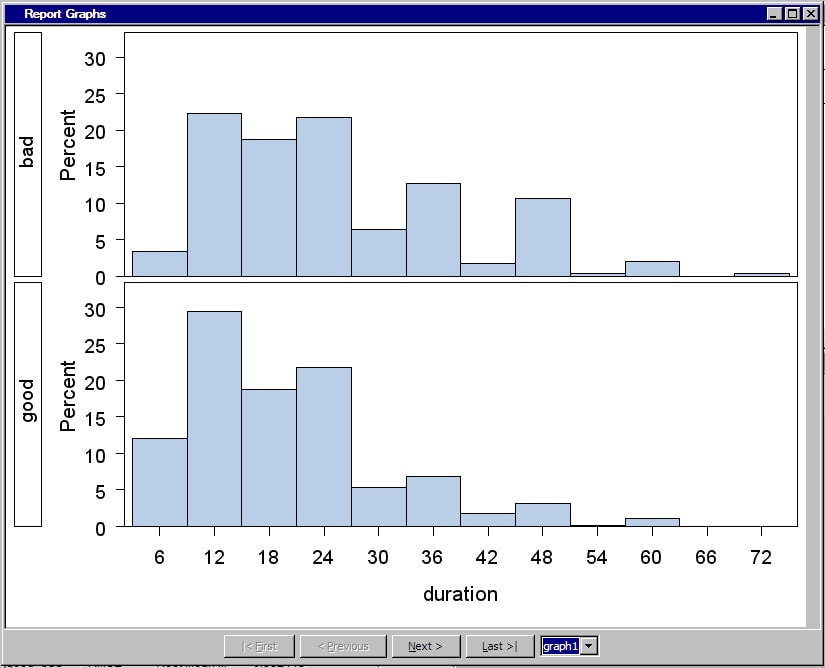
/* Generate Graphs */

proc univariate data=&em_import_data noprint;
     class &em_dec_target;
     histogram %em_interval_input;
run;
SAS graphs are automatically copied from the WORK.GSEG catalog and GIF files are created and stored in the node's REPORTGRAPH subfolder. For example, suppose your projects are stored in a folder namedC:\EMPROJECTS. If your project name is SASCODE and your diagram ID is EMWS1, the GIF files will be stored inC:\EMPROJECTS\SASCODE\WORKSPACES\EMWS1\EMCODE\REPORTGRAPH. -
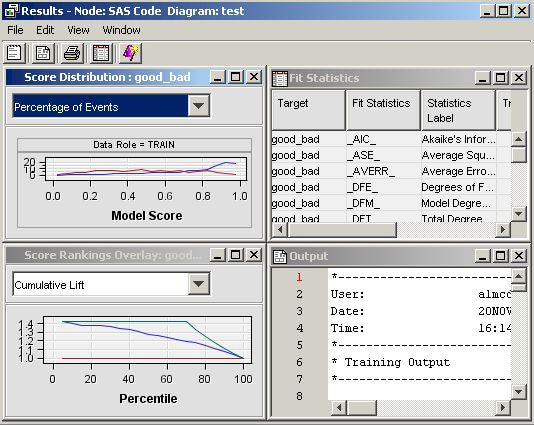
Run the SAS Code node and view the results. Open the Score Distribution chart. The following display shows an example of the SAS Code results window.Standard results of a model node are displayed. The SAS Code is registered as a MODEL tool at the beginning of the SAS code. Therefore, fit statistics, and plots of score distribution and score rankings are automatically displayed. Select ViewSAS ResultsReport Graphs from the main menu. The Report Graphs window appears and displays the output from the PROC UNIVARIATE
statement. The PROC UNIVARIATE statement produces histograms of each
input interval input for both target levels.
-
Open the Code Editor for the newly added SAS Code node and copy the following code in the Training Code editor. The code is similar to that in step 6, but uses PROC ARBOR to create a decision tree model. The PROC ARBOR step is encapsulated in the %EM_ARBOR macro.
/* Registering User Files */ %em_register(key=MODEL, type=DATA); %em_register(key=IMPORTANCE, type=DATA); %em_register(key=NODES, type=DATA); %em_register(key=LEAFSTATS, type=DATA); /* Training Decision Tree Model */ %em_arbor( criterion=probchisq, alpha=0.2, outmodel=&EM_USER_MODEL, outimport=&EM_USER_IMPORTANCE, outnodes=&EM_USER_NODES); /**************************************************************************/ /* CRITERION = criterion (VARIANCE, PROBF, ENTROPY, GINI, PROBCHISQ) */ /* ALPHA = alpha value; used with criterion = PROBCHISQ or PROBF */ /* (default=0.20) */ /* OUTMODEL = tree data set; encode info used in the INMODEL option */ /* OUTIMPORT = importance data set; contains variable importance */ /* OUTNODES = nodes data set; contains node information */ /**************************************************************************/ /* Modifying Exported Metadata */ data _null_; length string $200; filename X "&EM_FILE_CDELTA_TRAIN"; file X; set &EM_USER_IMPORTANCE end=eof; if IMPORTANCE =0 then do; string = 'if NAME="'!!trim(left(name))!!'" then do;'; put string; put 'ROLE="REJECTED";'; string = 'COMMENT="'!!"&EM_NODEID"!!':Rejected because of low importance value";'; put string; put 'end;'; end; else do; string = 'if NAME="'!!trim(left(name))!!'" then ROLE="INPUT";'; put string; end; if ^eof then put 'else'; run; -
/* Generating Reports */

/* Initialize &EM_PRED with the name of the */
/* target=1 prediction variable             */

data _null_;
   set &em_dec_decmeta;
   where _TYPE_ eq "PREDICTED" AND LEVEL eq "GOOD";
   call symput("EM_PRED",VARIABLE);
run;

/* Reinitialize registered keys  */

%em_getname(key=LEAFSTATS, type=data);
%em_getname(key=NODES, type=data);
%em_getname(key=IMPORTANCE, type=data);

/* retrieve the predicted variables data set */

data &EM_USER_LEAFSTATS;
   set &EM_USER_NODES(
   keep=LEAF N NPRIORS P_: I_: U_:);
   where LEAF ne .;
   format LEAF 3.;
run;

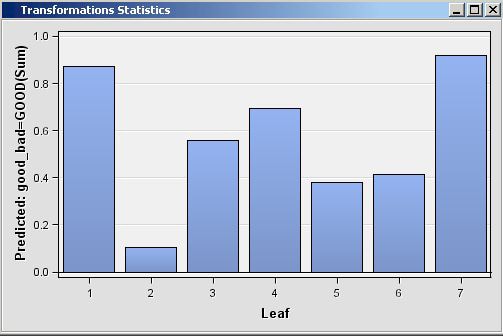
/* plot the target prediction for each leaf */

%EM_REPORT(key=LEAFSTATS,
           description=STATISTICS,
           viewtype=BAR,
           freq=&EM_PRED,
           x=LEAF);

/* Generating Graphs */

%em_getname(key=IMPORTANCE, type=data);

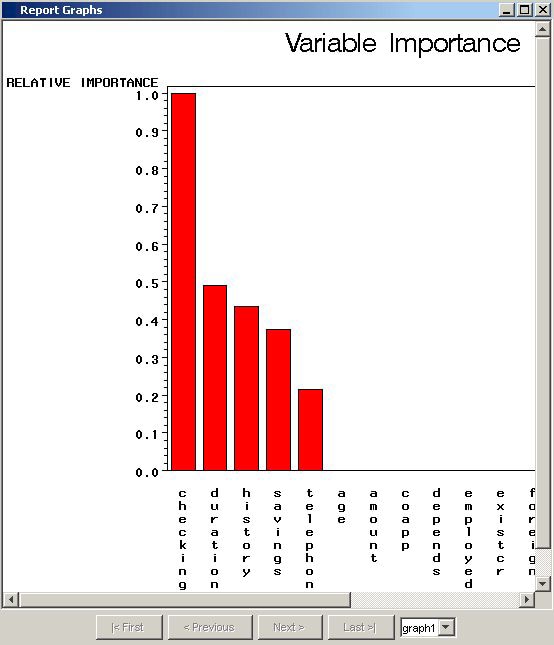
/* Plot the Importance of the Individual Variables */

proc gchart data=&EM_USER_IMPORTANCE;
     vbar name/sumvar=importance discrete descending;
     title 'Variable Importance';
run;
title;
quit;
Examples Using %EM_REPORT
Bar Charts
-
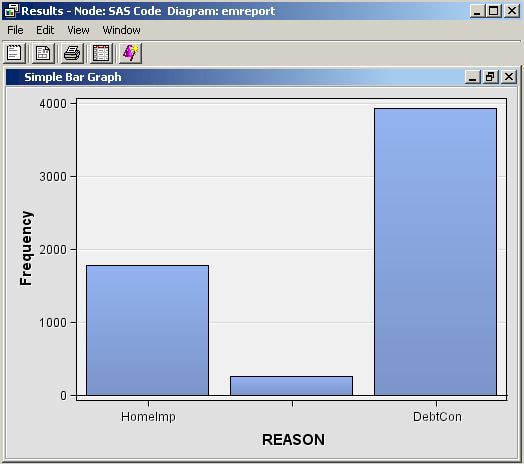
Click Results (). When the Results window
appears, double click the title bar of the bar chart pane and you
should see the following:
performs a SAS DATA step. By using the macro variable &em_user_Example for the data set name, the data set name is linked to the data key that was registered previously. So the general form of this macro variable is &em_user_<key>, where <key> is the argument that you supplied to %EM_REGISTER. The macro variable &EM_IMPORT_DATA used in the set statement resolves to the data set that is imported from the Home Equity data node that precedes the SAS Code node in the path. Finally, let's analyze the arguments that were supplied to the macro %EM_REPORT:
%em_report(
   key=Example,
   viewtype=Bar,
   x=Reason,
   autodisplay=Y,
   description=%bquote(Simple Bar Chart),
   block=%bquote(My Graphs));
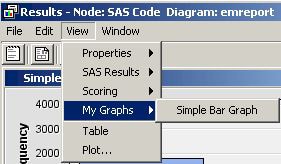
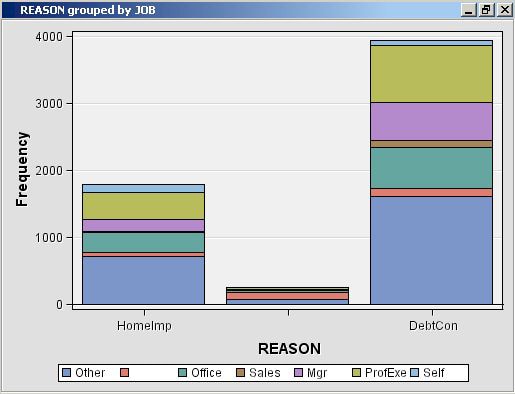
The 1st argument, KEY=Example, links the graph to the data set via the key that was registered previously using %EM_REGISTER; it is a required argument for %EM_REPORT.The 3rd argument, X=Reason, specifies that the variable REASON is to populate the x-axis. By default, the y-axis is the frequency of the variable populating the x-axis, but as will be demonstrated later, this feature of the graph can be changed using the FREQ argument. The variable, Reason, records the reported purpose for the applicant's home equity loan.The 4th argument, AUTODISPLAY=Y, specifies to automatically display the graph in the Results window. Without this option, you would have to use the Results window's View menu to display the graph.The 5th argument, DESCRIPTION=%bquote(Simple Bar Chart), specifies the text that is to appear in the title bar of the graph pane. The description is also used to populate a View submenu. By default, the View menu will list an item, known as a block, called Custom Reports. The description will be listed in the block's submenu. By including the final option, BLOCK=%bquote(My Graphs), the block will be labeled "My Graphs" rather than "Custom Reports" and the Description, "Simple Bar Chart" will appear as a menu item under My Graphs.Our data set includes a variable, JOB, which records the profession of the loan applicant. Suppose you want to see how the frequencies for REASON are distributed across JOB. You can do this by specifying the GROUP option of %EM_REPORT. So, replace the call to %EM_REPORT in your code with the following:%em_report( key=Example, viewtype=Bar, x=Reason, group=Job, autodisplay=Y, description=%bquote(REASON grouped by JOB), block=%bquote(My Graphs));
Save your modified code, click Run Node (), and then click Results ( ). You new graph should look like this:
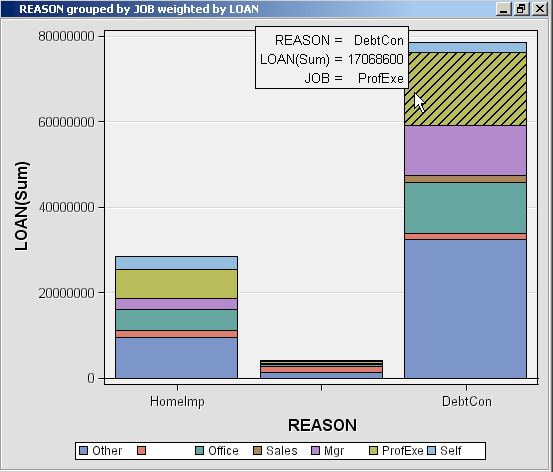
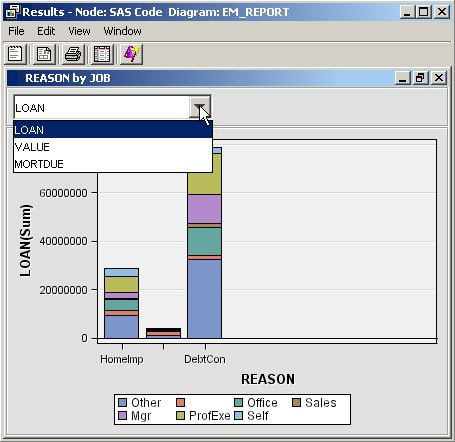
There is a variable in our data set called LOAN that records the dollar amount of the requested loan. Suppose now that instead of displaying the number of loans by type, you want to display the dollar amounts, still grouping by JOB. To do this, add the FREQ argument to %EM_REPORT. Replace the call to %EM_REPORT with the following:%em_report( key=example, viewtype=Bar, x=Reason, group=Job, freq=Loan, autodisplay=Y, description=%bquote(REASON grouped by JOB weighted by LOAN), block=%bquote(My Graphs));

Multiple Bar Charts
The previous example,
Bar Charts, demonstrated how to generate a single bar chart using
%EM_REPORT. Specifically, using the Home Equity data set, a bar chart
was generated for the variable REASON, grouped by JOB, and weighted
by LOAN. This example extends that example by demonstrating how to
generate a combo box that enables you to view different frames of
a plot. The example will start where the previous example finished
and will add two additional plots; a different weight variable will
be used for each frame of the plot. This is accomplished by including
the VIEW argument of %EM_REPORT to specify an ID value in multiple
calls to %EM_REPORT. The CHOICETEXT argument is also used, enabling
you to attach text to each frame that is displayed by the combo box.
-
%em_register(type=Data, key=Example);
data &em_user_Example;
set &em_import_data;
run;

%em_report(
   key=Example,
   viewtype=Bar,
   view=1,
   x=Reason,
   group=Job,
   freq=Loan,
   choicetext=Loan,
   autodisplay=Y,
   description=%bquote(Reason by Job with Weights),
   block=%bquote(My Graphs));

%em_report(
   view=1,
   freq=Value,
   choicetext=Value);

%em_report(
   view=1,
   freq=Mortdue,
   choicetext=Mortdue);
Each call to %EM_REPORT defines a different frame for the graph. There are three things that you should notice about the second and third calls to %EM_REPORT. The first is that you must specify the VIEW argument with the same ID number in all three calls to %EM_REPORT. This links the three calls. The second is that except for the VIEW argument, the only other arguments that you need to specify are the ones that have values that differ from the first call to %EM_REPORT. The third is that while arguments can have different values across the multiple calls to %EM_REPORT, you cannot specify different sets of arguments.
Multiple Y Plot
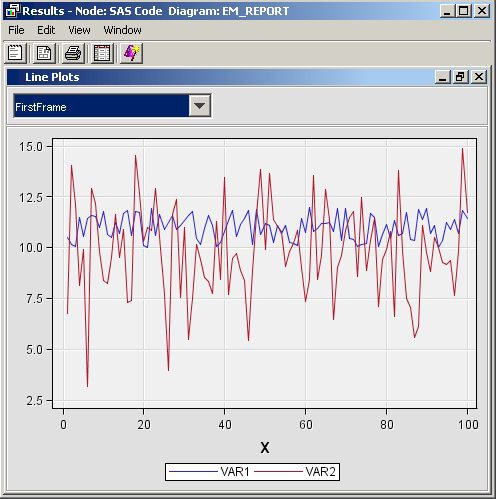
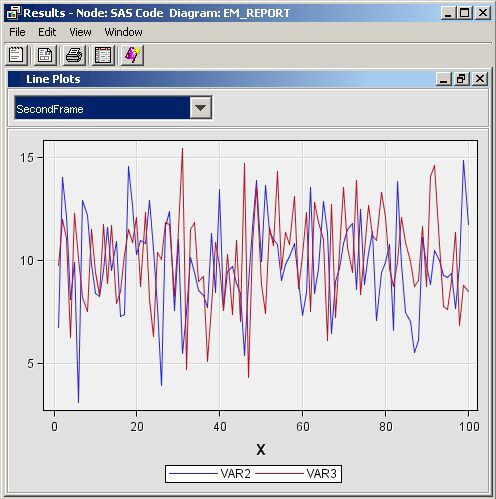
This example demonstrates
how to use the macro %EM_REPORT to generate a line plot with two variables
on the y-axis. The technique demonstrated previously, in the example Multiple Bar Charts, for generating multiple frames will also
be applied.
-
%em_register(type=Data, key=Sample);

/* Simulate the data */

data &em_user_Sample;
   do X=1 to 100;
      var1 = 10 + ranuni(1234)*2;
      var2 = 10 + rannor(1234)*2;
      var3 = 10 + rannor(1234)*2.5;
      output;
   end;
run ;

%em_report(
   key=Sample,
   viewtype=Lineplot,
   view=2,
   x=X,                  /* specify the x-axis variable     */
   y1=var1,              /* specify the 1st y-axis variable */
   y2=var2,              /* specify the 2nd y-axis variable */
   choicetext=FirstFrame,
   autodisplay=Y,
   description=%bquote(Line Plots),
   block=%bquote(My Graphs));

%em_report(
   view=2,
   y1=var2,
   y2=var3,
   choicetext=SecondFrame);
Dendogram
-
%em_register(key=Outtree, type=Data);
%em_getname(key=Outtree, type=Data);
proc varclus data = &em_import_data hi outtree=&em_user_Outtree;
var Clage Clno Debtinc Delinq Derog Loan Mortdue Ninq Value Yoj;
run;
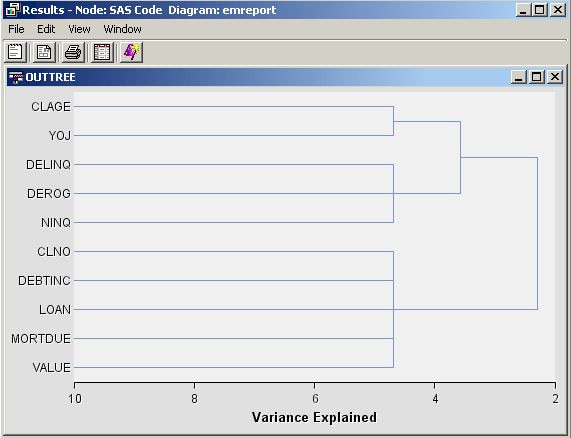
%em_report(
   key=OUTTREE,
   viewtype=DENDROGRAM,
   autodisplay=Y,
   block=Dendrogram,
   name=_Name_,
   parent=_Parent_,
   height=_Varexp_);
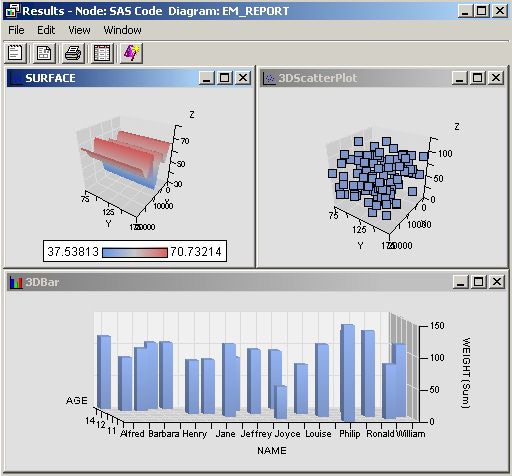
Three Dimensional Components
This example demonstrates
how to use %EM_REPORT to generate 3-dimensional scatter, bar, and
surface plots.
-
%em_register(key=Data, type=Data);

/* simulate data */

data One;
do i = 1 to 100;
   x= ranuni(0) * 100 * 200;
   y = ranuni(0) * 100 + 75;
   z = ranuni(0) * 100 + 10;
   output;
end;
run;

data &em_user_data;
  set Work.One;
run;

/* K-Dimensional Scatter Plot */

%em_report(
   key=Data,
   viewtype=ThreeDScatter,
   x=X,
   y=Y,
   z=Z,
   block=%bquote(My Graphs),
   description=%bquote(3DScatterPlot),
   autodisplay=Y);

/* K-Dimensional Surface Plot */

%em_report(
   key=Data,
   viewtype=Surface,
   x=X,
   y=Y,
   z=Z,
   block=%bquote(My Graphs),
   description=%bquote(Surface),
   autodisplay=Y);

%em_register(key=Class, type=Data);

data &em_user_Class;
  set Sashelp.Class;
run;

/* K-Dimensional Bar Chart */

%em_report(
   key=Class,
   viewtype=ThreeDBar,
   x=Name,
   y=Weight,
   series=Age,
   block=%bquote(My Graphs),
   description=%bquote(3DBar),
   autodisplay=Y);
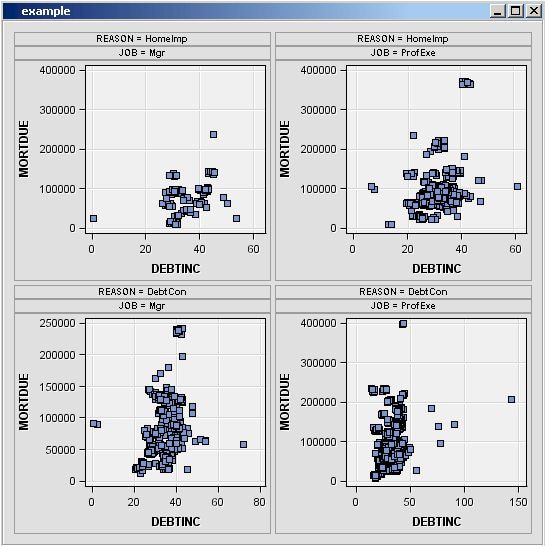
Simple Lattice of Plots
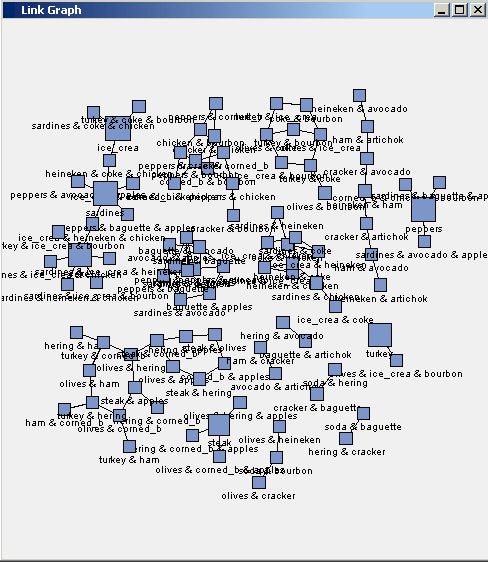
Constellation Plot
-
%em_register(key=A, type=DATA);
%em_register(key=B, type=DATA);

data &em_user_a;
   set &em_lib..assoc_links;
run;

data &em_user_b;
   set &em_lib..assoc_nodes;
run;

%em_report(viewtype=Constellation,
           linkkey=A,
           nodekey=B,
           LINKFROM=FROM,
           LINKTO=TO,
           LINKID=linkid,
           LINKVALUE=CONF,
           nodeid=item,
           nodesize=count,
           nodetip=item);
Importing Statistical Graphics with %EM_REPORT
The SAS Code node can
be used to display the results of PROC SGPLOT, or any other SG procedure.
What follows here is a pseudo-example that demonstrates the structure
required to import these graphics. The graphics are first exported
as a PDF by PROC SGPLOT and then imported using %EM_REPORT. To begin,
you will need to enter the following code in the Report
Code section of the Code Editor. This is also illustrated in the image below.
%em_register(key=REPORT, type=FILE, extension=pdf);
%em_report(KEY=REPORT, BLOCK=MODEL, VIEWTYPE = FILEVIEWER,
	autodisplay=Y, DESCRIPTION=My Custom Document);

ods pdf file="";
/* your sgplot code goes here */
ods pdf close;
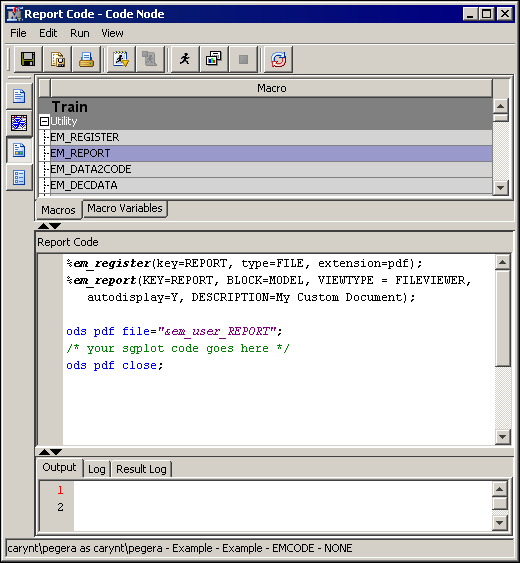
Notice the commented
portion
/* your sgplot code goes here */.
You need to insert your specific PROC SGPLOT code at that point in
the code.
This code creates a
window in the SAS Code node Results window
that enables you to open a PDF file that contains the results of the
SGPLOT procedure. The %EM_REGISTER macro creates a file reference
for the ODS file that is produced and is stored in the project’s
workspace for this code node. For example, this could be
C:\Project\test\Workspaces\EMWS7\EMCODE\report.pdf, which maps to the project, workspace, code node ID, and file reference
for the PDF.
The %EM_REPORT macro
uses that file reference to populate a window in the SAS Code Node
results browser that displays a link to your report. The
ODS PDF statement uses a macro variable created by the
%EM_REGISTER macro called &EM_USER_REPORT to write the PDF file
in the desired location. Here, the term report in this macro variable is the same as the KEY= value in the &EM_REGISTER
macro invocation.