Compare Models
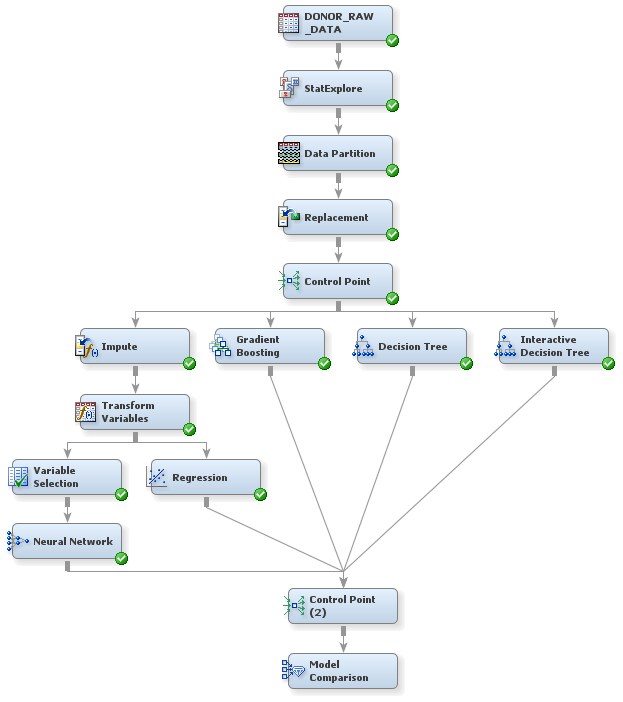
To use the Model Comparison
node to compare the models that you have built in this example and to select one as
the
champion model:
-
Select the Utility tab on the Toolbar.
-
Select the Control Point node icon. Drag the node into the Diagram Workspace.
-
Connect all five model nodes to the Control Point node.TipControl Point nodes enable you to better organize your process flow diagram. These nodes do not perform calculations; they simply pass data from preceding nodes to subsequent nodes.
-
Select the Assess tab on the Toolbar.
-
Select the Model Comparison node icon. Drag the node into the Diagram Workspace.
-
Connect the Control Point node to the Model Comparison node.
-
In the Diagram Workspace, right-click the Model Comparison node, and select Run from the resulting menu. Click Yes in the Confirmation window that opens.
-
In the window that appears when processing completes, click Results. The Results window appears.
-
In the Fit Statistics window, notice that the regression model was selected as the champion model. The champion model has the value
Yin the Selected Model column in the Fit Statistics window.In the model selection node, SAS Enterprise Miner selects the champion model based on the value of a single statistic. You can specify which statistic to use for selection in the node Properties Panel. Because you did not change the value of this property, the default statistic was used, which (because a profit matrix is defined) is the average profit in the validation data. -
Close the Results window.
Copyright © SAS Institute Inc. All Rights Reserved.