Creating a Define-XML 2.0 define.xml File from SDTM Source Data
Overview
The SAS Clinical Standards
Toolkit supports the currently published CDISC Define-XML 2.0 submission
standard, which supports representation of the CDISC SDTM and CDISC
SEND tabulation data sets and ADaM 2.1 analysis data sets in metadata
form.
Assumption
You have a library of
CDISC SDTM SAS data sets (which are not read by this process) from
which a set of metadata (in the form of source_study, source_tables,
source_columns, source_codelists, source_values, and source_documents
data sets) has been created. This metadata must contain the expected,
correctly typed columns created for the sample study provided by SAS.
The source_study, source_tables, and source_columns data sets are
required to create a Define-XML 2.0 define.xml file.
Location of Define-XML 2.0 Driver Programs
The Define-XML driver
programs are located in the
sample study library directory/cdisc-definexml-2.0-1.7/programs directory.
Step 1: Extract Available SDTM Source Metadata into the SAS Representation of Define-XML 2.0 Metadata
The initial task is
to extract the available SDTM metadata into Define-XML 2.0 metadata
files. The SAS representation of Define-XML 2.0 involves 54 data sets,
but only 31 of these are typically used to create a Define-XML 2.0
file. The other 23 data sets contain ODM (Operational Data Model)
metadata or Analysis Results metadata that are extensions of the Define-XML
2.0 model. The sample driver program create_sasdefine_from_source.sas,
modified to point to your specific SDTM study metadata, must be submitted
to create the SAS representation of Define-XML 2.0 metadata. This
process builds the 31 core data sets, but it might not populate all
of them (depending on the completeness of the metadata of your study).
The sample driver program
runs this macro:
%define_sourcetodefine(
     _cstOutLib=srcdata,
     _cstSourceStudy=sampdata.source_study,
     _cstSourceTables=sampdata.source_tables,
     _cstSourceColumns=sampdata.source_columns,
     _cstSourceCodeLists=sampdata.source_codelists,
     _cstSourceDocuments=sampdata.source_documents,
     _cstSourceValues=sampdata.source_values,
     _cstFullModel=N,
			_cstCheckLengths=Y,
     _cstLang=en
     );
The macro is located
in the
global standards library directory/standards/cdisc-definexml-2.0-1.7/macros directory.
Note: The key input (source) files
are the SDTM metadata files (source_study, source_tables, source_columns,
source_codelists, source_values, and source_documents), not the SDTM
domain data sets. The source files to create a Define-XML 2.0 file
have a different structure than the source files to create a CRT-DDS
1.0 file.
In the sample study,
the source files for the SDTM 3.1.2 study are in the
sample study library directory/cdisc-definexml-2.0-1.7/sascstdemodata/cdisc-sdtm-3.1.2/metadata directory.
Step 2: Create the define.xml File
At this point, all available
content for the define.xml file has been captured in the SAS representation
(31 data sets) of the CDISC Define-XML 2.0 standard. The SAS Clinical
Standards Toolkit provides a sample driver program, create_definexml.sas.
This program builds and validates the define-sdtm-3.1.2.xml file.
Submit the create_definexml.sas driver program.
In this driver program,
the call to the primary task macro requests that the default style
sheet provided by SAS (the source of which is CDISC) be copied to
the folder location containing the generated define.xml file. The
macro is located in the
global standards library directory/standards/cdisc-definexml-2.0-1.7/macros directory.
Here is the macro:
%define_write(_cstCreateDisplayStyleSheet=1,
     _cstHeaderComment=%str(Produced from SAS data using the SAS
     Clinical Standards Toolkit &_cstVersion));
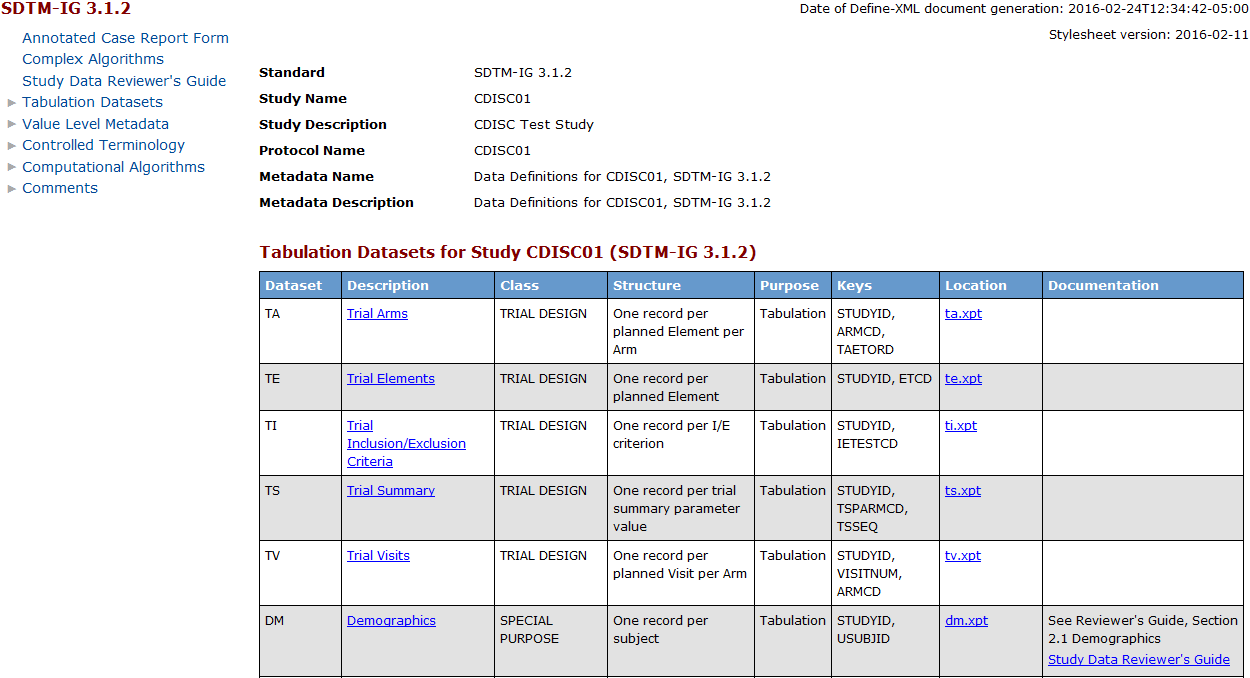
Here is a portion of
the define-sdtm-3.1.2.xml file as rendered by the default style sheet.
Hyperlinks among tables, columns, codelists, and other file elements
are provided.
Partial Sample define-sdtm-3.1.2.xml File (as Rendered by the
Default Style Sheet)
The final task in the
sample create_definexml.sas driver program is to call the %CSTUTILXMLVALIDATE
macro to perform the schema validation. This involves verifying that
the Define-XML define.xml file is valid structurally and syntactically
according to the XML schema.
Note: The steps contained in the
two sample driver programs create_sasdefine_from_source.sas and create_definexml.sas
are also available as combined steps in the single sample driver program
create_definexml_from_source.sas.
Note: The SAS Clinical Standards
Toolkit 1.7
does not contain validation checks to validate the SAS representation
of the Define-XML 2.0 standard. The only methodology included in the
SAS Clinical Standards Toolkit 1.7
to validate a Define-XML 2.0 file is XML schema validation.
Here is a sample Results
data set produced by the validation process:
Partial Sample Results Data Set (CDISC Define-XML 2.0 Create
Process)
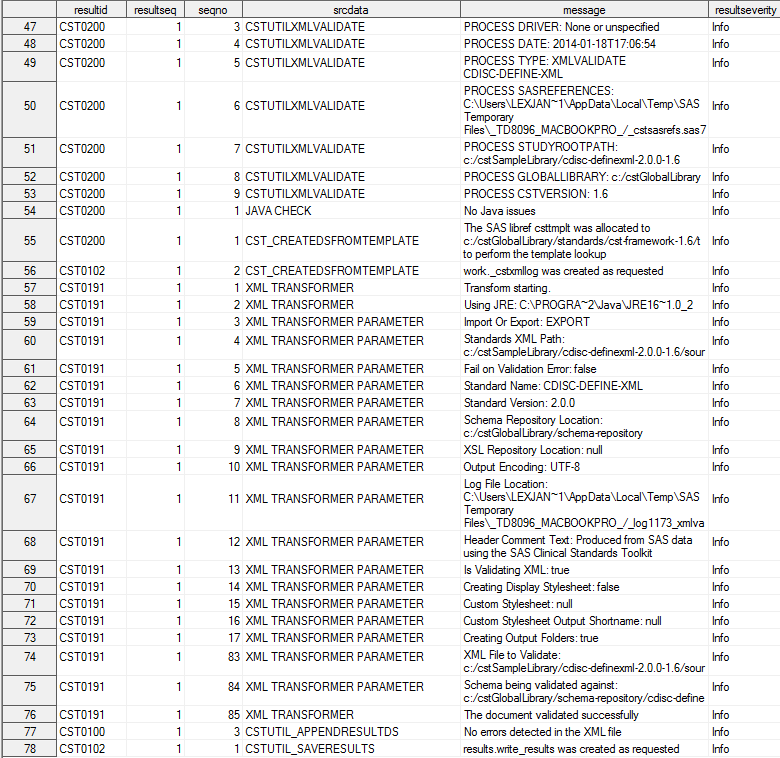
The Results data set
provides process information and the location of the generated define-sdtm-3.1.2.xml
file. The Results data set confirms that no problems were found with
the file after validation of the file.
Copyright © SAS Institute Inc. All Rights Reserved.