The SAS Clinical Standards Toolkit File Roadmap
The primary function
of the SAS Clinical Standards Toolkit global standards library is
to provide the metadata that defines each supported SAS Clinical Standards
Toolkit standard. This location is specified during product installation
and can be subsequently moved to another location. By default, on
Microsoft Windows, this location is set to the
c:\cstGlobalLibrary directory.
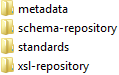
The metadata folder
contains key metadata about all supported standards and can be updated
with each new product release. The metadata folder can also be updated
each time you elect to register a new standard or version of a standard.
The schema-repository and xsl-repository folders support XML-based
standards (such as CDISC-ODM and CDISC CRT-DDS). The standards folder
contains a subfolder hierarchy for each supported standard.
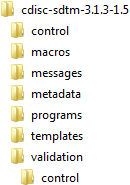
The control folder
contains data sets that provide general metadata about the standard.
The macros folder contains SAS macros for
standards that are included in the SAS autocall path when working
with that standard. The messages folder contains
messages used in reporting or process results for a specific standard.
The metadata folder contains the “gold-standard”
definition of the standard as interpreted and implemented by the person
who registered the standard. The programs folder
contains programs and property files supporting general use of the
standard. The validation folder and the control folder
contain validation check metadata for those standards supporting validation
of standard domains or data sets.
Installation of the
SAS Clinical Standards Toolkit places files in the !sasroot tree for the common SAS Clinical Standards Toolkit
framework files. The generic (cross-standard or standard-independent)
framework SAS macros are installed to the
!sasroot/cstframework/sasmacros directory (Microsoft
Windows). The SAS config file has been altered when the SAS Clinical
Standards Toolkit was installed to include this folder, by default,
in the SASautos path, meaning that the framework macros are available
to you whenever and however you start SAS referencing the default
config file.
In the SAS Clinical
Standards Toolkit sample library, there is a sample folder for each
standard. A sample folder contains the files that represent a sample
SAS implementation of the specific standard, sample study data sets,
and sample programs and results that illustrate the SAS Clinical Standards
Toolkit functionality.
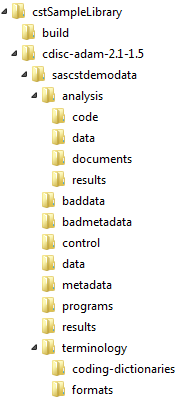
The folder hierarchy
might be different for other standards. For example, the CDISC ADaM
analysis folder
and subfolders are unique to ADaM. The cstSampleLibrary folder
merely provides a location for the sample SAS implementation. Your
files can be located anywhere accessible by SAS. You do not need to
conform to the folder-naming convention illustrated in the CDISC ADaM
sample.
Copyright © SAS Institute Inc. All rights reserved.