The Fundamentals of Frame SCL
SCL Labeled Sections
An SCL
labeled section is a set of programming statements that
execute as a unit. A section in SCL begins with a label and ends with
a RETURN statement.
Sections that are labeled
with the name of a control on the associated frame execute when the
user interacts with that control. For example, if you have a Push
Button named exitButton on your frame, and you want to use it to confirm
that the user wants to exit the application, you might have a labeled
section similar to the following in your frame SCL:
   exitButton:
      dcl list message={'Are you sure you want to exit?'};
      response=messagebox(message, '!', 'YN', 'Confirm Exit', 'N', '');
      if response='YES' then call execcmd('end;');
      message=dellist(message);
   return;
The code in the exitButton section executes
when that exitButton is clicked, resulting in a dialog box to confirm
the exit.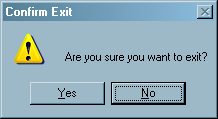
Section labels do not
have to match the casing of the name of the control to which they
are associated.
Frame SCL uses reserved
sections for program initialization and termination (there is also
a main processing section, but that is not covered in this document).
The INIT section executes once before the frame is displayed to the
user, and is typically used to initialize variables and open SAS tables.
The TERM section executes once before the frame is closed, and is
typically used to close tables and delete variables that are no longer
needed. You should always delete lists when they are no longer needed.
SCL Variables
Each variable that is used in SCL is of a specific data
type. The following SCL data types are used in the example application
later in this document:
All variables should
be declared using a DECLARE statement. DECLARE statements do not have
to exist in labeled sections. You can declare several variables with
one DECLARE statement. You can also use the abbreviation DCL.
CHAR(n) is a notation
that enables you to define the length of a character variable, where
'n' is the length in characters, a value up to 32767. By
default, character variables are 200 characters long. Consider the
following code:
DECLARE  NUM      n1 n2,     /* Two numeric variables.                */
         CHAR     c1,        /* A character variable with length 200. */
         CHAR(10) c2,        /* A character variable with length 10.  */
LIST myList={}; /* An empty SCL list. */Copyright © SAS Institute Inc. All rights reserved.