Dot Notation and SCL
To improve code readability and
to reduce the amount of coding that is necessary, SCL supports dot
notation, a syntax for accessing component properties
(attributes and methods). Using dot notation also enables the compiler
to check your syntax at compile time.
In dot notation, the
object (the List Box or Table Viewer) is separated from the property
(the attribute or method) by a period, which is called a dot. The
syntax follows this format:
object.property;
Dot notation is used
to set or query attributes, for example:
/* Setting the text color. */
     textEntry1.textColor='green';

/* Querying the text color.               */
/* The textEntry1 textColor attribute is  */
/* returned to the variable 'color'.      */
     dcl char(10) color;
     color = textEntry1.textColor;
Dot notation is also
used to call methods. For example, the following code deselects all
the items in listbox1: listbox1._deselectAll();
Sometimes you must provide
a method with values. These values are called arguments. For example,
the following code selects a row of a Table Viewer using the _selectRow
method when a Push Button is clicked. The method requires an argument
that specifies the row to select, in this case row 5.
init:
   /* Set the table to view. */
   sasdataset1.table='sashelp.class';
return;
pushbutton1:
   /* Select row 5. */
   dcl list row={5};
   tableviewer1._selectRow(row);
   if row then row=dellist(row);
return;
The frame with the selected row: 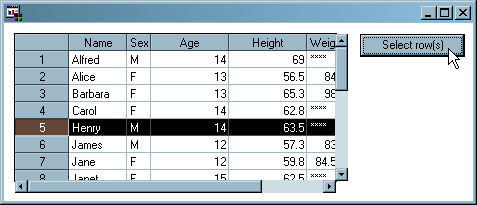
Sometimes the arguments
that you supply to methods are changed in the process of running the
method. The following code determines whether item #3 in listbox1
is selected. If the specified row was selected, the variable
selected is
set to 1. If the specified row was not selected, the variable selected is
set to 0. dcl num selected,
num row = 3;
listbox1._isSelected(row, selected);Copyright © SAS Institute Inc. All rights reserved.