Usage Note 70261: The error "Unable to connect to the profile" occurs when you connect to an application server context in SAS® Enterprise Guide®
 |  |  |  |
The following error might occur as a pop-up from SAS Enterprise Guide when you try to expand SASApp on the servers panel on the left pane side of the interface:
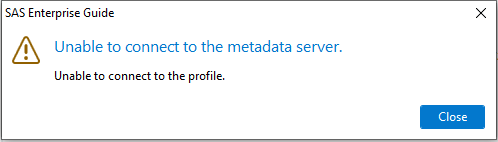
If the error below also occurs in the SAS Enterprise Guide application log (SAS KB0036457), complete the following steps to check the Read Metadata permissions on the Foundation repository:
2023-07-17 12:17:42,950 [9] ERROR SAS.EG.SDS.Dialogs.ProviderConnectDlg [(null)] - Exception while processing Connect():
SAS.EC.ServerInterfaces.SDSException: Error initializing metadata connection ---> SAS.EC.ServerInterfaces.SDSException: BIP Service Software Component is missing
at SAS.EC.Directory.Metadata.OMSProvider.GetServices()
at SAS.EC.Directory.Metadata.OMSProvider.Initialize()
--- End of inner exception stack trace ---
at SAS.EC.Directory.Metadata.OMSProvider.Initialize()
at SAS.EC.Directory.Metadata.OMSProvider.Connect()
at SAS.EG.SDS.Dialogs.ProviderConnectDlg.DoConnect(Object sender, DoWorkEventArgs e)
SAS.EC.ServerInterfaces.SDSException: Error initializing metadata connection ---> SAS.EC.ServerInterfaces.SDSException: BIP Service Software Component is missing
at SAS.EC.Directory.Metadata.OMSProvider.GetServices()
at SAS.EC.Directory.Metadata.OMSProvider.Initialize()
--- End of inner exception stack trace ---
at SAS.EC.Directory.Metadata.OMSProvider.Initialize()
at SAS.EC.Directory.Metadata.OMSProvider.Connect()
at SAS.EG.SDS.Dialogs.ProviderConnectDlg.DoConnect(Object sender, DoWorkEventArgs e)
Note: A SAS Integration Technologies test might display a successful connection to both the SAS Workspace Server and the SAS® Metadata Server
Check Read Metadata permissions on the Foundation repository
To check the Read Metadata permissions on the Foundation repository, complete the following steps:
- Launch SAS® Management Console and connect with an administrative SAS account (such as sasadm@saspw).
- On the Plug-ins tab, expand Environment Management ► Metadata Manager ► Active Server {hostname}.
- Right-click the Foundation repository and select Properties.
- On the Authorization tab, check the permissions for the SASUSERS group.
- If the ReadMetadata permission is denied, select the Grant box twice or until the permissions are the same as in the screenshot below.

- Click OK.
- In SAS Enterprise Guide, try to connect to SASApp again.
If you are still unable to connect to SAS Enterprise Guide, or if you encounter additional issues, please contact SAS Technical Support.
Operating System and Release Information
| Product Family | Product | System | SAS Release | |
| Reported | Fixed* | |||
| SAS System | SAS Enterprise Guide | z/OS | ||
| z/OS 64-bit | ||||
| Macintosh | ||||
| Microsoft® Windows® for 64-Bit Itanium-based Systems | ||||
| Microsoft Windows Server 2003 Datacenter 64-bit Edition | ||||
| Microsoft Windows Server 2003 Enterprise 64-bit Edition | ||||
| Microsoft Windows XP 64-bit Edition | ||||
| Microsoft® Windows® for x64 | ||||
| OS/2 | ||||
| Microsoft Windows 8 Enterprise 32-bit | ||||
| Microsoft Windows 8 Enterprise x64 | ||||
| Microsoft Windows 8 Pro 32-bit | ||||
| Microsoft Windows 8 Pro x64 | ||||
| Microsoft Windows 8.1 Enterprise 32-bit | ||||
| Microsoft Windows 8.1 Enterprise x64 | ||||
| Microsoft Windows 8.1 Pro 32-bit | ||||
| Microsoft Windows 8.1 Pro x64 | ||||
| Microsoft Windows 10 | ||||
| Microsoft Windows 11 | ||||
| Microsoft Windows 95/98 | ||||
| Microsoft Windows 2000 Advanced Server | ||||
| Microsoft Windows 2000 Datacenter Server | ||||
| Microsoft Windows 2000 Server | ||||
| Microsoft Windows 2000 Professional | ||||
| Microsoft Windows NT Workstation | ||||
| Microsoft Windows Server 2003 Datacenter Edition | ||||
| Microsoft Windows Server 2003 Enterprise Edition | ||||
| Microsoft Windows Server 2003 Standard Edition | ||||
| Microsoft Windows Server 2003 for x64 | ||||
| Microsoft Windows Server 2008 | ||||
| Microsoft Windows Server 2008 R2 | ||||
| Microsoft Windows Server 2008 for x64 | ||||
| Microsoft Windows Server 2012 Datacenter | ||||
| Microsoft Windows Server 2012 R2 Datacenter | ||||
| Microsoft Windows Server 2012 R2 Std | ||||
| Microsoft Windows Server 2012 Std | ||||
| Microsoft Windows Server 2016 | ||||
| Microsoft Windows Server 2019 | ||||
| Microsoft Windows Server 2022 | ||||
| Microsoft Windows XP Professional | ||||
| Windows 7 Enterprise 32 bit | ||||
| Windows 7 Enterprise x64 | ||||
| Windows 7 Home Premium 32 bit | ||||
| Windows 7 Home Premium x64 | ||||
| Windows 7 Professional 32 bit | ||||
| Windows 7 Professional x64 | ||||
| Windows 7 Ultimate 32 bit | ||||
| Windows 7 Ultimate x64 | ||||
| Windows Millennium Edition (Me) | ||||
| Windows Vista | ||||
| Windows Vista for x64 | ||||
| 64-bit Enabled AIX | ||||
| 64-bit Enabled HP-UX | ||||
| 64-bit Enabled Solaris | ||||
| HP-UX IPF | ||||
| Linux | ||||
| Linux for x64 | ||||
| Solaris for x64 | ||||
This SAS Note outlines the possible cause of the error, "Unable to connect to the metadata server... Unable to connect to the profile" in SAS Enterprise Guide, which occurs when attempting a connection to an application server context, such as SASApp.
| Type: | Usage Note |
| Priority: |
| Date Modified: | 2023-07-27 11:01:25 |
| Date Created: | 2023-07-17 13:24:21 |