Problem Note 69728: A traceback error occurs when you modify 32-bit SAS® Foundation user preferences on a Windows operating system at SAS® 9.4M7 or later
 |  |  |  |
If you run a 32-bit SAS 9.4M7 (TS1M7) or later SAS Foundation Graphical User Interface (GUI) session on a Microsoft Windows operating system, an error occurs when you modify the user preferences.
Changing options on the Results tab of the Preferences window leads to a traceback error that is reported in the SAS log. The issue occurs on either a 32- or 64-bit Windows operating system that runs 32-bit SAS.
To access the Preferences dialog box, select Tools ▶ Options ▶ Preferences drop-down list. Then, click the Results tab.
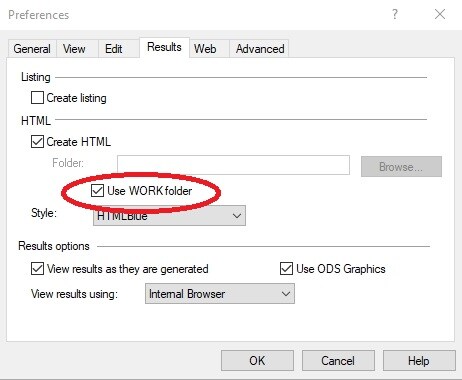
When you deselect the Use WORK Folder check box and click OK, SAS becomes unresponsive for 5-10 seconds before a traceback error similar to the following is displayed in the log:
Please contact technical support and provide them with the following traceback information:
Exception occurred at (7BD5AB96)
Task Traceback
Address Frame (DBGHELP API Version 4.0 rev 5)
7BD5AB96 05469164 sasods:tkvercn1+0xA9B62
7BD5A1E4 0546B7CC sasods:tkvercn1+0xA91B0
7BD5A1E4 0546DE34 sasods:tkvercn1+0xA91B0
7BD58B61 0546E57C sasods:tkvercn1+0xA7B2D
7C0833F9 0546F800 sasodr:tkvercn1+0x23C5
7A3212ED 0546F850 sashost:Main+0xC2B1
7A3F2038 0546F864 sashost:tkStartSas+0x19718
767EFA29 0546F874 KERNEL32:BaseThreadInitThunk+0x19
77837BBE 0546F8D0 ntdll:RtlGetAppContainerNamedObjectPath+0x11E
77837B8E 0546F8E0 ntdll:RtlGetAppContainerNamedObjectPath+0xEE
After the error occurs, the new setting might not have been saved. The SAS session needs to be restarted because it has become unstable.
There is no workaround for this problem. However, you can move to the 64-bit version of SAS 9.4 where the issue is not observed.
Operating System and Release Information
| Product Family | Product | System | Product Release | SAS Release | ||
| Reported | Fixed* | Reported | Fixed* | |||
| SAS System | Base SAS | Microsoft® Windows® for x64 | 9.4_M7 | 9.4 TS1M7 | ||
| Microsoft Windows 8 Enterprise 32-bit | 9.4_M7 | 9.4 TS1M7 | ||||
| Microsoft Windows 8 Enterprise x64 | 9.4_M7 | 9.4 TS1M7 | ||||
| Microsoft Windows 8 Pro 32-bit | 9.4_M7 | 9.4 TS1M7 | ||||
| Microsoft Windows 8 Pro x64 | 9.4_M7 | 9.4 TS1M7 | ||||
| Microsoft Windows 8.1 Enterprise 32-bit | 9.4_M7 | 9.4 TS1M7 | ||||
| Microsoft Windows 8.1 Enterprise x64 | 9.4_M7 | 9.4 TS1M7 | ||||
| Microsoft Windows 8.1 Pro 32-bit | 9.4_M7 | 9.4 TS1M7 | ||||
| Microsoft Windows 8.1 Pro x64 | 9.4_M7 | 9.4 TS1M7 | ||||
| Microsoft Windows 10 | 9.4_M7 | 9.4 TS1M7 | ||||
| Microsoft Windows 11 | 9.4_M7 | 9.4 TS1M7 | ||||
| Microsoft Windows Server 2008 | 9.4_M7 | 9.4 TS1M7 | ||||
| Microsoft Windows Server 2008 R2 | 9.4_M7 | 9.4 TS1M7 | ||||
| Microsoft Windows Server 2008 for x64 | 9.4_M7 | 9.4 TS1M7 | ||||
| Microsoft Windows Server 2012 Datacenter | 9.4_M7 | 9.4 TS1M7 | ||||
| Microsoft Windows Server 2012 R2 Datacenter | 9.4_M7 | 9.4 TS1M7 | ||||
| Microsoft Windows Server 2012 R2 Std | 9.4_M7 | 9.4 TS1M7 | ||||
| Microsoft Windows Server 2012 Std | 9.4_M7 | 9.4 TS1M7 | ||||
| Microsoft Windows Server 2016 | 9.4_M7 | 9.4 TS1M7 | ||||
| Microsoft Windows Server 2019 | 9.4_M7 | 9.4 TS1M7 | ||||
| Microsoft Windows Server 2022 | 9.4_M7 | 9.4 TS1M7 | ||||
| Windows 7 Enterprise 32 bit | 9.4_M7 | 9.4 TS1M7 | ||||
| Windows 7 Enterprise x64 | 9.4_M7 | 9.4 TS1M7 | ||||
| Windows 7 Home Premium 32 bit | 9.4_M7 | 9.4 TS1M7 | ||||
| Windows 7 Home Premium x64 | 9.4_M7 | 9.4 TS1M7 | ||||
| Windows 7 Professional 32 bit | 9.4_M7 | 9.4 TS1M7 | ||||
| Windows 7 Professional x64 | 9.4_M7 | 9.4 TS1M7 | ||||
| Windows 7 Ultimate 32 bit | 9.4_M7 | 9.4 TS1M7 | ||||
| Windows 7 Ultimate x64 | 9.4_M7 | 9.4 TS1M7 | ||||
| Type: | Problem Note |
| Priority: | medium |
| Date Modified: | 2022-12-08 09:24:02 |
| Date Created: | 2022-11-30 02:51:27 |