Usage Note 69553: Accessing a SAS® Visual Analytics report might return the error "403 Forbidden"
 |  |  |  |
You might encounter an error similar to the one in the screenshot below when accessing a SAS Visual Analytics report:

This error typically indicates that a network appliance (such as load balancer, firewall, proxy server, and so on) that sits in front of the SAS middle-tier is blocking the call. If you use a network trace in the browser and developer tools as described in SAS KB0036430, you can confirm which server is blocking the call. For example, the screenshot below shows that the Amazon Web Services Elastic Load Balancing (awselb) server blocks the request:
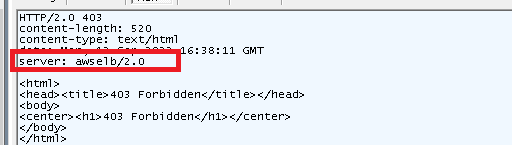
You can find these details in the response body of the failed request in the HAR file that is generated by the developer tools.
If this issue occurs, the administrator of this network device should investigate whether this device has a default setting that blocks requests that exceed a certain size. For example, several of these network devices block requests that are larger than 1MB by default. Increasing this default value often resolves the issue.
Operating System and Release Information
| Product Family | Product | System | SAS Release | |
| Reported | Fixed* | |||
| SAS System | SAS Visual Analytics (on SAS Viya) | Cloud Foundry | Viya | |
| Linux for x64 | Viya | |||
| Microsoft® Windows® for x64 | Viya | |||
| SAS System | SAS Visual Analytics | Microsoft® Windows® for x64 | Viya | |
| Linux for x64 | Viya | |||
| Cloud Foundry | Viya | |||
| Type: | Usage Note |
| Priority: |
| Date Modified: | 2022-09-20 13:27:55 |
| Date Created: | 2022-09-15 08:19:13 |