Problem Note 68462: A "...NoSuchMethodError..." message occurs for CloseableHttpResponse during post-update tasks for SAS® Environment Manager configuration
 |  |  |  |  |
When you upgrade a SAS® 9.4 release in Microsoft Windows environments, SAS® Deployment Manager might fail during the post-update task in SAS Environment Manager, and messages similar to the following are displayed in the vfabrchyperc_postapplyUpdate_yyyy-mm-dd-xx.xx.xx.log file:
[hypericserverTarget] 2021-08-26 14:18:24,040 [main] INFO com.sas.appserver.utils.AntProcessInvoker - Working Directory: C:\SAS\Config\Lev1\Web\SASEnvironmentManager\server-5.8.0-EE\hqapi1-client-6.0.2\bin
[hypericserverTarget] [exec] Exception in thread "main" java.lang.NoSuchMethodError: org.apache.http.impl.client.DefaultHttpClient.execute(Lorg/apache/http/client/methods/HttpUriRequest;Lorg/apache/http/protocol/HttpContext;)Lorg/apache/http/client/methods/CloseableHttpResponse;
This error occurs because underlying class definitions might still be using HttpResponse, but they have since been updated to use CloseableHttpResponse. To resolve this issue, you must remove or move the deprecated library contents. To locate the deprecated .jar files, perform the following steps:
- Navigate to the following directory: SAS-configuration-directory\Lev1\Web\SASEnvironmentManager\server-5.8.0-EE\hqapi1-client-6.0.2\bin.
- Back up and replace the hqapi.bat file in the directory with the hqapi.bat file that you can obtain from the Downloads tab of this SAS Note.
- Open an administrative command prompt and run the following hqapi command:
hqapi.bat user list --host="host-name" --port="7080" --user="sasadm@saspw" --password="password"
Note: You need to use the quotation marks as shown in the command.
You might see the following output:
Exception in thread "main" java.lang.NoSuchMethodError:
org.apache.http.impl.client.DefaultHttpClient.execute(Lorg/apache/http/client/methods/HttpUriRequest;
Lorg/apache/http/protocol/HttpContext;)Lorg/apache/http/client/methods/CloseableHttpResponse;
- Open the outputted classpath.txt file with a text editor. This file is located in SAS-configuration-directory\Lev1\Web\SASEnvironmentManager\server-5.8.0-EE\hqapi1-client-6.0.2\bin\.
- Search the classpath.txt file for "old" to locate the old .jar files that need to be removed. See below for an example:
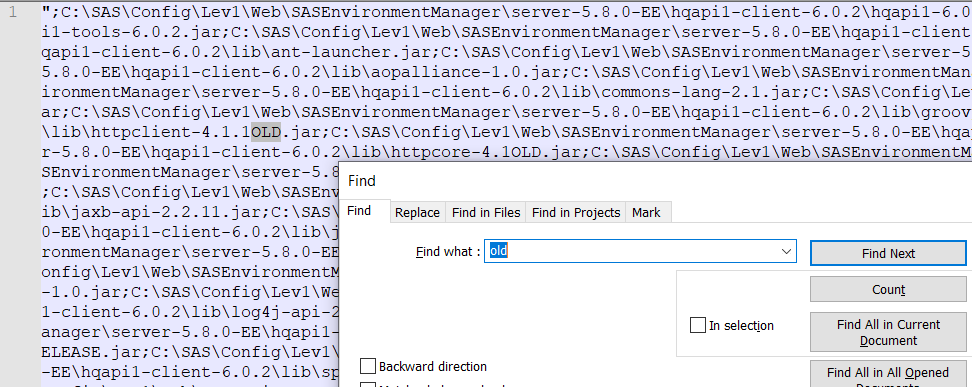
- Navigate to the path that contains the old .jar files, and move them out of the hqapi1-client file path (from step 4) or delete them. Then re-run the hqapi command (from step 3).
- You can then retry SAS Deployment Manager to continue your upgrade. If you continue to encounter issues, open a support track with SAS Technical Support.
Operating System and Release Information
| Product Family | Product | System | SAS Release | |
| Reported | Fixed* | |||
| SAS System | SAS Environment Manager | Microsoft® Windows® for x64 | ||
| Type: | Problem Note |
| Priority: | medium |
| Date Modified: | 2021-12-02 09:58:30 |
| Date Created: | 2021-10-01 11:52:12 |