Problem Note 68036: Emailing a Microsoft Excel file from SAS® Enterprise Guide® might generate an attached file with a long and incorrect name
 |  |  |  |
When you share a Microsoft Excel file by using the E-mail as a step in the project option in SAS Enterprise Guide, the email is correctly sent to the recipient. However, the attached Microsoft Excel file might have a different name than the one that you choose.
This behavior might occur in the following scenario:
- Open SAS Enterprise Guide.
- Expand the Servers panel ► Server ► Files and select the directory in which the Excel file is located.
- Drag-and-drop an Excel file into the Process Flow or double-click it. The file is added to the Process Flow. In this example, the file is called CARS.xlsx.
- Right-click the file into Process Flow ► Share ► Email as a step in the project
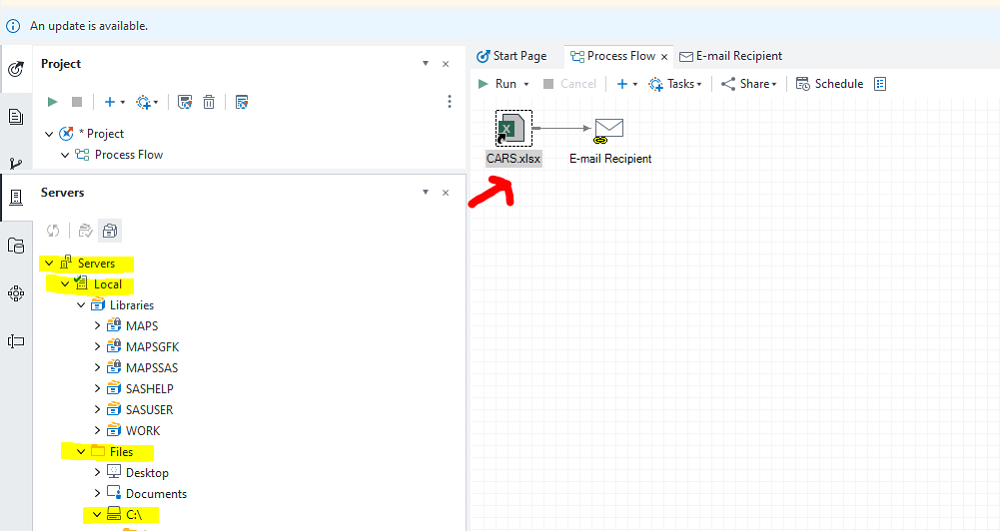
After you execute the task, the recipient receives an email with an attached Excel file. The name of the attached file might be a very long name instead of CARS.xlsx as shown below:
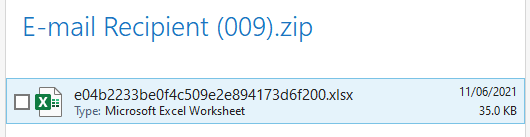
To work around this behavior, do one of the following:
- Drag-and-drop the Excel file from your local machine to the Process Flow instead of dragging and dropping it from Servers panel ► Server ► Files within SAS Enterprise Guide.
- Alternately, you might add the Excel file to the Process Flow by using the option File ► Open within SAS Enterprise Guide instead of choosing it Servers ► Sever ► Files.
Operating System and Release Information
| Product Family | Product | System | Product Release | SAS Release | ||
| Reported | Fixed* | Reported | Fixed* | |||
| SAS System | SAS Enterprise Guide | Microsoft® Windows® for x64 | 8.3 | 9.4 TS1M7 | ||
| Microsoft Windows 8 Enterprise 32-bit | 8.3 | 9.4 TS1M7 | ||||
| Microsoft Windows 8 Enterprise x64 | 8.3 | 9.4 TS1M7 | ||||
| Microsoft Windows 8 Pro 32-bit | 8.3 | 9.4 TS1M7 | ||||
| Microsoft Windows 8 Pro x64 | 8.3 | 9.4 TS1M7 | ||||
| Microsoft Windows 8.1 Enterprise 32-bit | 8.3 | 9.4 TS1M7 | ||||
| Microsoft Windows 8.1 Enterprise x64 | 8.3 | 9.4 TS1M7 | ||||
| Microsoft Windows 8.1 Pro 32-bit | 8.3 | 9.4 TS1M7 | ||||
| Microsoft Windows 8.1 Pro x64 | 8.3 | 9.4 TS1M7 | ||||
| Microsoft Windows 10 | 8.3 | 9.4 TS1M7 | ||||
| Microsoft Windows Server 2008 | 8.3 | 9.4 TS1M7 | ||||
| Microsoft Windows Server 2008 R2 | 8.3 | 9.4 TS1M7 | ||||
| Microsoft Windows Server 2008 for x64 | 8.3 | 9.4 TS1M7 | ||||
| Microsoft Windows Server 2012 Datacenter | 8.3 | 9.4 TS1M7 | ||||
| Microsoft Windows Server 2012 R2 Datacenter | 8.3 | 9.4 TS1M7 | ||||
| Microsoft Windows Server 2012 R2 Std | 8.3 | 9.4 TS1M7 | ||||
| Microsoft Windows Server 2012 Std | 8.3 | 9.4 TS1M7 | ||||
| Microsoft Windows Server 2016 | 8.3 | 9.4 TS1M7 | ||||
| Microsoft Windows Server 2019 | 8.3 | 9.4 TS1M7 | ||||
| Windows 7 Enterprise 32 bit | 8.3 | 9.4 TS1M7 | ||||
| Windows 7 Enterprise x64 | 8.3 | 9.4 TS1M7 | ||||
| Windows 7 Home Premium 32 bit | 8.3 | 9.4 TS1M7 | ||||
| Windows 7 Home Premium x64 | 8.3 | 9.4 TS1M7 | ||||
| Windows 7 Professional 32 bit | 8.3 | 9.4 TS1M7 | ||||
| Windows 7 Professional x64 | 8.3 | 9.4 TS1M7 | ||||
| Windows 7 Ultimate 32 bit | 8.3 | 9.4 TS1M7 | ||||
| Windows 7 Ultimate x64 | 8.3 | 9.4 TS1M7 | ||||
| Type: | Problem Note |
| Priority: | high |
| Date Modified: | 2021-06-15 11:04:36 |
| Date Created: | 2021-06-11 08:13:26 |