Problem Note 67292: The error messages in the system error text for the Japanese locale are unreadable in SAS® Customer Intelligence Studio
 |  |  |  |
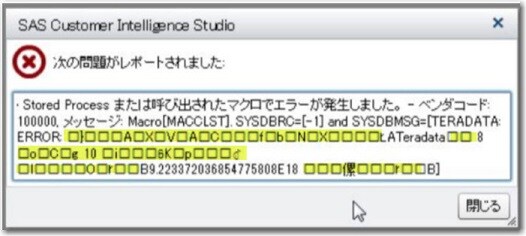
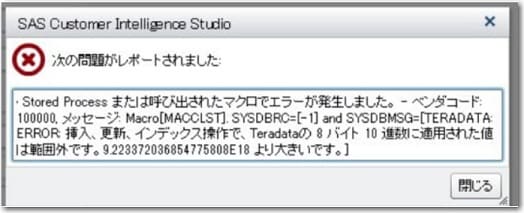
For the Japanese locale in SAS Customer Intelligence Studio, the error window translates the SAS® Marketing Automation portion of the message correctly in Japanese. However, the system error text (SYSERRORTEXT) from the stored process contains non-displayable characters.This problem happens when you use double-byte character sets (DBCS) and the Shift_JIS encoding.
A dialog box similar to the following is displayed when non-displayable characters are present in the error message:
When the characters in the error are correct, the dialog box looks similar to this one:
The SAS® Stored Process Server log file shows the correct SYSERRORTEXT text:
To work around this problem, you need to modify the mastatus.sas macro (located in the SASHOME/SASFoundation/9.4/sasautos directory) to include the KCVT function with the SYSENCODING, and UFT8 parameters. (Note: Make sure to create a backup copy of the macro before you make any changes.)
if symexist('MAMsg') then do;
msg=kcvt(symgetc('MAMsg'), "&SYSENCODING", "utf8");
/* Output to the file only for the non-missing value. */
if missing(msg) then;
else put 'MAMsg=' msg;
end;
if symexist('MANodeName') then do;
msg=kcvt(symgetc('MANodeName'), "&SYSENCODING", "utf8");
/* Output to the file only for the nonmissing value. */
if missing(msg) then;
else put 'MANodeName=' msg;
end;
if symexist('MATableName') then do;
msg=kcvt(symgetc('MATableName'), "&SYSENCODING", "utf8");
/* Output to the file only for the nonmissing value. */
if missing(msg) then;
else put 'MATableName=' msg;
end;
if symexist('MAColumnName') then do;
msg=kcvt(symgetc('MAColumnName'), "&SYSENCODING", "utf8");
/* Output to the file only for the nonmissing value. */
if missing(msg) then;
else put 'MAColumnName=' msg;
Note: If you install future hot fixes, you need to submit the -reinstallhotfix command-line option after you manually modify the mastatus.sas file. To make sure that you do not lose any of your changes, please make a backup of the file. If you manually modify the file without submitting the command, the file is not updated when you apply any hot fixes.
Operating System and Release Information
| Product Family | Product | System | Product Release | SAS Release | ||
| Reported | Fixed* | Reported | Fixed* | |||
| SAS System | SAS Customer Intelligence Studio | Microsoft® Windows® for x64 | 6.6 | |||
| Microsoft Windows 8 Enterprise 32-bit | 6.6 | |||||
| Microsoft Windows 8 Enterprise x64 | 6.6 | |||||
| Microsoft Windows 8 Pro 32-bit | 6.6 | |||||
| Microsoft Windows 8 Pro x64 | 6.6 | |||||
| Microsoft Windows 8.1 Enterprise 32-bit | 6.6 | |||||
| Microsoft Windows 8.1 Enterprise x64 | 6.6 | |||||
| Microsoft Windows 8.1 Pro 32-bit | 6.6 | |||||
| Microsoft Windows 8.1 Pro x64 | 6.6 | |||||
| Microsoft Windows 10 | 6.6 | |||||
| Microsoft Windows 95/98 | 6.6 | |||||
| Microsoft Windows 2000 Advanced Server | 6.6 | |||||
| Microsoft Windows 2000 Datacenter Server | 6.6 | |||||
| Microsoft Windows 2000 Server | 6.6 | |||||
| Microsoft Windows 2000 Professional | 6.6 | |||||
| Microsoft Windows NT Workstation | 6.6 | |||||
| Microsoft Windows Server 2003 Datacenter Edition | 6.6 | |||||
| Microsoft Windows Server 2003 Enterprise Edition | 6.6 | |||||
| Microsoft Windows Server 2003 Standard Edition | 6.6 | |||||
| Microsoft Windows Server 2003 for x64 | 6.6 | |||||
| Microsoft Windows Server 2008 | 6.6 | |||||
| Microsoft Windows Server 2008 R2 | 6.6 | |||||
| Microsoft Windows Server 2008 for x64 | 6.6 | |||||
| Microsoft Windows Server 2012 Datacenter | 6.6 | |||||
| Microsoft Windows Server 2012 R2 Datacenter | 6.6 | |||||
| Microsoft Windows Server 2012 R2 Std | 6.6 | |||||
| Microsoft Windows Server 2012 Std | 6.6 | |||||
| Microsoft Windows Server 2016 | 6.6 | |||||
| Microsoft Windows Server 2019 | 6.6 | |||||
| Microsoft Windows XP Professional | 6.6 | |||||
| Windows 7 Enterprise 32 bit | 6.6 | |||||
| Windows 7 Enterprise x64 | 6.6 | |||||
| Windows 7 Home Premium 32 bit | 6.6 | |||||
| Windows 7 Home Premium x64 | 6.6 | |||||
| Windows 7 Professional 32 bit | 6.6 | |||||
| Windows 7 Professional x64 | 6.6 | |||||
| Windows 7 Ultimate 32 bit | 6.6 | |||||
| Windows 7 Ultimate x64 | 6.6 | |||||
| Windows Millennium Edition (Me) | 6.6 | |||||
| Windows Vista | 6.6 | |||||
| Windows Vista for x64 | 6.6 | |||||
| 64-bit Enabled AIX | 6.6 | |||||
| 64-bit Enabled Solaris | 6.6 | |||||
| HP-UX IPF | 6.6 | |||||
| Linux for x64 | 6.6 | |||||
| Solaris for x64 | 6.6 | |||||
| Type: | Problem Note |
| Priority: | high |
| Date Modified: | 2022-02-18 15:14:53 |
| Date Created: | 2021-01-21 17:06:37 |