Problem Note 66945: Microsoft PowerPoint might not correctly display graphs generated from SAS® Enterprise Guide®
 |  |  |  |
Graphs generated from SAS Enterprise Guide might not be displayed correctly in Microsoft PowerPoint.
For example, you might encounter this issue if you complete steps similar to the following:
- Create a graph by executing the following SAS code within SAS Enterprise Guide and redirecting the output to a Microsoft PowerPoint file:
ods powerpoint file="C:\temp\test.pptx";
ods graphics on;
proc gchart data=sashelp.class; vbar age; run;
ods graphics off;
ods powerpoint close;
ods graphics on;
proc gchart data=sashelp.class; vbar age; run;
ods graphics off;
ods powerpoint close;
The file is correctly created.
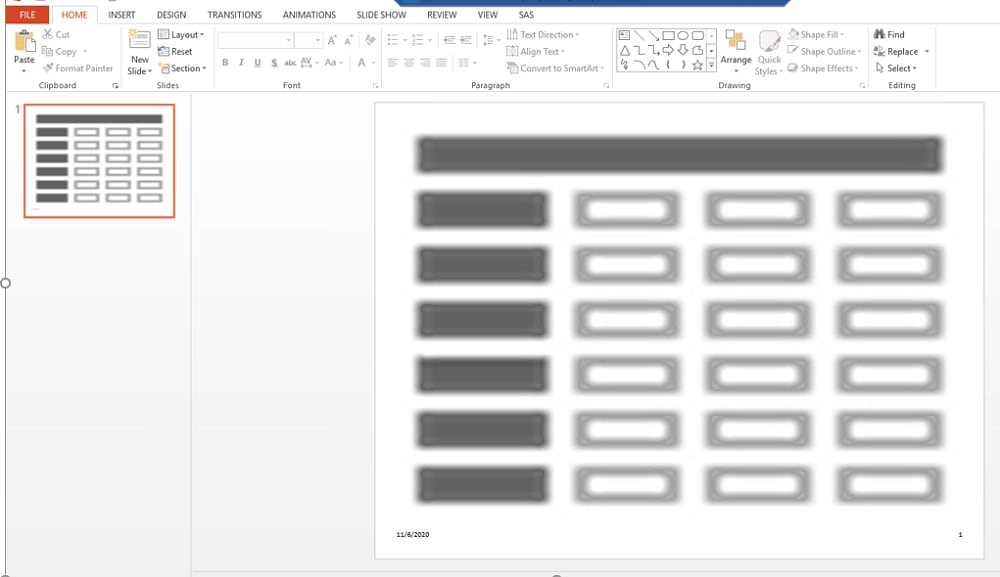
- If you open the PowerPoint file with Microsoft Office 365, then the graph is correctly displayed. But if you open the PowerPoint file in Microsoft Office Professional Plus 2013, then the graph might not be displayed at all. The following display shows a Microsoft PowerPoint file that contains a graph created with SAS Enterprise Guide and opened with Microsoft Office Professional Plus 2013.
This problem mainly occurs because SAS Enterprise Guide executes the DEV=SVG option by default before running the code in programs.
To circumvent this problem, change the default DEV option from SVG to PNG by performing the following steps:
- Open SAS Enterprise Guide.
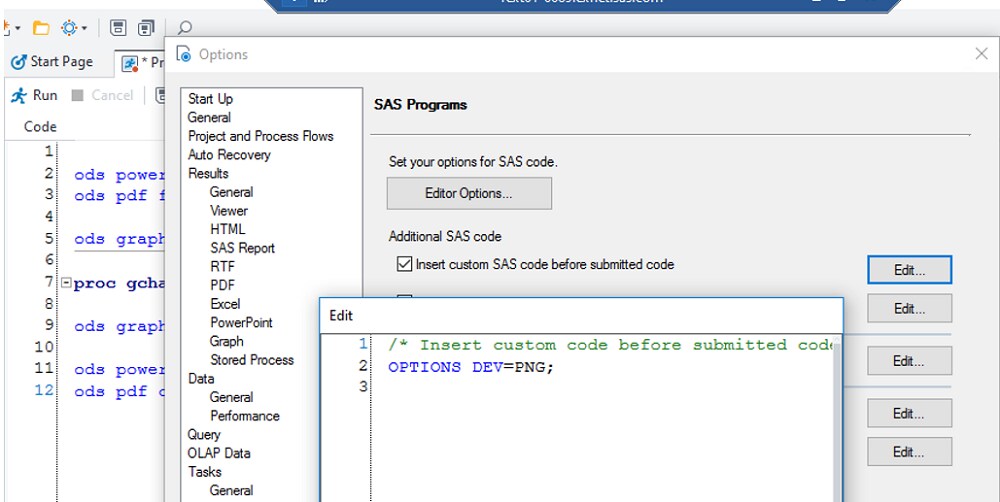
- Select Tools ► Options ► SAS Programs.
- Select the Insert custom SAS code before submitted code option and add this option: OPTIONS DEV=PNG;
Operating System and Release Information
| Product Family | Product | System | Product Release | SAS Release | ||
| Reported | Fixed* | Reported | Fixed* | |||
| SAS System | SAS Enterprise Guide | Microsoft® Windows® for x64 | 8.2 | 9.4 TS1M6 | ||
| Microsoft Windows 8 Enterprise 32-bit | 8.2 | 9.4 TS1M6 | ||||
| Microsoft Windows 8 Enterprise x64 | 8.2 | 9.4 TS1M6 | ||||
| Microsoft Windows 8 Pro 32-bit | 8.2 | 9.4 TS1M6 | ||||
| Microsoft Windows 8 Pro x64 | 8.2 | 9.4 TS1M6 | ||||
| Microsoft Windows 8.1 Enterprise 32-bit | 8.2 | 9.4 TS1M6 | ||||
| Microsoft Windows 8.1 Enterprise x64 | 8.2 | 9.4 TS1M6 | ||||
| Microsoft Windows 8.1 Pro 32-bit | 8.2 | 9.4 TS1M6 | ||||
| Microsoft Windows 8.1 Pro x64 | 8.2 | 9.4 TS1M6 | ||||
| Microsoft Windows 10 | 8.2 | 9.4 TS1M6 | ||||
| Microsoft Windows Server 2008 | 8.2 | 9.4 TS1M6 | ||||
| Microsoft Windows Server 2008 R2 | 8.2 | 9.4 TS1M6 | ||||
| Microsoft Windows Server 2008 for x64 | 8.2 | 9.4 TS1M6 | ||||
| Microsoft Windows Server 2012 Datacenter | 8.2 | 9.4 TS1M6 | ||||
| Microsoft Windows Server 2012 R2 Datacenter | 8.2 | 9.4 TS1M6 | ||||
| Microsoft Windows Server 2012 R2 Std | 8.2 | 9.4 TS1M6 | ||||
| Microsoft Windows Server 2012 Std | 8.2 | 9.4 TS1M6 | ||||
| Microsoft Windows Server 2016 | 8.2 | 9.4 TS1M6 | ||||
| Microsoft Windows Server 2019 | 8.2 | 9.4 TS1M6 | ||||
| Windows 7 Enterprise 32 bit | 8.2 | 9.4 TS1M6 | ||||
| Windows 7 Enterprise x64 | 8.2 | 9.4 TS1M6 | ||||
| Windows 7 Home Premium 32 bit | 8.2 | 9.4 TS1M6 | ||||
| Windows 7 Home Premium x64 | 8.2 | 9.4 TS1M6 | ||||
| Windows 7 Professional 32 bit | 8.2 | 9.4 TS1M6 | ||||
| Windows 7 Professional x64 | 8.2 | 9.4 TS1M6 | ||||
| Windows 7 Ultimate 32 bit | 8.2 | 9.4 TS1M6 | ||||
| Windows 7 Ultimate x64 | 8.2 | 9.4 TS1M6 | ||||
| Type: | Problem Note |
| Priority: | medium |
| Date Modified: | 2020-11-16 14:52:14 |
| Date Created: | 2020-11-16 09:36:25 |