Problem Note 66107: The "Copy Link" function in SAS® Visual Analytics does not pass parameters correctly when you use the "Guest access" option
 |  |  |  |
URL parameters are handled for you when you generate a link to a report in SAS Visual Analytics. In the report details, you select Copy Link to create a URL link for a report that opens the report directly in SAS Visual Analytics. Copy Link contains some options that you can select to generate the URL:
- The Guest access option allows users to bypass the login screen and automatically use guest credentials.
- The Parameters option allows users to add parameters to the URL.
When you use both options, the parameters might not work correctly.
For example, you encounter the problem if you complete steps similar to the following.
- Create a report with a drop-down list and a list table. Your data source contains two data items: SEX and NAME.
- Create a character parameter based on SEX and use it in the drop-down list. The list table has SEX and NAME as roles and contains a filter based on the parameter: “Sex contains Param”.
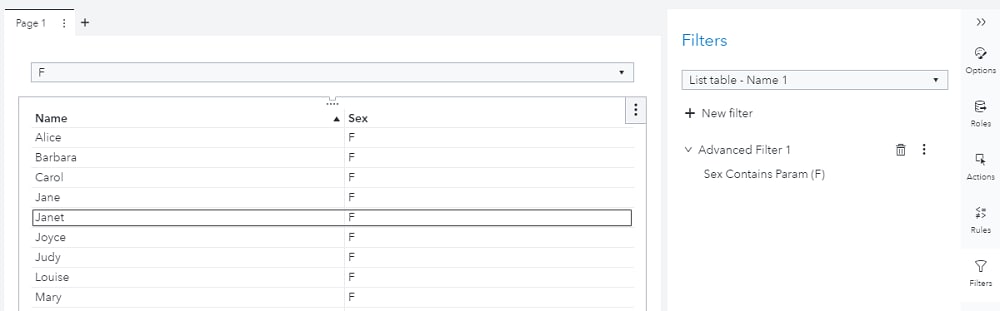
- Use Copy Link to create a URL and select the Guest access option. Also, add Parameter = F.
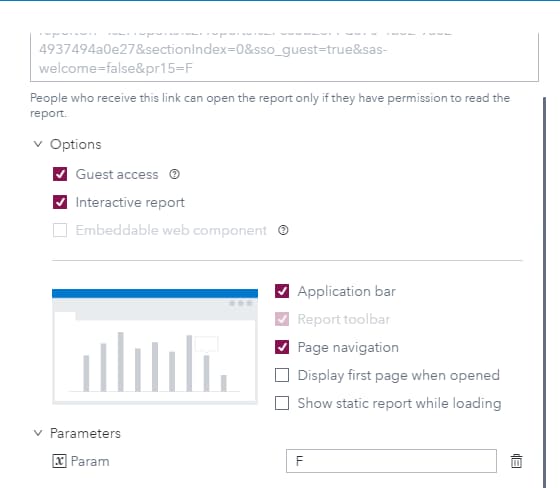
The URL created will be similar to the following: http://yourservername/SASVisualAnalytics/?reportUri=%2Freports%2Freports%2Fc85b23f4-d370-4b52-9a62-4937494a0e27§ionIndex=0&sso_guest=true&sas-welcome=false&pr15=F
If you use the URL, it works correctly when the parameter is set to F. However, if you change the parameter value in the URL from F to M, then the report will be filtered for parameter=F instead of parameter=M: http://yourservername/SASVisualAnalytics/?reportUri=%2Freports%2Freports%2Fc85b23f4-d370-4b52-9a62-4937494a0e27§ionIndex=0&sso_guest=true&sas-welcome=false&pr15=M
This problem does not affect URLs that you create with the Copy Link function if you do not use the Guest access option.
To work around this problem, you can create a new rule in SAS® Environment Manager with the following details:
URL: /reportTransforms/parameterizedReports
Rule type: Grant
Permissions: Create
Principal type: Guest
Then, implement the new rule by selecting the Save and Enable radio button in the dialog box.
Operating System and Release Information
| Product Family | Product | System | Product Release | SAS Release | ||
| Reported | Fixed* | Reported | Fixed* | |||
| SAS System | SAS Visual Analytics (on SAS Viya) | Cloud Foundry | 8.5 | Viya | ||
| Linux for x64 | 8.5 | Viya | ||||
| Microsoft® Windows® for x64 | 8.5 | Viya | ||||
| Type: | Problem Note |
| Priority: | high |
| Date Modified: | 2020-06-11 10:14:27 |
| Date Created: | 2020-06-09 11:25:43 |