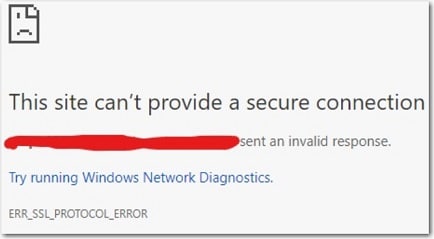
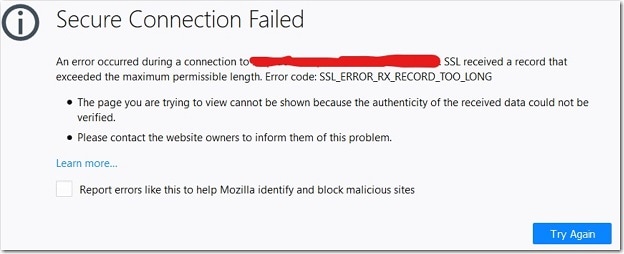
Problem Note 65311: SAS® Environment Manager produces a "Secure Connection Failed" or "This site can't provide a secure connection" error when you log on
 |  |  |  |
If SAS® Web Server is configured for HTTPS and SAS Environment Manager is configured for HTTP, you might experience the following errors in the browser after you enter your credentials in the SAS® 9.4 Logon Manager:
Google Chrome:
Mozilla Firefox:
When this issue occurs, the address bar contains the HTTPS protocol (even thought SAS Environment Manager is configured for HTTP), and HTTPS is associated with the port for HTTP. This issue happens because SAS Web Server is configured to use HTTP Strict Transport Security (HSTS), a security feature that prevents a website from connecting with HTTP if it has previously connected with HTTPS. Starting in SAS 9.4M5, when you initially configure SAS Web Server for HTTPS, SAS Environment Manager is also configured for HTTPS. However, if you configure SAS Web Server manually for HTTPS and you do configure SAS Environment Manager manually for HTTPS, you can still experience this issue.
To circumvent this problem, use your browser's Incognito or Private Browsing option to access SAS Environment Manager.
Operating System and Release Information
| Product Family | Product | System | SAS Release | |
| Reported | Fixed* | |||
| SAS System | SAS Environment Manager | Microsoft® Windows® for x64 | ||
| 64-bit Enabled AIX | ||||
| 64-bit Enabled Solaris | ||||
| HP-UX IPF | ||||
| Linux for x64 | ||||
| Solaris for x64 | ||||
| Type: | Problem Note |
| Priority: | medium |
| Date Modified: | 2020-01-10 14:44:22 |
| Date Created: | 2020-01-07 10:30:21 |