Problem Note 64779: The pop-up menu options to Expand and Collapse hierarchy levels in a crosstab are missing from view mode in SAS® Visual Analytics
 |  |  |  |  |
The pop-up menu options to Expand and Collapse hierarchy levels in a crosstab might be missing from view mode in SAS Visual Analytics. These options are available in edit mode.
As a workaround, use the left and right arrow icons to expand and collapse the hierarchy.
To expand a level in a hierarchy, click the arrow shown in the following display:
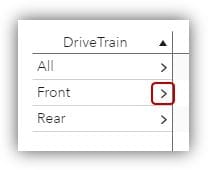
To collapse a level in a hierarchy, click the arrow shown in the following display:
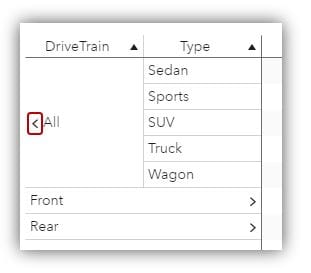
Click the Hot Fix tab in this note for a link to instructions about accessing and applying the software update.
Operating System and Release Information
| Product Family | Product | System | Product Release | SAS Release | ||
| Reported | Fixed* | Reported | Fixed* | |||
| SAS System | SAS Visual Analytics | Microsoft® Windows® for x64 | 8.4 | 8.5 | Viya | Viya |
| Linux for x64 | 8.4 | 8.5 | Viya | Viya | ||
| Cloud Foundry | 8.4 | 8.5 | Viya | Viya | ||
Viya on Windows: An update for this issue is available for SAS Viya 3.4. For instructions on how to access and apply software updates, see the Updating Your SAS Viya software section in the SAS Viya 3.4 for Windows Deployment Guide at
http://documentation.sas.com/?softwareId=administration&softwareVersion=3.4&softwareContextId=softwareUpdatesWinAn update for this issue is available for SAS Viya 3.4. For instructions on how to access and apply software updates, see the Updating Your SAS Viya software section in the SAS Viya 3.4 for Windows Deployment Guide at
http://documentation.sas.com/?softwareId=administration&softwareVersion=3.4&softwareContextId=softwareUpdatesWinAn update for this issue is available for SAS Viya 3.4. For instructions on how to access and apply software updates, see the Updating Your SAS Viya software section in the SAS Viya 3.4 for Linux Deployment Guide at
http://documentation.sas.com/?softwareId=administration&softwareVersion=3.4&softwareContextId=softwareUpdatesViya on Linux: An update for this issue is available for SAS Viya 3.4. For instructions on how to access and apply software updates, see the Updating Your SAS Viya software section in the SAS Viya 3.4 for Linux Deployment Guide at
http://documentation.sas.com/?softwareId=administration&softwareVersion=3.4&softwareContextId=softwareUpdates| Type: | Problem Note |
| Priority: | high |
| Date Modified: | 2019-10-08 09:35:53 |
| Date Created: | 2019-09-16 12:53:17 |