Problem Note 63551: The Advanced Filter dialog box in SAS® Visual Analytics accepts only strings as constant values for multi-select date and numeric parameters
 |  |  |  |
When you are using multi-select date and numeric parameters in an advanced filter expression, the Visual tab does not enable you to specify constant values such as a specific date or a number. On the Visual tab, the expression accepts only a string. As a workaround, select the Text tab and enter the constant values that you want to use. When you are finished, click OK on the Text tab to save the filter and close the dialog box.
In this example, the expression uses a multi-select date parameter and a multi-select numeric parameter. On the Visual tab, notice that only a string can be entered as a constant value, and you see the error messages shown at the bottom of the dialog box.
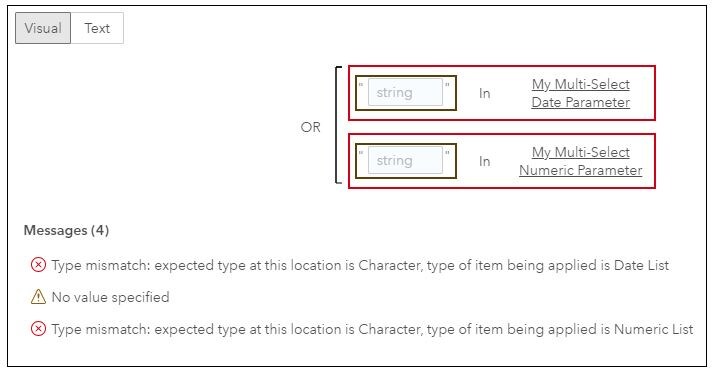
If you select the Text tab, you can enter constant values. The OK button is enabled and you can save the filter.
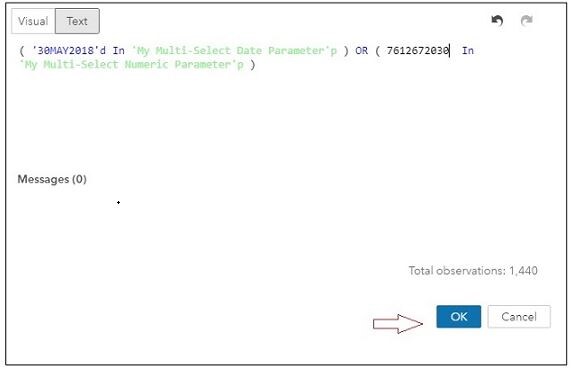
However, because of the problem with the Visual tab, you cannot edit the filter. When you open the filter for editing, the Visual tab is displayed by default. This causes the filter to reset and the errors to reappear in the dialog box. In this case, you must return to the Text tab to make your changes.
Operating System and Release Information
| Product Family | Product | System | Product Release | SAS Release | ||
| Reported | Fixed* | Reported | Fixed* | |||
| SAS System | SAS Visual Analytics | Microsoft® Windows® for x64 | 8.3 | Viya | ||
| Linux for x64 | 8.3 | Viya | ||||
| Type: | Problem Note |
| Priority: | medium |
| Date Modified: | 2019-01-29 14:55:41 |
| Date Created: | 2019-01-25 15:58:26 |