Problem Note 62595: "REPORT CORRUPTED" error for "type:"CustomSort"" appears when opening a SAS® Visual Analytics report in SAS® Report Viewer
 |  |  |  |
When opening a SAS Visual Analytics report in SAS Report Viewer, you might encounter an exception similar to the following:
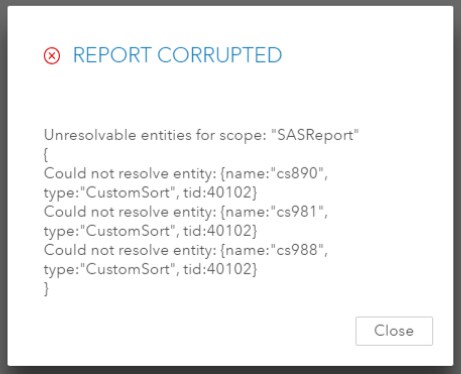
The key part of the error is this text:
"Could not resolve entity: {name:"cs890", type:"CustomSort", tid:40102}"
This error can occur after a geographic data item has been created in the report. When the geographic data item is created, any existing custom sorts are corrupted.
As a workaround, open the report in SAS Visual Analytics and re-create all of the custom sorts in the report.
Operating System and Release Information
| Product Family | Product | System | Product Release | SAS Release | ||
| Reported | Fixed* | Reported | Fixed* | |||
| SAS System | SAS Visual Analytics | Linux for x64 | 8.2 | 8.3 | Viya | Viya |
| SAS System | SAS Report Viewer | Linux for x64 | 8.2 | 8.3 | Viya | Viya |
| Type: | Problem Note |
| Priority: | high |
| Date Modified: | 2020-04-02 08:40:56 |
| Date Created: | 2018-07-11 09:24:52 |