Usage Note 62189: SwitcherUtility.exe might cause errors in SAS® Add-In for Microsoft Office
 |  |  |  |
This SAS Note applies to SAS® Add-In 7.1 for Microsoft Office through SAS® Add-In 8 for Microsoft Office, including both versions and minor releases.
Sometimes you need to use the SwitcherUtility.exe file, which is the executable for the SAS Add-In for Microsoft Office Utility.
However, when you use SwitcherUtility.exe, you might see one of the following pop-up messages.
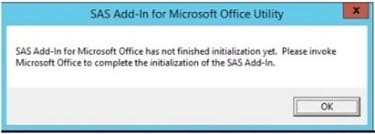
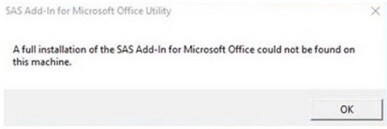
If you encounter either of the above errors, take the following steps.
- Select OK in the pop-up message.
- Close any open Microsoft Office programs, like Excel, Word, or PowerPoint.
- Open and run a command prompt as Administrator. It is very important that you open a command prompt as Administrator. Depending on the version you have, navigate to the 7.1 or 8 folder within the SAS Add-In installation path. Here are examples of paths (your path depends on how the add-in was installed):
C:\Program Files (x86)\SASHOME\x86\SASAddinforMicrosoftOffice\7.1
C:\Program Files\SASHOME\SASAddinforMicrosoftOffice\7.1
C:\Program Files (x86)\SASHOME\x86\SASAddinforMicrosoftOffice\8
C:\Program Files\SASHOME\SASAddinforMicrosoftOffice\8 - Depending on the version you have, when you are in the 7.1 or 8 folder, issue this command:
SwitcherUtility.exe resetall - If errors occur in the command prompt window, take a screenshot of them and contact SAS Technical Support. Otherwise, if there are no errors, go to the next step.
- While you are still in the 7.1 folder, issue this command:
SwitcherUtility.exe installR13 +EXCEL +WORD +POWERPOINT -OUTLOOK
While you are still in the 8 folder, issue this command:
SwitcherUtility.exe installR18 +EXCEL +WORD +POWERPOINT -OUTLOOK - If errors occur in the command prompt window, take a screenshot of them and contact SAS Technical Support.
- If there are no errors, exit the command prompt and open Microsoft Excel. The SAS menu should be available in the program.
Operating System and Release Information
| Product Family | Product | System | Product Release | SAS Release | ||
| Reported | Fixed* | Reported | Fixed* | |||
| SAS System | SAS Add-in for Microsoft Office | Microsoft® Windows® for x64 | 7.1 | 9.4 TS1M2 | ||
| Microsoft Windows 8 Enterprise 32-bit | 7.1 | 9.4 TS1M2 | ||||
| Microsoft Windows 8 Enterprise x64 | 7.1 | 9.4 TS1M2 | ||||
| Microsoft Windows 8 Pro 32-bit | 7.1 | 9.4 TS1M2 | ||||
| Microsoft Windows 8 Pro x64 | 7.1 | 9.4 TS1M2 | ||||
| Microsoft Windows 8.1 Enterprise 32-bit | 7.1 | 9.4 TS1M2 | ||||
| Microsoft Windows 8.1 Enterprise x64 | 7.1 | 9.4 TS1M2 | ||||
| Microsoft Windows 8.1 Pro 32-bit | 7.1 | 9.4 TS1M2 | ||||
| Microsoft Windows 8.1 Pro x64 | 7.1 | 9.4 TS1M2 | ||||
| Microsoft Windows 10 | 7.1 | 9.4 TS1M2 | ||||
| Microsoft Windows Server 2008 | 7.1 | 9.4 TS1M2 | ||||
| Microsoft Windows Server 2008 R2 | 7.1 | 9.4 TS1M2 | ||||
| Microsoft Windows Server 2008 for x64 | 7.1 | 9.4 TS1M2 | ||||
| Microsoft Windows Server 2012 Datacenter | 7.1 | 9.4 TS1M2 | ||||
| Microsoft Windows Server 2012 R2 Datacenter | 7.1 | 9.4 TS1M2 | ||||
| Microsoft Windows Server 2012 R2 Std | 7.1 | 9.4 TS1M2 | ||||
| Microsoft Windows Server 2012 Std | 7.1 | 9.4 TS1M2 | ||||
| Windows 7 Enterprise 32 bit | 7.1 | 9.4 TS1M2 | ||||
| Windows 7 Enterprise x64 | 7.1 | 9.4 TS1M2 | ||||
| Windows 7 Home Premium 32 bit | 7.1 | 9.4 TS1M2 | ||||
| Windows 7 Home Premium x64 | 7.1 | 9.4 TS1M2 | ||||
| Windows 7 Professional 32 bit | 7.1 | 9.4 TS1M2 | ||||
| Windows 7 Professional x64 | 7.1 | 9.4 TS1M2 | ||||
| Windows 7 Ultimate 32 bit | 7.1 | 9.4 TS1M2 | ||||
| Windows 7 Ultimate x64 | 7.1 | 9.4 TS1M2 | ||||
| Type: | Usage Note |
| Priority: |
| Date Modified: | 2018-05-09 09:30:45 |
| Date Created: | 2018-04-24 08:50:53 |