Usage Note 61639: SAS® Visual Analytics automatically imports hidden sheets from Microsoft Excel
When importing a Microsoft Excel spreadsheet, SAS Visual Analytics includes all sheets by default, including hidden sheets. For example, suppose that you have a Microsoft Excel spreadsheet where Sheet2 is hidden. In the Import Microsoft Excel File dialog box, Sheet2 is listed and automatically selected, as shown in the following display:
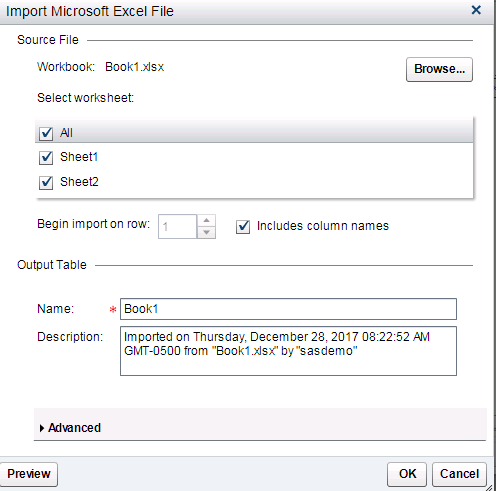
If you do not want to import hidden sheets, you must manually deselect the check boxes for the hidden sheets.
Operating System and Release Information
| SAS System | SAS Visual Analytics | Microsoft® Windows® for x64 | 7.4 | | 9.4 TS1M5 | |
| Linux for x64 | 7.4 | | 9.4 TS1M5 | |
*
For software releases that are not yet generally available, the Fixed
Release is the software release in which the problem is planned to be
fixed.
| Date Modified: | 2018-01-02 14:27:57 |
| Date Created: | 2017-12-28 08:31:09 |


