Installation Note 58431: SAS® Drug Development API Macros - Install and configure
In order to run the API macros from Base SAS® on Windows, the Java API and Macro API clients must be installed and configured.
In these instructions, the Macro API are installed at the following location: "C:\sddapi"
-
Install the Java API
-
Download the corresponding version of the SAS® Drug Development Macro API client.
-
Unzip the content of the SAS Macro API ZIP file to "C:\sddapi\sas"
-
"sas" folder contains:
-
C:\sddapi\sas\conf – contains configuration files
-
C:\sddapi\sas\docs – contains documentation for API Macros
-
C:\sddapi\sas\lib – contains JAR files for SAS API Macros
-
C:\sddapi\sas\sasmacros – contains sas macro files
-
Open sasv9.cfg file located at !sasroot in a text editor.
-
The default !sasroot location for SAS 9.4 is:
-
C:\Program Files\SASHome\SASFoundation\9.4\nls\u8 - if using UTF-8 encoding
-
C:\Program Files\SASHome\SASFoundation\9.4\nls\en - if using LATIN1 encoding
-
Use UTF-8, if possible, as SAS Drug Development uses UTF-8 encoding.
-
For more information about the SAS Configuration File, including specifying system options and creating a customized configuration file, see our Documentation on Files Used by SAS
-
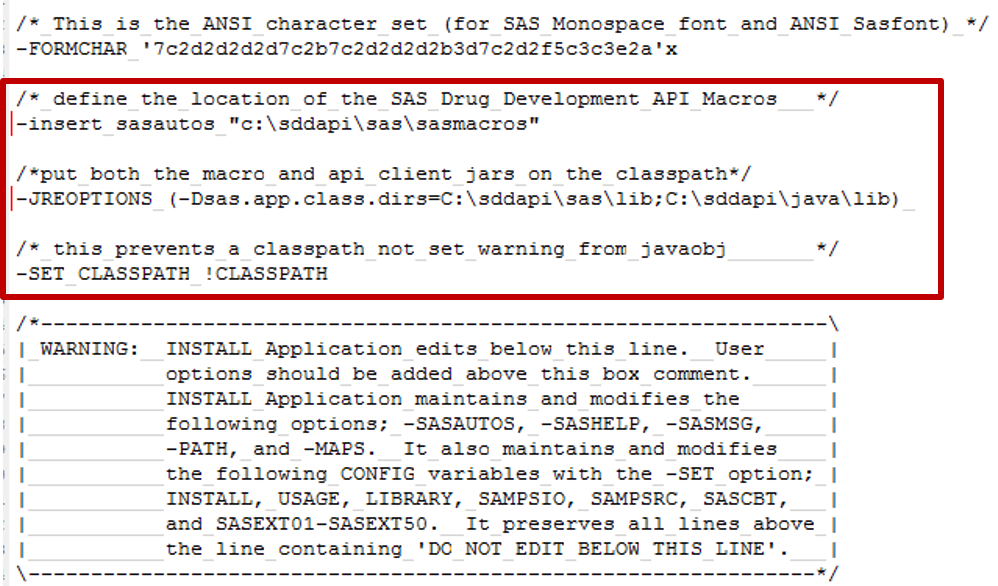
Copy options below and paste immediately before the WARNING section. Change red text to the location that you have installed the Java and Macro APIs.
 /* define the location of the SAS Drug Development API Macros*/
-insert sasautos "C:\sddapi\sas\sasmacros"

 /*put both the macro and api client jars on the classpath*/
-JREOPTIONS=(-Dsas.app.class.dirs=C:\sddapi\sas\lib;C:\sddapi\java\lib)

 /* this prevents a classpath not set warning from javaobj*/
-SET CLASSPATH !CLASSPATH
|
-
Below is a screenshot of where the above options should be pasted.
-
Test that Java API and Macro API are installed correctly by logging in and out.
Operating System and Release Information
| SAS System | SAS Drug Development | Microsoft® Windows® for x64 | | |
| Microsoft Windows 8 Enterprise 32-bit | | |
| Microsoft Windows 8 Enterprise x64 | | |
| Microsoft Windows 8 Pro 32-bit | | |
| Microsoft Windows 8 Pro x64 | | |
| Microsoft Windows 8.1 Enterprise 32-bit | | |
| Microsoft Windows 8.1 Enterprise x64 | | |
| Microsoft Windows 8.1 Pro 32-bit | | |
| Microsoft Windows 8.1 Pro x64 | | |
| Windows 7 Enterprise 32 bit | | |
| Windows 7 Enterprise x64 | | |
| Windows 7 Home Premium 32 bit | | |
| Windows 7 Home Premium x64 | | |
| Windows 7 Professional 32 bit | | |
| Windows 7 Professional x64 | | |
| Windows 7 Ultimate 32 bit | | |
| Windows 7 Ultimate x64 | | |
*
For software releases that are not yet generally available, the Fixed
Release is the software release in which the problem is planned to be
fixed.
| Type: | Installation Note |
| Priority: | medium |
| Date Modified: | 2018-03-26 10:39:34 |
| Date Created: | 2016-06-17 13:20:19 |


