Sample 54675: Using color coding in PROC REPORT output and adding an arrow symbol with user-defined formats
 |  |  |  |  |  |
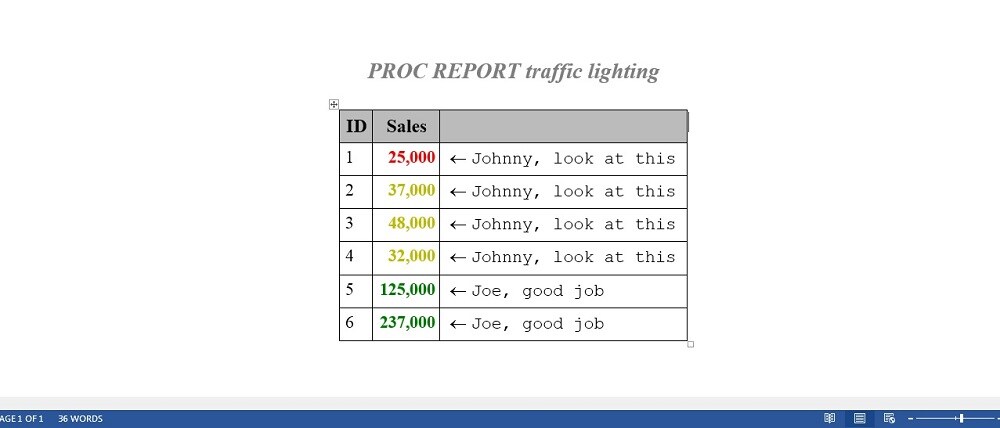
The sample code on the Full Code tab can be used to create a user-defined format to apply color coding to cell values in PROC REPORT output. In a second user-defined format, inline formatting is used to draw an arrow symbol and add text to the adjacent cells.
There are several methods for finding out what symbols are available to you. For Windows 7, you can select Start ► Programs ► Accessories ► System Tools ► Character Map. For the font displayed, you can highlight a symbol and see the Unicode value for that symbol. An example follows of using inline formatting in PROC FORMAT to generate an upside-down smiley face and left arrow symbol in the Wingdings font using the Unicode function.
proc format;
   value testfmt
   low-52000="^S={font_face=Wingdings }^{unicode 4C} ^S={}Action needed"
   52000-high="^S={font_face=Wingdings}^{unicode DF} ^S={} Joe, good job"
   other=' ';
run;
The TESTFMT format can be used in place of the arrow format with the code on the Full Code tab. In addition to running the PROC FORMAT code above, use the TESTFMT format instead of the arrow format in the COMPUTE block as shown below:
compute arrow / char length=100;
   arrow=strip(put(Sales.sum,testfmt.));
endcomp;
These sample files and code examples are provided by SAS Institute Inc. "as is" without warranty of any kind, either express or implied, including but not limited to the implied warranties of merchantability and fitness for a particular purpose. Recipients acknowledge and agree that SAS Institute shall not be liable for any damages whatsoever arising out of their use of this material. In addition, SAS Institute will provide no support for the materials contained herein.
proc format;
   value salefmt low - 25000 = 'red'
               25000 - 52000 = 'dark yellow'
                52000 - high = 'green'
   ;

   value arrow
         low-52000="^S={font_face=symbol}¬ ^S={font_face=arial} Johnny, look at this"
        52000-high="^S={font_face=symbol}¬ ^S={font_face=arial}Joe, good job"
             other=' '
   ;
run;

data test;
   input ID Sales;
   datalines;
1 23000
1  2000
2 37000
3 48000
4 32000
5 125000
6 237000
;
run;

options nonumber nodate;
ods escapechar='^';
ods rtf file='test.rtf';

proc report nowd data=test;
   column ID Sales ARROW;
   define ID / group;
   define Sales / 'Sales' style(column)={font_weight=bold foreground=salefmt.};
   define arrow / computed ' ';
   compute arrow / char length=100;
      arrow=strip(put(Sales.sum,arrow.));
   endcomp;
run;

ods rtf close;
These sample files and code examples are provided by SAS Institute Inc. "as is" without warranty of any kind, either express or implied, including but not limited to the implied warranties of merchantability and fitness for a particular purpose. Recipients acknowledge and agree that SAS Institute shall not be liable for any damages whatsoever arising out of their use of this material. In addition, SAS Institute will provide no support for the materials contained herein.
| Type: | Sample |
| Topic: | Query and Reporting ==> Creating Reports ==> Non Graphical Query and Reporting ==> Creating Reports Query and Reporting ==> Report Distribution Query and Reporting |
| Date Modified: | 2015-02-05 14:55:52 |
| Date Created: | 2014-11-19 14:28:43 |
Operating System and Release Information
| Product Family | Product | Host | SAS Release | |
| Starting | Ending | |||
| SAS System | Base SAS | Solaris for x64 | 9.3 TS1M2 | |
| Linux for x64 | 9.3 TS1M2 | |||
| Linux | 9.3 TS1M2 | |||
| HP-UX IPF | 9.3 TS1M2 | |||
| 64-bit Enabled Solaris | 9.3 TS1M2 | |||
| 64-bit Enabled HP-UX | 9.3 TS1M2 | |||
| 64-bit Enabled AIX | 9.3 TS1M2 | |||
| Windows Vista for x64 | 9.3 TS1M2 | |||
| Windows Vista | 9.3 TS1M2 | |||
| Windows 7 Ultimate x64 | 9.3 TS1M2 | |||
| Windows 7 Ultimate 32 bit | 9.3 TS1M2 | |||
| Windows 7 Professional x64 | 9.3 TS1M2 | |||
| Windows 7 Professional 32 bit | 9.3 TS1M2 | |||
| Windows 7 Home Premium x64 | 9.3 TS1M2 | |||
| Windows 7 Home Premium 32 bit | 9.3 TS1M2 | |||
| Windows 7 Enterprise x64 | 9.3 TS1M2 | |||
| Windows 7 Enterprise 32 bit | 9.3 TS1M2 | |||
| Microsoft Windows XP Professional | 9.3 TS1M2 | |||
| Microsoft Windows Server 2012 Std | 9.3 TS1M2 | |||
| Microsoft Windows Server 2012 R2 Std | 9.3 TS1M2 | |||
| Microsoft Windows Server 2012 R2 Datacenter | 9.3 TS1M2 | |||
| Microsoft Windows Server 2012 Datacenter | 9.3 TS1M2 | |||
| Microsoft Windows Server 2008 for x64 | 9.3 TS1M2 | |||
| Microsoft Windows Server 2008 R2 | 9.3 TS1M2 | |||
| Microsoft Windows Server 2008 | 9.3 TS1M2 | |||
| Microsoft Windows Server 2003 for x64 | 9.3 TS1M2 | |||
| Microsoft Windows Server 2003 Standard Edition | 9.3 TS1M2 | |||
| Microsoft Windows Server 2003 Enterprise Edition | 9.3 TS1M2 | |||
| Microsoft Windows Server 2003 Datacenter Edition | 9.3 TS1M2 | |||
| Microsoft Windows 8.1 Pro 32-bit | 9.3 TS1M2 | |||
| Microsoft Windows 8.1 Pro | 9.3 TS1M2 | |||
| Microsoft Windows 8.1 Enterprise x64 | 9.3 TS1M2 | |||
| Microsoft Windows 8.1 Enterprise 32-bit | 9.3 TS1M2 | |||
| Microsoft Windows 8 Pro x64 | 9.3 TS1M2 | |||
| Microsoft Windows 8 Pro 32-bit | 9.3 TS1M2 | |||
| Microsoft Windows 8 Enterprise x64 | 9.3 TS1M2 | |||
| Microsoft Windows 8 Enterprise 32-bit | 9.3 TS1M2 | |||
| Microsoft® Windows® for x64 | 9.3 TS1M2 | |||
| Z64 | 9.3 TS1M2 | |||
| z/OS | 9.3 TS1M2 | |||