Usage Note 54180: SAS® Data Integration Studio parallel loop job does not indicate failure when an inner loop process fails, unless status handling is defined
 |  |  |  |
A SAS Data Integration Studio loop job, set to run in parallel, spawns a separate SAS session for each iteration of the loop. By default, each session, including the calling job, contains its own job status information, none of which is shared among processes. As a result, the calling program might indicate that the job completed successfully, even though one or more of the spawned processes failed. The only way to force the calling job to indicate failure when a spawned process fails is to set up status handling in the loop transformation.
The following steps indicate how to set up status handling to force the calling program to report an unsuccessful completion as the result of a failed loop process.
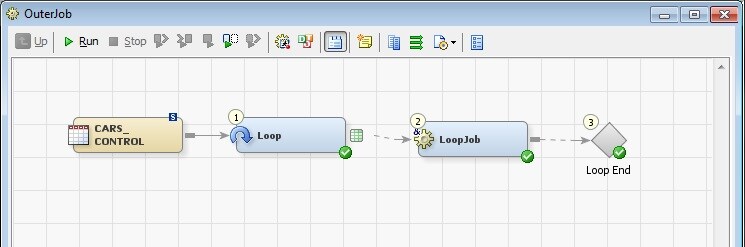
- Open the outer loop job.
- As shown in the image below, open the Loop Properties window and click the Status Handling tab. Click New to add a record to the table and choose one of the three "Abort" actions from the Action column list: Abort All triggers immediate job termination; Abort Remaining terminates the remaining loop processes; and Abort After Loop terminates the loop job after loop processing completes.
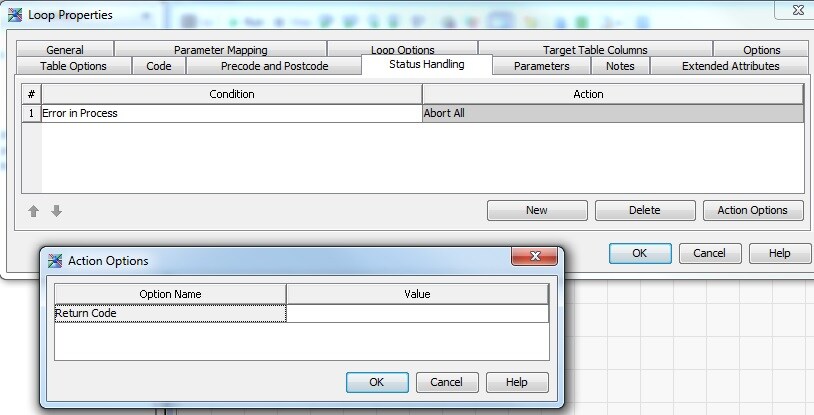
- Selecting Abort All or Abort After Loop brings up the Action Options dialog box, requesting that a value be defined for Return Code.
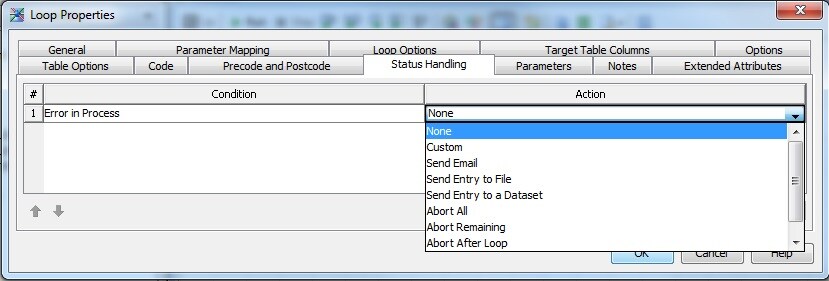
(Selecting any other action does not bring up the Action Options dialog box because a return code is not necessary under these conditions.)
Return Code is the numeric value that is sent back to the host system. Any value of 5 or greater works. Define a value and click OK.
The parallel loop job is now set to abort if any spawned session returns a job error.
Operating System and Release Information
| Product Family | Product | System | SAS Release | |
| Reported | Fixed* | |||
| SAS System | SAS Data Integration Studio | Microsoft® Windows® for x64 | ||
| Microsoft Windows 8 Enterprise 32-bit | ||||
| Microsoft Windows 8 Enterprise x64 | ||||
| Microsoft Windows 8 Pro 32-bit | ||||
| Microsoft Windows 8 Pro x64 | ||||
| Microsoft Windows 8.1 Enterprise 32-bit | ||||
| Microsoft Windows 8.1 Enterprise x64 | ||||
| Microsoft Windows 8.1 Pro | ||||
| Microsoft Windows 8.1 Pro 32-bit | ||||
| Microsoft Windows 95/98 | ||||
| Microsoft Windows 2000 Advanced Server | ||||
| Microsoft Windows 2000 Datacenter Server | ||||
| Microsoft Windows 2000 Server | ||||
| Microsoft Windows 2000 Professional | ||||
| Microsoft Windows NT Workstation | ||||
| Microsoft Windows Server 2003 Datacenter Edition | ||||
| Microsoft Windows Server 2003 Enterprise Edition | ||||
| Microsoft Windows Server 2003 Standard Edition | ||||
| Microsoft Windows Server 2003 for x64 | ||||
| Microsoft Windows Server 2008 | ||||
| Microsoft Windows Server 2008 R2 | ||||
| Microsoft Windows Server 2008 for x64 | ||||
| Microsoft Windows Server 2012 Datacenter | ||||
| Microsoft Windows Server 2012 R2 Datacenter | ||||
| Microsoft Windows Server 2012 R2 Std | ||||
| Microsoft Windows Server 2012 Std | ||||
| Microsoft Windows XP Professional | ||||
| Windows 7 Enterprise 32 bit | ||||
| Windows 7 Enterprise x64 | ||||
| Windows 7 Home Premium 32 bit | ||||
| Windows 7 Home Premium x64 | ||||
| Windows 7 Professional 32 bit | ||||
| Windows 7 Professional x64 | ||||
| Windows 7 Ultimate 32 bit | ||||
| Windows 7 Ultimate x64 | ||||
| Windows Millennium Edition (Me) | ||||
| Windows Vista | ||||
| Windows Vista for x64 | ||||
| Type: | Usage Note |
| Priority: |
| Date Modified: | 2014-10-27 14:57:48 |
| Date Created: | 2014-09-23 11:45:36 |