Usage Note 53340: Using offline mode [the "Disable auto refresh" button] in BI reports
 |  |  |  |
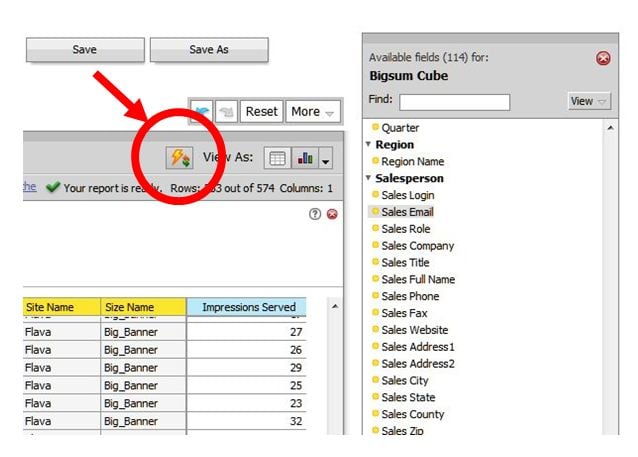
Although the time to calculate the data is essentially the same, this feature can be a timesaver. Prior to building the query, select the "Disable auto-refresh" button; the user can then build the query, select "Refresh Report" and do other tasks as the calculations are performed. This eliminates the need to re-visit the report each time a data calculation is performed when a filter or report column is added.
There is an additional advantage with offline mode for reports with large datasets that may time out in the browser. By selecting the "Disable auto refresh" button the user can build the query without the calculations being performed, save the query, and subsequently email the saved query --- this will bypass browser timeout issues.
On-the-fly data calculation for ad-hoc queries can be re-enabled by selecting the button again.
Operating System and Release Information
| Product Family | Product | System | SAS Release | |
| Reported | Fixed* | |||
| SAS System | SAS Intelligent Advertising for Publishers | N/A | ||
| Type: | Usage Note |
| Priority: |
| Date Modified: | 2014-07-31 10:35:08 |
| Date Created: | 2014-06-30 10:09:38 |