Problem Note 53119: In SAS® Visual Analytics, the option to delete an exploration, a query, or a report might be unavailable
 |  |  |  |
Overview
In SAS Visual Analytics, the option to delete an exploration, a query, or a report might be unavailable to select in the Open dialog box, as shown in the following display.
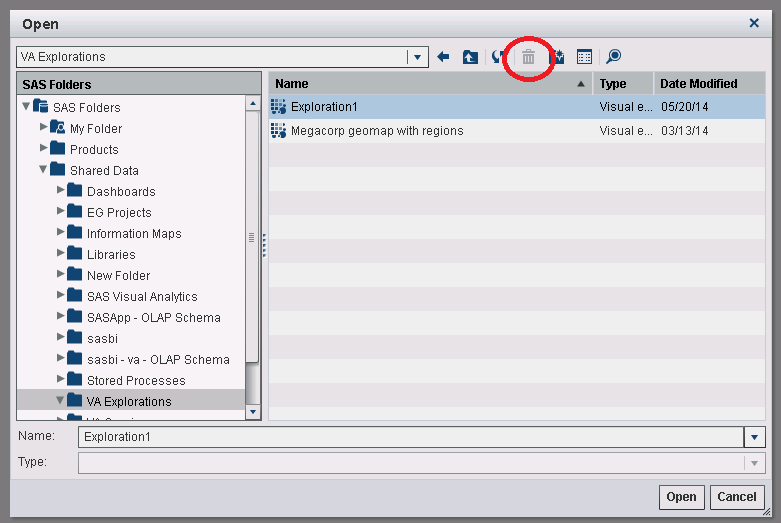
In some cases, SAS® Visual Data Builder might not display any existing queries in the Folder tree in the left pane.
These issues can occur even though you can successfully create explorations, queries, and reports.
There are three possible causes for this problem.
Cause 1: Permissions
This problem can occur if metadata permissions are not correct for the user or the group. There are two permissions to check:
- The user and the group must have WriteMetadata permission on the exploration, query, or report itself.
- The user and the group must have WriteMemberMetadata permission on the folders that contain the exploration, query, or report.
Cause 2: Entries Missing from SAS® Shared Services
If the permissions are correct, then this problem can also occur when the entries for "VisualExploration" and "VisualDataQuery" are missing from the SAS Shared Services database. If this is the problem, then you should be able to delete reports with no issues. However, you might be unable to delete explorations or queries.
In addition to being unable to delete explorations or queries, SAS Visual Data Builder might not display any existing queries in the Folder tree in the left pane.
To verify that the entries for "VisualExploration" and "VisualDataQuery" are missing, submit the following URL in either Mozilla Firefox or Google Chrome.
In the XML output that is displayed, look for VisualDataQuery and VisualExploration. If these entries are missing, then you are encountering second cause of this problem.
Note: If you use Internet Explorer, a blank screen is displayed instead of XML output.
If the entries are missing, contact SAS® Technical Support in order to repair the database.
Cause 3: Visual Analytics Extension for Services Component Is Not Configured
Another possibility is that the Visual Analytics Extension for Services component is not configured in the SAS® Web Infrastructure Platform Server. To confirm if that is the case, check the following location on that server:
<sas-config-dir>\Lev1\Web\WebAppServer\SASServer1_1\sas_webapps\sas.wip.services.war\WEB-INF\lib
If any of the following JAR files are missing from that directory, then the component likely either failed to configure or it was unconfigured:
- sas.bireport.content.client.jar
- sas.bireport.content.server.jar
- sas.bireport.logical.jar
- sas.bireport.logical.nls.jar
- sas.bireport.metadata.jar
- sas.bireport.metadata.nls.jar
Another symptom of this problem is that the Rename and Move options are also missing in SAS® Visual Analytics Designer reports. To correct the problem, you must reconfigure the Visual Analytics Extension for Services component. After the component has been reconfigured successfully, rebuild and redeploy the SAS Web Infrastructure Platform web applications.
Operating System and Release Information
| Product Family | Product | System | Product Release | SAS Release | ||
| Reported | Fixed* | Reported | Fixed* | |||
| SAS System | SAS Visual Analytics | Microsoft® Windows® for x64 | 6.3 | 9.4 TS1M1 | ||
| Linux for x64 | 6.3 | 9.4 TS1M1 | ||||
| Type: | Problem Note |
| Priority: | medium |
| Date Modified: | 2017-10-02 15:27:49 |
| Date Created: | 2014-06-03 14:51:11 |