Usage Note 52273: SAS® Health and Life Sciences Solutions - Flash performance when using Chrome browsers
 |  |  |  |
Using Chrome 22 and above with the Pepper Flash plug-in can result in degraded performance when using and navigating SAS® Drug Development 4 or SAS® Clinical Trials Data Transparency 4.
To see this issue:
- Log on to either application using Chrome
- Navigate to different locations within the application
Expected performance is a smooth and responsive transition between windows within the browser session.
Actual performance is a choppy and slow transition between windows within the browser session.
Google has been tracking this issue. No fix is currently available.
Workaround is to install Adobe Flash and disable Pepper Flash following these instructions:
- Open Chrome
- Navigate to this URL chrome://plugins/
-
Make sure that Adobe Flash is installed under the Flash folder. If not installed, go here and install.
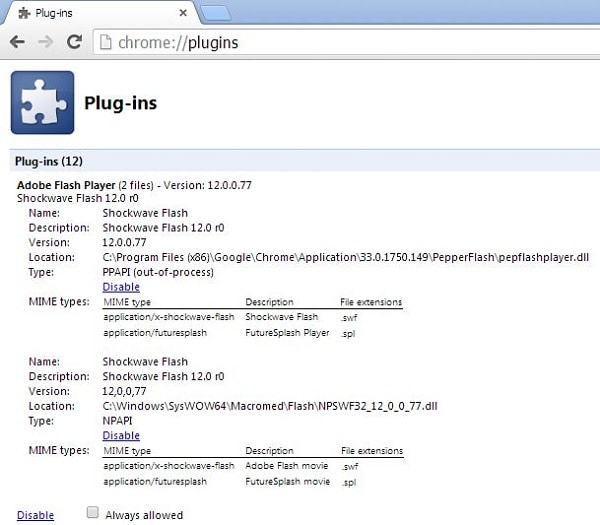
In this Windows 7 example, it is in this folder C:\Windows\SysWOW64\MacroMed\Flash\.
-
Make sure that the pepflashplayer.dll is disabled by selecting the Disable link
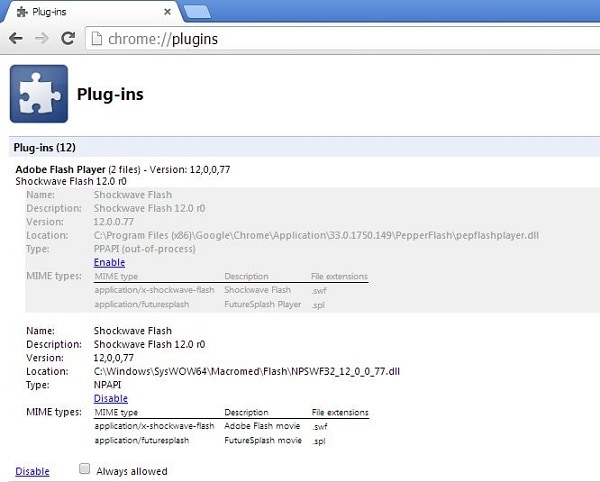
In this Windows 7 example, it is in this folder C:\Program Files (x86)\Chrome\Application\33.0.1750.149\PepperFlash\. It is called pepflashplayer.dll
- Close and reopen browser to make sure plug-in is not being used for the HLS Solution that is being used.
Operating System and Release Information
| Product Family | Product | System | SAS Release | |
| Reported | Fixed* | |||
| SAS System | SAS Drug Development | Microsoft® Windows® for 64-Bit Itanium-based Systems | ||
| Microsoft® Windows® for x64 | ||||
| Microsoft Windows 8 Enterprise x64 | ||||
| Microsoft Windows 8 Pro x64 | ||||
| Microsoft Windows 8.1 Enterprise x64 | ||||
| Microsoft Windows 8.1 Pro | ||||
| Microsoft Windows Server 2008 R2 | ||||
| Windows 7 Enterprise x64 | ||||
| Windows 7 Professional x64 | ||||
| Windows 7 Ultimate x64 | ||||
| Windows Vista for x64 | ||||
| Type: | Usage Note |
| Priority: |
| Date Modified: | 2014-12-05 11:22:05 |
| Date Created: | 2014-02-06 17:33:46 |