Usage Note 51951: Output from the SAS® Customer Intelligence command-line utility (sasciutils.exe) might not render correctly
 |  |  |  |
Output written to the command prompt window by the SAS Customer Intelligence command-line utility (sasciutils.exe) might not be correctly rendered if it contains certain characters (for example, ones that are accented).
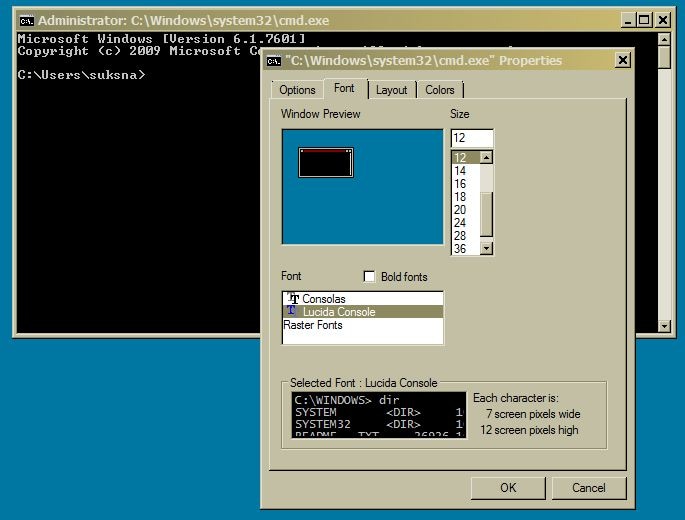
This is not an issue with SAS Customer Intelligence. It is an issue with the font that is used by the Windows command prompt. The output will render correctly if you use the right-mouse button functionality on the title bar of the command window to change the font selection to Lucida Console.
You also need to change the code page that the console is using for displaying fonts to be 1252, which supports the accented characters that are used in some non-English languages. This is done by entering chcp 1252 at the prompt in the command window.
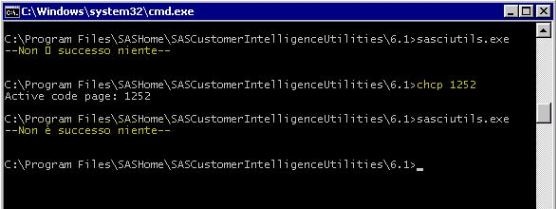
You can make this setting permanent by editing the Windows registry.
Use caution when you are editing the Windows registry. First, back up your Windows registry BEFORE you make any changes.
- Click Start ► Run and type regedit.
- Go to [HKEY_LOCAL_MACHINE\SYSTEM\CurrentControlSet\Control\Nls\CodePage] and change the OEMCP value to 1252.
Operating System and Release Information
| Product Family | Product | System | Product Release | SAS Release | ||
| Reported | Fixed* | Reported | Fixed* | |||
| SAS System | SAS Customer Intelligence Utilities | Windows Vista for x64 | 6.1 | |||
| Windows Vista | 6.1 | |||||
| Windows Millennium Edition (Me) | 6.1 | |||||
| Windows 7 Ultimate x64 | 6.1 | |||||
| Windows 7 Ultimate 32 bit | 6.1 | |||||
| Windows 7 Professional x64 | 6.1 | |||||
| Windows 7 Professional 32 bit | 6.1 | |||||
| Windows 7 Home Premium x64 | 6.1 | |||||
| Windows 7 Home Premium 32 bit | 6.1 | |||||
| Windows 7 Enterprise x64 | 6.1 | |||||
| Windows 7 Enterprise 32 bit | 6.1 | |||||
| Microsoft Windows XP Professional | 6.1 | |||||
| Microsoft Windows Server 2012 Std | 6.1 | |||||
| Microsoft Windows Server 2012 R2 Std | 6.1 | |||||
| Microsoft Windows Server 2012 R2 Datacenter | 6.1 | |||||
| Microsoft Windows Server 2012 Datacenter | 6.1 | |||||
| Microsoft Windows Server 2008 for x64 | 6.1 | |||||
| Microsoft Windows Server 2008 R2 | 6.1 | |||||
| Microsoft Windows Server 2008 | 6.1 | |||||
| Microsoft Windows Server 2003 for x64 | 6.1 | |||||
| Microsoft Windows Server 2003 Standard Edition | 6.1 | |||||
| Microsoft Windows Server 2003 Enterprise Edition | 6.1 | |||||
| Microsoft Windows Server 2003 Datacenter Edition | 6.1 | |||||
| Microsoft Windows NT Workstation | 6.1 | |||||
| Microsoft Windows 2000 Professional | 6.1 | |||||
| Microsoft Windows 2000 Server | 6.1 | |||||
| Microsoft Windows 2000 Datacenter Server | 6.1 | |||||
| Microsoft Windows 2000 Advanced Server | 6.1 | |||||
| Microsoft Windows 95/98 | 6.1 | |||||
| Microsoft Windows 8.1 Pro 32-bit | 6.1 | |||||
| Microsoft Windows 8.1 Pro | 6.1 | |||||
| Microsoft Windows 8.1 Enterprise x64 | 6.1 | |||||
| Microsoft Windows 8.1 Enterprise 32-bit | 6.1 | |||||
| Microsoft Windows 8 Pro x64 | 6.1 | |||||
| Microsoft Windows 8 Pro 32-bit | 6.1 | |||||
| Microsoft Windows 8 Enterprise x64 | 6.1 | |||||
| Microsoft Windows 8 Enterprise 32-bit | 6.1 | |||||
| Microsoft® Windows® for x64 | 6.1 | |||||
| Type: | Usage Note |
| Priority: |
| Date Modified: | 2014-03-20 15:19:47 |
| Date Created: | 2014-01-02 14:51:26 |