Problem Note 51323: "Unable to delete the metadata object(s)" is returned when you upgrade to SAS® Real-Time Decision Manager 6.1
 |  |  |  |
When you upgrade to SAS Real-Time Decision Manager 6.1, you might receive the following errors:
- The SAS® Decision Services Design Mid-Tier fails.

The text of the error text is as follows:
The following problem was encoutered while configuring SAS Decision Services Monitor:

Unable to delete the metadata object(s): SASHOME/SASDecisionServicesDesignMidTier/
5.6/Config/Deployment/Metadata/policydesign_RealTimeDecisionDesignServer.xml.orig:
... WARNING:No objects of type ServerComponent were found using the search criteria:
@Name='SASDSDesignServer ...'

Configuration script:

SASHOME/SASDecisionServicesDesignMidTier/5.6/Config/policydesign_config.xml

For More information please see the log file:
configuration-directory/Lev1/Logs/Configure/policydesign_updateConfigure_time-stamp.log
...
Would you like to continue with the remaining configuration steps?
To work around this issue, click Yes to continue in the SAS® Software Deployment Wizard.
- The SAS Decision Services Monitor fails because the database already exists.
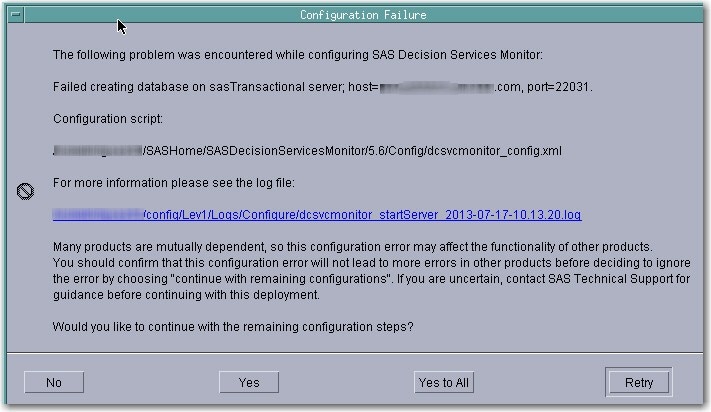
The text of the error is as follows:
Click Yes to continue because the database already exists.The following problem was encoutered while configuring SAS Decision Services Monitor: Failed creating database on sasTransactional server; host=your-host, port=your-port. Configuration script: SASHOME/SASDecisionServicesMonitor/5.6/Config/dcsvcmonitor_config.xml For more information please see the log file: configuration-directory/Lev1/Logs/Configure/dcsvcmonitor_startServer_time-stamp.log ... Would you like to continue with the remaining configuration steps?
- After the UIP is completed, the following issues might also occur:
- The engine server diagnostics for the following resources fail to connect:
- $SAS_Activity_Resource
- $Audit_Log_JDBCConnectionResource
- $User_Log_JDBCConnectionResource
- GeneralIO_Activity_Resource
To work around this issue, use SAS® Management Console to correct the system resources in the Engine and Design repository. Navigate to the Engine and Design repository and verify that the DSN connections are correct.
- The passwords for the following resources in the engine repository are missing:
- $SAS_Activity_Resource
- $Audit_Log_JDBCConnectionResource
- $User_Log_JDBCConnectionResource
- GeneralIO_Activity_Resource
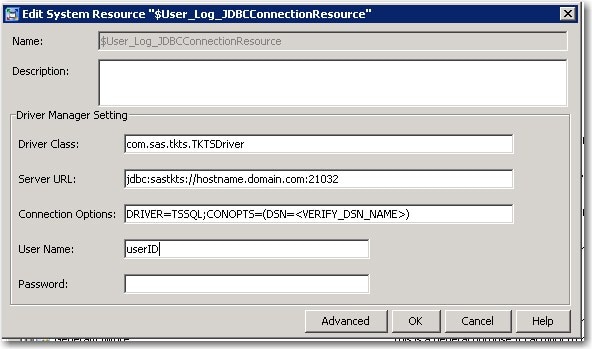
To work around this issue, use SAS Management Console to enter the passwords for the SAS® Federation Server administrator in the system resources in the Engine repository. Navigate to the Engine repository and correct the passwords for the system resources.
- The engine server diagnostics for the following resources fail to connect:
Operating System and Release Information
| Product Family | Product | System | Product Release | SAS Release | ||
| Reported | Fixed* | Reported | Fixed* | |||
| SAS System | SAS Real-Time Decision Manager | Microsoft® Windows® for x64 | 6.1 | 6.3 | 9.2 TS2M0 | |
| Microsoft Windows Server 2003 Datacenter Edition | 6.1 | 6.3 | 9.2 TS2M0 | |||
| Microsoft Windows Server 2003 Enterprise Edition | 6.1 | 6.3 | 9.2 TS2M0 | |||
| Microsoft Windows Server 2003 Standard Edition | 6.1 | 6.3 | 9.2 TS2M0 | |||
| Microsoft Windows Server 2003 for x64 | 6.1 | 6.3 | 9.2 TS2M0 | |||
| Microsoft Windows Server 2008 R2 | 6.1 | 6.3 | 9.2 TS2M0 | |||
| Microsoft Windows Server 2008 for x64 | 6.1 | 6.3 | 9.2 TS2M0 | |||
| Microsoft Windows XP Professional | 6.1 | 6.3 | 9.2 TS2M0 | |||
| Windows Vista | 6.1 | 6.3 | 9.2 TS2M0 | |||
| Windows Vista for x64 | 6.1 | 6.3 | 9.2 TS2M0 | |||
| 64-bit Enabled AIX | 6.1 | 6.3 | 9.2 TS2M0 | |||
| 64-bit Enabled Solaris | 6.1 | 6.3 | 9.2 TS2M0 | |||
| HP-UX IPF | 6.1 | 6.3 | 9.2 TS2M0 | |||
| Linux for x64 | 6.1 | 6.3 | 9.2 TS2M0 | |||
| Solaris for x64 | 6.1 | 6.3 | 9.2 TS2M0 | |||
| Type: | Problem Note |
| Priority: | alert |
| Date Modified: | 2013-10-15 12:28:43 |
| Date Created: | 2013-10-11 07:41:35 |