Usage Note 50292: Install Shield -5004 errors occur when you install the SAS® PC Files Server
 |  |  |  |
When installing the SAS PC Files Server, you might receive -5004 errors similar to that shown in the image below:
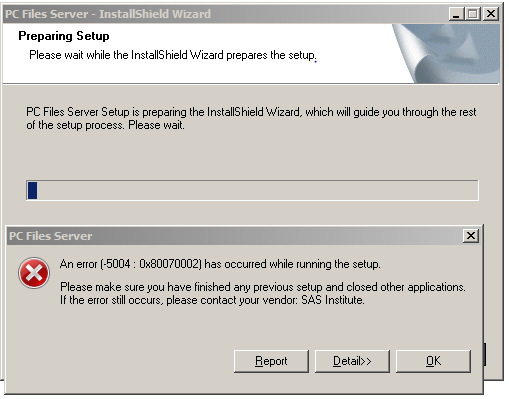
The problem occurs when the Install Shield folder on the Windows machine is corrupted. You can typically find the Install Shield folder at this location:
*
For software releases that are not yet generally available, the Fixed
Release is the software release in which the problem is planned to be
fixed.
The problem occurs when the Install Shield folder on the Windows machine is corrupted. You can typically find the Install Shield folder at this location:
C:\Program Files (x86)\Common Files\InstallShield
To resolve the problem, rename the Install Shield folder to the following and restart the installation:
C:\Program Files (x86)\Common Files\old.InstallShield
A new InstallShield folder is created by the installation process.
Operating System and Release Information
| Product Family | Product | System | Product Release | SAS Release | ||
| Reported | Fixed* | Reported | Fixed* | |||
| SAS System | SAS/ACCESS Interface to PC Files | Microsoft® Windows® for 64-Bit Itanium-based Systems | 9.21_M2 | |||
| Microsoft Windows Server 2003 Datacenter 64-bit Edition | 9.21_M2 | |||||
| Microsoft Windows Server 2003 Enterprise 64-bit Edition | 9.21_M2 | |||||
| Microsoft Windows XP 64-bit Edition | 9.21_M2 | |||||
| Microsoft® Windows® for x64 | 9.21_M2 | |||||
| Microsoft Windows 8 Ent | 9.21_M2 | |||||
| Microsoft Windows 8 Pro | 9.21_M2 | |||||
| Microsoft Windows 95/98 | 9.21_M2 | |||||
| Microsoft Windows 2000 Advanced Server | 9.21_M2 | |||||
| Microsoft Windows 2000 Datacenter Server | 9.21_M2 | |||||
| Microsoft Windows 2000 Server | 9.21_M2 | |||||
| Microsoft Windows 2000 Professional | 9.21_M2 | |||||
| Microsoft Windows NT Workstation | 9.21_M2 | |||||
| Microsoft Windows Server 2003 Datacenter Edition | 9.21_M2 | |||||
| Microsoft Windows Server 2003 Enterprise Edition | 9.21_M2 | |||||
| Microsoft Windows Server 2003 Standard Edition | 9.21_M2 | |||||
| Microsoft Windows Server 2003 for x64 | 9.21_M2 | |||||
| Microsoft Windows Server 2008 | 9.21_M2 | |||||
| Microsoft Windows Server 2008 R2 for x64 | 9.21_M2 | |||||
| Microsoft Windows Server 2008 for x64 | 9.21_M2 | |||||
| Microsoft Windows Server 2012 Datacenter | 9.21_M2 | |||||
| Microsoft Windows Server 2012 Std | 9.21_M2 | |||||
| Microsoft Windows XP Professional | 9.21_M2 | |||||
| Windows 7 Enterprise 32 bit | 9.21_M2 | |||||
| Windows 7 Enterprise x64 | 9.21_M2 | |||||
| Windows 7 Home Premium 32 bit | 9.21_M2 | |||||
| Windows 7 Home Premium x64 | 9.21_M2 | |||||
| Windows 7 Professional 32 bit | 9.21_M2 | |||||
| Windows 7 Professional x64 | 9.21_M2 | |||||
| Windows 7 Ultimate 32 bit | 9.21_M2 | |||||
| Windows 7 Ultimate x64 | 9.21_M2 | |||||
| Windows Millennium Edition (Me) | 9.21_M2 | |||||
| Windows Vista | 9.21_M2 | |||||
| Windows Vista for x64 | 9.21_M2 | |||||
When installing the SAS PC Files Server, you might receive Install Shield -5004 errors. This can mean there is a corrupted Install Shield folder. To resolve the problem, rename the old Install Shield folder and restart the installation to create a new folder.
| Type: | Usage Note |
| Priority: |
| Date Modified: | 2013-08-12 17:13:31 |
| Date Created: | 2013-06-28 12:46:06 |