Usage Note 45644: Opening an information map into a PivotTable using the SAS® Add-In for Microsoft Office might not show expected values for summarized fields
 |  |  |  |
When opening results from an information map query into a PivotTable in Excel, you might see unexpected values for summarized fields because, by default, information map queries are aggregated. The aggregations are performed on the SAS server, and then the aggregated values are passed to Excel. This design means that the size of the workbook is smaller; however, this design also means that Excel is not aware of the underlying data that is used to generate the aggregations.
Using an information map based on the SASHELP.CLASS table as an example, if you include the aggregated values of Age in a PivotTable and include only the Gender category (which is not unique), you see the results shown in Figure 1.
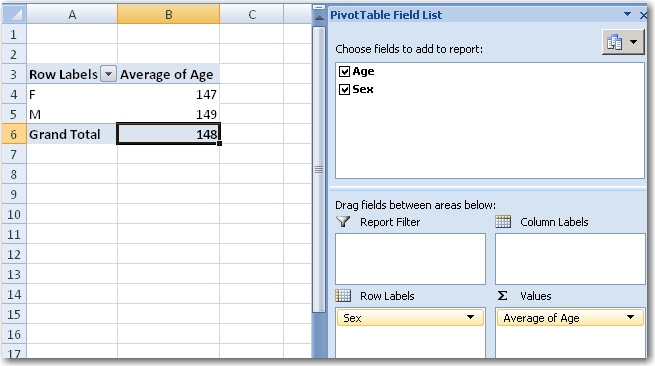
Figure 1. The average is calculated based on the aggregated data sent to Excel from the SAS server.
In order to see an average that takes the underlying data into consideration, you have two options, depending on your data source:
- Click in the PivotTable, and select Filter & Sort in the Selection group on the SAS tab to open the Open Information Map dialog box.
- Do one of the following:
- Deselect the Display aggregated values (group by category) option.
- If possible, select a unique category data item to include in the report. In this example, Name is a unique category. Your ability to use this option depends on whether your data includes a unique category.
- Click OK.
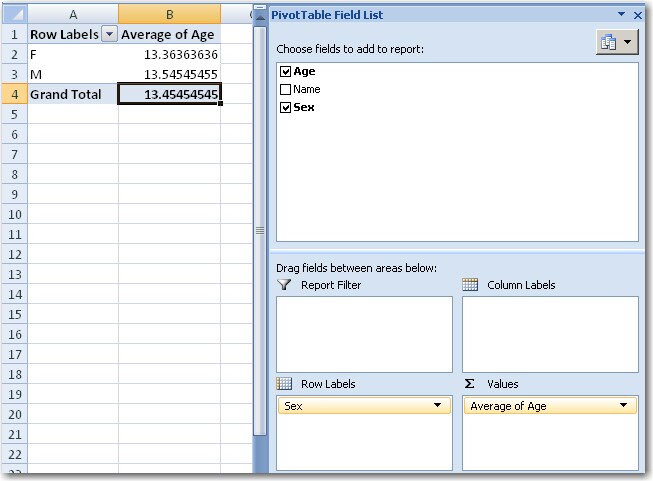
Figure 2. With a unique category data item (Name) included in the report, Excel can use all of the underlying data to calculate the average.
Operating System and Release Information
| Product Family | Product | System | Product Release | SAS Release | ||
| Reported | Fixed* | Reported | Fixed* | |||
| SAS System | SAS Add-in for Microsoft Office | Microsoft® Windows® for x64 | 4.2 | 9.2 TS2M0 | ||
| Microsoft Windows Server 2003 Datacenter Edition | 4.2 | 9.2 TS2M0 | ||||
| Microsoft Windows Server 2003 Enterprise Edition | 4.2 | 9.2 TS2M0 | ||||
| Microsoft Windows Server 2003 Standard Edition | 4.2 | 9.2 TS2M0 | ||||
| Microsoft Windows Server 2003 for x64 | 4.2 | 9.2 TS2M0 | ||||
| Microsoft Windows Server 2008 for x64 | 4.2 | 9.2 TS2M0 | ||||
| Microsoft Windows XP Professional | 4.2 | 9.2 TS2M0 | ||||
| Windows Vista | 4.2 | 9.2 TS2M0 | ||||
| Windows Vista for x64 | 4.2 | 9.2 TS2M0 | ||||
| Type: | Usage Note |
| Priority: |
| Date Modified: | 2012-02-13 13:22:12 |
| Date Created: | 2012-02-13 13:06:06 |