Usage Note 45339: Plot and compare ROC curves from logistic models fit to independent samples
 |  |  |  |
ROC curves from models fit to two or more independent groups of observations are not dependent and therefore cannot be compared using the ROC and ROCCONTRAST statements in PROC LOGISTIC. Those statements compare dependent curves, such as when comparing competing models fit to the same set of observations. For an example of comparing dependent ROC curves, see "Comparing Receiver Operating Characteristic Curves" in the Examples section of the LOGISTIC documentation.
Gönen (2007) presents the following large-sample test to compare the areas under two independent ROC curves:
ChiSq = (AUC1 - AUC2)2 / (s12 + s22) ,
where AUC1 and AUC2 are the areas under the two independent ROC curves, and s1 and s2 are their respective standard errors. The statistic, ChiSq, is distributed as chi-square with one degree of freedom. A p-value can be obtained using the PROBCHI function in the DATA step. Specify the ROCCI option Note1 in the MODEL statement in PROC LOGISTIC to display the areas and standard errors needed to compute the above statistic.
The following example illustrates plotting and comparing independent ROC curves from models that are separately fitted to independent samples. A similar case is comparing the performance of a single model that is fit to one data set and then used to score several other independent samples. See this note for an example of that situation.
Example
The following uses the data in the example titled "Binomial Counts in Randomized Blocks" in the GLIMMIX documentation. Researchers studied 16 varieties (entries) of wheat for their resistance to infestation by the Hessian fly. The data give the number of damaged plants, Y, out of a total number of plants, n, in each of four blocks which are assumed to be independent.
      data HessianFly;
        label Y = 'No. of damaged plants'
              n = 'No. of plants';
        input block entry lat lng n Y @@;
        datalines;
        1 14 1 1  8 2    1 16 1 2  9 1
        1  7 1 3 13 9    1  6 1 4  9 9
        1 13 2 1  9 2    1 15 2 2 14 7
        1  8 2 3  8 6    1  5 2 4 11 8
        1 11 3 1 12 7    1 12 3 2 11 8
        1  2 3 3 10 8    1  3 3 4 12 5
        1 10 4 1  9 7    1  9 4 2 15 8
        1  4 4 3 19 6    1  1 4 4  8 7
        2 15 5 1 15 6    2  3 5 2 11 9
        2 10 5 3 12 5    2  2 5 4  9 9
        2 11 6 1 20 10   2  7 6 2 10 8
        2 14 6 3 12 4    2  6 6 4 10 7
        2  5 7 1  8 8    2 13 7 2  6 0
        2 12 7 3  9 2    2 16 7 4  9 0
        2  9 8 1 14 9    2  1 8 2 13 12
        2  8 8 3 12 3    2  4 8 4 14 7
        3  7 1 5  7 7    3 13 1 6  7 0
        3  8 1 7 13 3    3 14 1 8  9 0
        3  4 2 5 15 11   3 10 2 6  9 7
        3  3 2 7 15 11   3  9 2 8 13 5
        3  6 3 5 16 9    3  1 3 6  8 8
        3 15 3 7  7 0    3 12 3 8 12 8
        3 11 4 5  8 1    3 16 4 6 15 1
        3  5 4 7 12 7    3  2 4 8 16 12
        4  9 5 5 15 8    4  4 5 6 10 6
        4 12 5 7 13 5    4  1 5 8 15 9
        4 15 6 5 17 6    4  6 6 6  8 2
        4 14 6 7 12 5    4  7 6 8 15 8
        4 13 7 5 13 2    4  8 7 6 13 9
        4  3 7 7  9 9    4 10 7 8  6 6
        4  2 8 5 12 8    4 11 8 6  9 7
        4  5 8 7 11 10   4 16 8 8 15 7
      ;
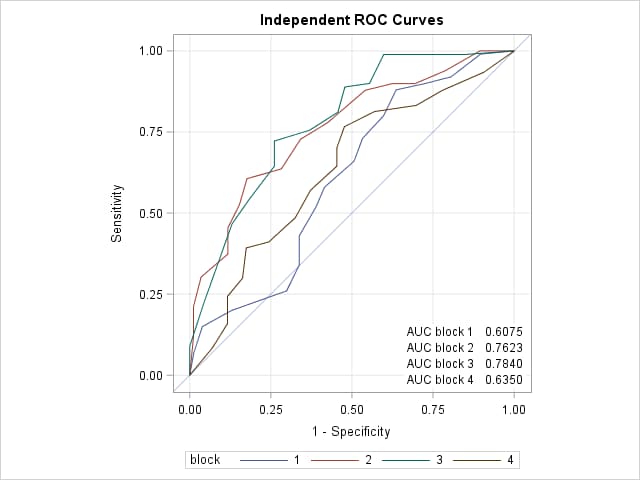
In the following PROC LOGISTIC step, the BY statement requests that the specified model be separately fit to the data in each block. The ROCCI option plots the ROC curves and displays the estimated AUCs and their standard errors. The OUTROC= option saves the ROC plot data in data set ROC. The ODS OUTPUT statement saves the ROC statistics in data set AUC.
      proc logistic data=HessianFly;
        by block;
        model y/n = entry / rocci outroc=ROC;
        ods output ROCassociation=AUC;
        run;
The ROC statistics for the separate fits are shown below.
|
block=1
block=2
block=3
block=4
|
||||||||||||||||||||||||||||||||||||||||||||||||||||||||||||||||||||||||||||||||||||||||||||||||||||||||||||||||
These next statements create a comparative plot which overlays the ROC curves. The two DATA steps add the (0,0) points to the curves since these points are omitted in the OUTROC= data sets. The PROC SQL step copies the AUC values into macro variables (AUC1-AUC4) to be used in PROC SGPLOT for display along with the ROC curves. The ASPECT=1 option in the PROC SGPLOT statement creates a square plot as appropriate for an ROC plot which ranges from zero to one on both axes Note2.
      data Zero;
        do block=1 to 4;
          _1mspec_=0; _sensit_=0; output;
        end;
        run;
      data FourPlots;
        set Zero ROC;
        by block;
        run;
      proc sql noprint;
        select distinct(Area)
        into :auc1 - :auc4
        from AUC
        order by block;
        quit;
      proc sgplot data=FourPlots aspect=1;
        xaxis values=(0 to 1 by 0.25) grid offsetmin=.05 offsetmax=.05;
        yaxis values=(0 to 1 by 0.25) grid offsetmin=.05 offsetmax=.05;
        lineparm x=0 y=0 slope=1 / transparency=.7;
        series x=_1mspec_ y=_sensit_ / group=block;
        inset ("AUC block 1" = "&auc1"
               "AUC block 2" = "&auc2"
               "AUC block 3" = "&auc3"
               "AUC block 4" = "&auc4") / opaque position=bottomright;
        title "Independent ROC Curves";
        run;
 |
These statements read the ROC statistics in the AUC data set and compute pairwise tests comparing the areas under the ROC curves.
      proc sql noprint;
        create table Pairs as select
          a1.block  as block1, a2.block  as block2,
          a1.area   as AUC1,   a2.area   as AUC2,
          a1.stderr as s1,     a2.stderr as s2,
          (auc1 - auc2)**2/(s1**2 + s2**2) as ChiSq,
          1-probchi(calculated ChiSq,1) as Prob
        from AUC as a1, auc as a2
        where block1 ^= block2;
        quit;
      proc print data=Pairs;
        id block1 block2;
        var AUC1 AUC2 Chisq Prob;
        format Prob pvalue6.;
        title "Pairwise comparison of independent ROC curves";
        run;
The results of the pairwise tests appear below.
|
Note 1: Prior to SAS® 9.4 TS1M3, specify the ROC statement instead of the ROCCI option.
roc;
Note 2: Prior to SAS® 9.4, a square plot can be created by specifying a statement like the following prior to PROC SGPLOT. This statement produces a square plot that has 480 pixels on each side.
ods graphics / height=480px width=480px;
Operating System and Release Information
| Product Family | Product | System | SAS Release | |
| Reported | Fixed* | |||
| SAS System | SAS/STAT | z/OS | ||
| OpenVMS VAX | ||||
| Microsoft® Windows® for 64-Bit Itanium-based Systems | ||||
| Microsoft Windows Server 2003 Datacenter 64-bit Edition | ||||
| Microsoft Windows Server 2003 Enterprise 64-bit Edition | ||||
| Microsoft Windows XP 64-bit Edition | ||||
| Microsoft® Windows® for x64 | ||||
| OS/2 | ||||
| Microsoft Windows 95/98 | ||||
| Microsoft Windows 2000 Advanced Server | ||||
| Microsoft Windows 2000 Datacenter Server | ||||
| Microsoft Windows 2000 Server | ||||
| Microsoft Windows 2000 Professional | ||||
| Microsoft Windows NT Workstation | ||||
| Microsoft Windows Server 2003 Datacenter Edition | ||||
| Microsoft Windows Server 2003 Enterprise Edition | ||||
| Microsoft Windows Server 2003 Standard Edition | ||||
| Microsoft Windows Server 2003 for x64 | ||||
| Microsoft Windows Server 2008 | ||||
| Microsoft Windows Server 2008 for x64 | ||||
| Microsoft Windows XP Professional | ||||
| Windows 7 Enterprise 32 bit | ||||
| Windows 7 Enterprise x64 | ||||
| Windows 7 Home Premium 32 bit | ||||
| Windows 7 Home Premium x64 | ||||
| Windows 7 Professional 32 bit | ||||
| Windows 7 Professional x64 | ||||
| Windows 7 Ultimate 32 bit | ||||
| Windows 7 Ultimate x64 | ||||
| Windows Millennium Edition (Me) | ||||
| Windows Vista | ||||
| Windows Vista for x64 | ||||
| 64-bit Enabled AIX | ||||
| 64-bit Enabled HP-UX | ||||
| 64-bit Enabled Solaris | ||||
| ABI+ for Intel Architecture | ||||
| AIX | ||||
| HP-UX | ||||
| HP-UX IPF | ||||
| IRIX | ||||
| Linux | ||||
| Linux for x64 | ||||
| Linux on Itanium | ||||
| OpenVMS Alpha | ||||
| OpenVMS on HP Integrity | ||||
| Solaris | ||||
| Solaris for x64 | ||||
| Tru64 UNIX | ||||
| Type: | Usage Note |
| Priority: | |
| Topic: | Analytics ==> Regression Analytics ==> Categorical Data Analysis SAS Reference ==> Procedures ==> LOGISTIC Analytics ==> Statistical Graphics |
| Date Modified: | 2020-05-12 12:30:29 |
| Date Created: | 2012-01-09 16:41:35 |