Usage Note 45276: SAS® Drug Development 3.5 - Diagnosing issues with Java
 |  |  |  |
Starting the Java Control Panel
For Windows XP, Select Start, Settings, Control Panel, and Java.
For Windows 7, Select Start, Control Panel, and Java.
Identifying enabled Java versions in the Java Control Panel
Select the Java tab within the Java Control Panel application and the View button. As shown below:
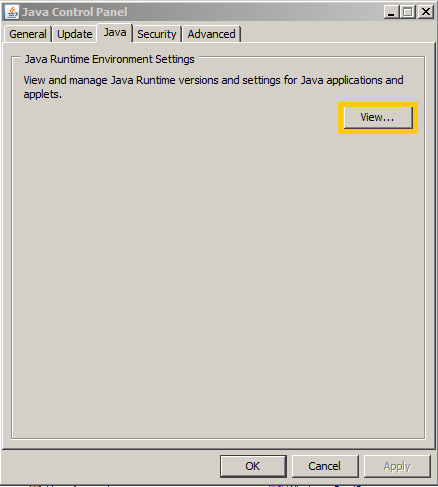
Enabled Java versions are selected with a check mark for the version numbers that are enabled in the Product column.
SAS Drug Development Versions with supported Operating Systems, Browsers, and Java Runtime Environments
Make sure that the Java version for this end user's version SAS Drug Development is enabled:
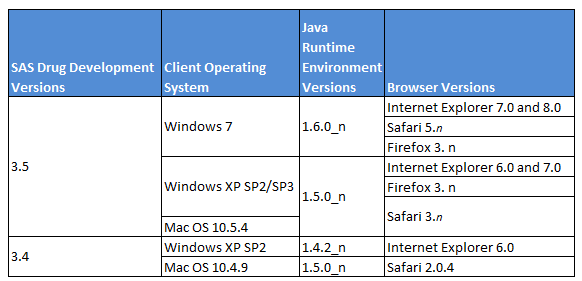
Consider the following for an end user experiencing problems with Java:
- SDD 3.4 was not tested against Java versions 1.6.0_XX
- Java versions 1.5.0_16, 1.6.0_14, 1.6.0_23, 1.6.0_24, and 1.6.0_25 are not compatible with SDD 3.X
- Internet Explorer 8 and Java 1.4_XX versions do not work for SDD 3.4 Tools
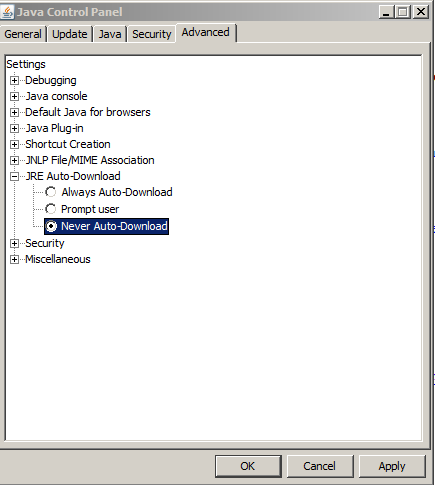
Changing the JRE Auto-Download feature
JRE Auto-Download feature might need to be disabled based for a specific combination of browser and Java version needed to run SDD 3.X. To disable the JRE Auto-Download feature, go to the Advanced tab in the Java Control Panel, expand the JRE Auto-Download tree and select Never Auto-Download as shown below:
Enabling Java Console in the Java Control Panel
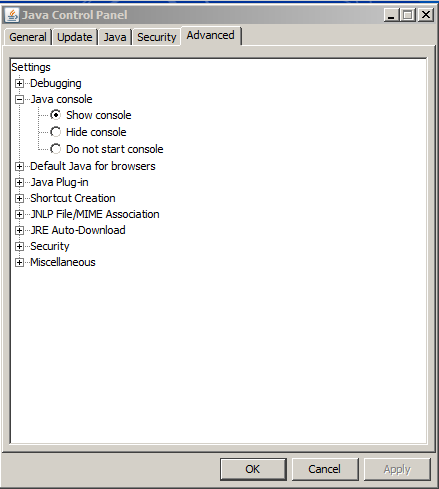
Select the Advanced tab and expand the Java console the default value is "Do not start console" as shown below.
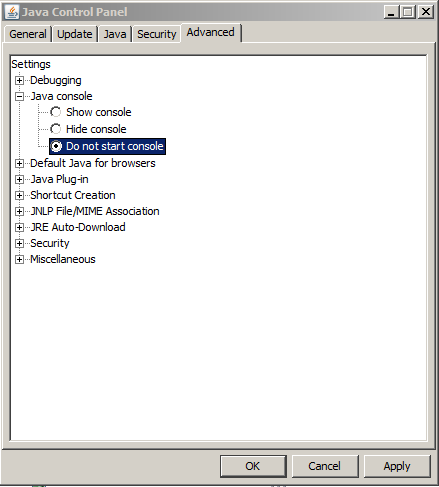
Select "Show console" and Apply or OK as shown below.
The next time the Process Editor or some other SDD application is opened the following appears:
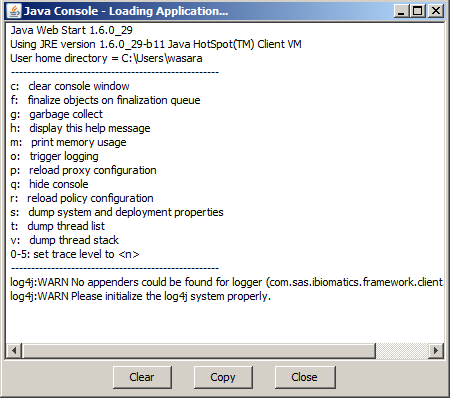
The Java console starts when the end user uses a SAS Drug Development Tool.
To copy the information from the console select the Copy button. This information can be pasted to an e-mail and sent to the appropriate support group.
Java Errors, Exceptions, and .NET Documentation
The following links have information about Java Errors and Exceptions useful in diagnosing issues with Java applets and connectivity to SAS Drug Development.
For JRE versions 1.4.2:
- For Java Errors use: http://docs.oracle.com/javase/1.4.2/docs/api/java/lang/Error.html
- For Java Exceptions use: http://docs.oracle.com/javase/1.4.2/docs/api/java/lang/Exception.html
- For Java.NET Exceptions use: http://docs.oracle.com/javase/1.4.2/docs/api/java/lang/class-use/Exception.html#java.net
For JRE versions 1.5.0:
- For Java Errors use: http://docs.oracle.com/javase/1.5.0/docs/api/java/lang/Error.html
- For Java Exceptions use: http://docs.oracle.com/javase/1.5.0/docs/api/java/lang/Exception.html
- For Java.NET Exceptions use: http://docs.oracle.com/javase/1.5.0/docs/api/java/lang/class-use/Exception.html#java.net
For JRE versions 1.6.0:
- For Java Errors use: http://docs.oracle.com/javase/6/docs/api/java/lang/Error.html
- For Java Exceptions use: http://docs.oracle.com/javase/6/docs/api/java/lang/Exception.html
- For Java.NET Exceptions use: http://docs.oracle.com/javase/6/docs/api/java/lang/class-use/Exception.html#java.net
Operating System and Release Information
| Product Family | Product | System | SAS Release | |
| Reported | Fixed* | |||
| SAS System | SAS Drug Development - SAS Hosted Edition | Microsoft Windows XP 64-bit Edition | ||
| Microsoft® Windows® for x64 | ||||
| Microsoft Windows XP Professional | ||||
| Windows 7 Enterprise 32 bit | ||||
| Windows 7 Enterprise x64 | ||||
| Windows 7 Professional 32 bit | ||||
| Windows 7 Professional x64 | ||||
| Windows 7 Ultimate 32 bit | ||||
| Windows 7 Ultimate x64 | ||||
| Windows Millennium Edition (Me) | ||||
| Windows Vista | ||||
| Windows Vista for x64 | ||||
| Type: | Usage Note |
| Priority: |
| Date Modified: | 2012-01-10 12:17:56 |
| Date Created: | 2012-01-03 17:43:15 |