Usage Note 45215: Create identical parameter estimates in PROC GENMOD and in the SAS® Enterprise Miner(tm) Ratemaking node
 |  |  |  |
The Ratemaking node in SAS Enterprise Miner efficiently builds a selected group of generalized linear models (GLMs) that are useful in developing insurance rating plans. The node calls the HPG procedure for the modeling tasks. In order to maximize performance, PROC HPG uses only the Reference parameterization method and makes these assumptions:
- all predictors are nominal variables
- all nominal values are consecutive nonnegative integers starting from zero and ending with the largest observed value
In practice, most (if not all) rating variables are nominal. However, their values are not necessarily consecutive nonnegative integers starting from zero. Therefore, the Ratemaking node first pre-processes the data by recoding levels in the rating variables. The recoded new numeric variables are consecutive nonnegative integers starting from zero. Values of the original rating variables are mapped to the new numeric variables in the sequence that the unique values are observed in the data. The first unique observed value is mapped to 0. The second unique observed value is mapped to 1, and so on. The recoded data set is then used by PROC HPG to build a user-specified GLM. After the GLM is built, the Ratemaking node displays results based on the original values of the rating variables.
By default, PROC HPG uses the largest integer in each nominal predictor as the reference level. Therefore, the last unique value of each rating variable that is observed in the data is always the reference level. This reference-level definition is different from the reference-level definition that is used by PROC GENMOD. The purpose of this note is to show how to obtain identical parameter estimates by specifying the same reference levels in the Ratemaking node and in the GENMOD procedure.
To replicate the Ratemaking node’s results using PROC GENMOD, determine the reference levels from the Parameter Estimates window in the Ratemaking node results. The reference levels always have Estimate values of 0, Relativity values of 1, and missing Chi-Square significances. When you run PROC GENMOD, specify those same reference levels and other equivalent model options.
To replicate the GENMOD procedure’s results using the Ratemaking node, specify the proper reference level based on your version of SAS Enterprise Miner:
- SAS Enterprise Miner 7.1 M1 or later: use the Reference Level dialog box
- Earlier versions: add special records at the beginning of the training data
Example
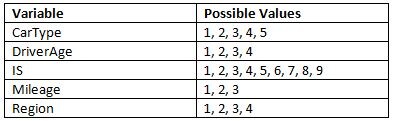
Build a GLM with the Tweedie distribution and logarithm link function to predict PurePremium. Use the five rating-variables that are listed in the table below:
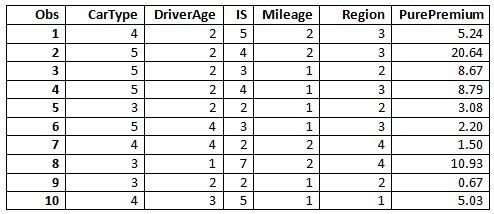
The first ten observations are shown.
Replicate Ratemaking node results using PROC GENMOD
Read this data into SAS Enterprise Miner and run the GLM using the Ratemaking node. The table below describes the order of values that are read and the reference level that is used by the node.
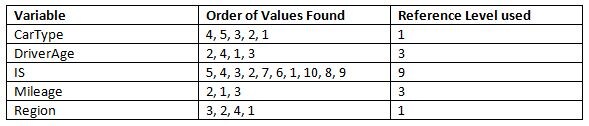
Specify the above reference levels in the PROC GENMOD code to replicate results of the Ratemaking node.
Replicate PROC GENMOD results using the Ratemaking Node
In this example, supposed that the PROC GENMOD options ORDER=FREQ DESCENDING were specified in the CLASS statement. These options cause PROC GENMOD to sort the rating variables’ values in ascending order based on the number of observations in each level. PROC GENMOD thus uses the values with the highest number of observations as the reference level. The order and the reference levels are shown here in ascending order:
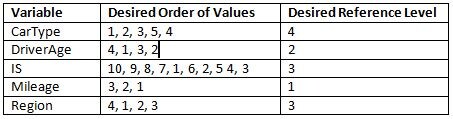
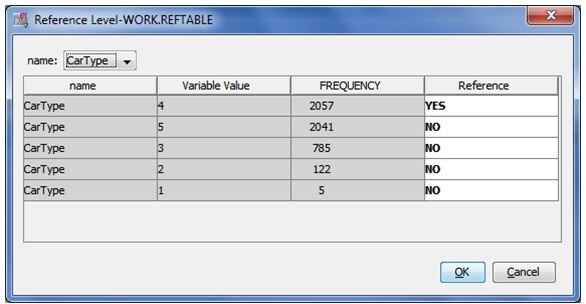
If you have SAS Enterprise Miner 7.1 M1 or later, then you can directly specify the desired reference level in the Reference Level dialog box. By default, the Ratemaking node uses the value with the highest number of observations as the default reference level. Run the Ratemaking node first to access this dialog box. After running, change the Set Reference Level to User Defined in the Property panel and then select the Reference Level field button. The following dialog box appears, and you can specify your desired reference level.
To make the Ratemaking node use your desired order using an earlier SAS Enterprise Miner version, insert the following ten records at the beginning of your data. Ten records are sufficient in this example because the largest number of levels among all rating variables is ten. Note that the reference levels (bolded and shaded) are repeated for subsequent rows to avoid having the missing value as a level in the rating variable. Also, the target variable PurePremium must have values that are used in finding reference levels, but those values are not used for building the GLM. These values must be used because observations with missing target values are discarded by the Ratemaking node before determining the reference levels. However, do not distort the GLM results with these artificial observations. In the above example, the target variable PurePremium has the value -100 in all observations because negative target values are not used when building a Tweedie GLM.
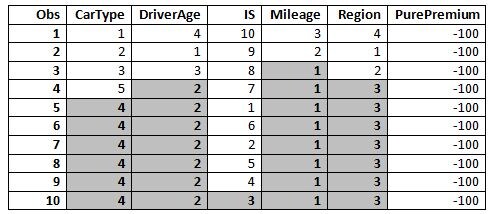
After passing this augmented data set to the Ratemaking node, the node builds the Tweedie GLM with these desired reference levels. The node produces results that are identical to the results from PROC GENMOD.
Operating System and Release Information
| Product Family | Product | System | Product Release | SAS Release | ||
| Reported | Fixed* | Reported | Fixed* | |||
| SAS System | SAS Enterprise Miner | Solaris for x64 | 7.1 | 9.3 TS1M0 | ||
| Linux for x64 | 7.1 | 9.3 TS1M0 | ||||
| HP-UX IPF | 7.1 | 9.3 TS1M0 | ||||
| Linux | 7.1 | 9.3 TS1M0 | ||||
| 64-bit Enabled HP-UX | 7.1 | 9.3 TS1M0 | ||||
| 64-bit Enabled Solaris | 7.1 | 9.3 TS1M0 | ||||
| Windows Vista for x64 | 7.1 | 9.3 TS1M0 | ||||
| 64-bit Enabled AIX | 7.1 | 9.3 TS1M0 | ||||
| Windows Vista | 7.1 | 9.3 TS1M0 | ||||
| Windows 7 Ultimate 32 bit | 7.1 | 9.3 TS1M0 | ||||
| Windows 7 Ultimate x64 | 7.1 | 9.3 TS1M0 | ||||
| Windows 7 Professional x64 | 7.1 | 9.3 TS1M0 | ||||
| Windows 7 Home Premium x64 | 7.1 | 9.3 TS1M0 | ||||
| Windows 7 Professional 32 bit | 7.1 | 9.3 TS1M0 | ||||
| Windows 7 Enterprise x64 | 7.1 | 9.3 TS1M0 | ||||
| Windows 7 Home Premium 32 bit | 7.1 | 9.3 TS1M0 | ||||
| Windows 7 Enterprise 32 bit | 7.1 | 9.3 TS1M0 | ||||
| Microsoft Windows Server 2008 for x64 | 7.1 | 9.3 TS1M0 | ||||
| Microsoft Windows XP Professional | 7.1 | 9.3 TS1M0 | ||||
| Microsoft Windows Server 2008 | 7.1 | 9.3 TS1M0 | ||||
| Microsoft Windows Server 2003 Standard Edition | 7.1 | 9.3 TS1M0 | ||||
| Microsoft Windows Server 2003 for x64 | 7.1 | 9.3 TS1M0 | ||||
| Microsoft Windows Server 2003 Enterprise Edition | 7.1 | 9.3 TS1M0 | ||||
| Microsoft® Windows® for x64 | 7.1 | 9.3 TS1M0 | ||||
| Microsoft Windows Server 2003 Datacenter Edition | 7.1 | 9.3 TS1M0 | ||||
| Type: | Usage Note |
| Priority: | |
| Topic: | Analytics ==> Analysis of Variance Analytics ==> Data Mining Analytics ==> Regression |
| Date Modified: | 2011-12-22 17:55:48 |
| Date Created: | 2011-12-22 09:58:59 |