Usage Note 45129: SAS® Drug Development 3.5 - Using Xythos Drive Mapping for Windows XP
 |  |  |  |
Using Drive Mapping for Windows XP
Drive mapping refers to mapping a web server location as if it is a physical drive on your network. This means that you can define the SAS Drug Development repository as a drive and your desktop can access files stored in SAS Drug Development.
Advantages and Disadvantages to Using Drive Mapping
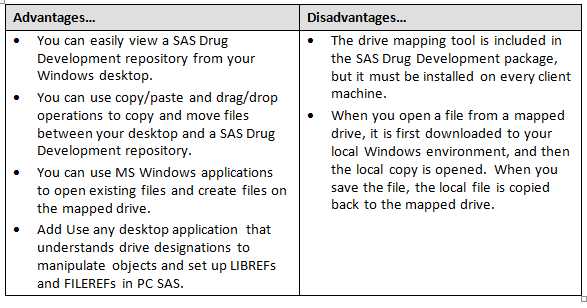
Example of Defining a Drive Mapping Tool
Here are the general steps for mapping a drive to SAS Drug Development.
1. From the Xythos Client window, select the Service button to display a drop-down menu. Select New Service from the drop-down menu.
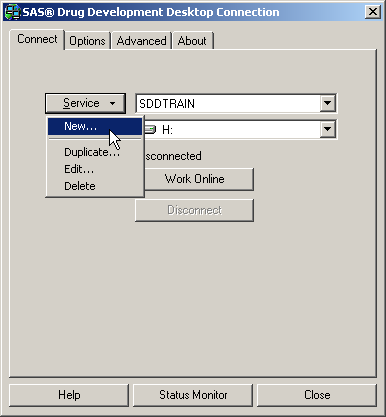
Xythos Client Window
2. From the Service Properties window, provide the following parameters:
- Service name (this can be anything you want to call it)
- SAS Drug Development Server URL
- your SAS Drug Development User name
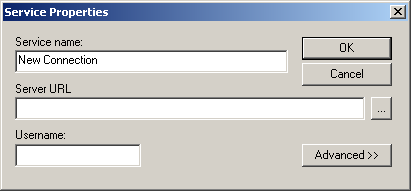
Service Properties Window
Select the OK button from the Service Properties window to close the window and return to the Xythos Client window.
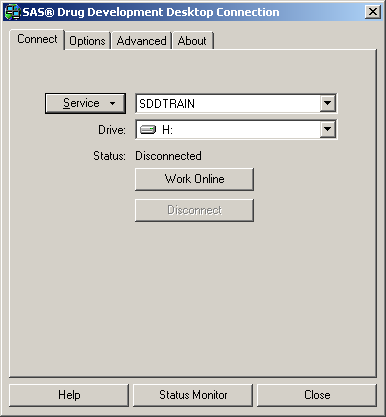
Xythos Client Window
3. You connect to SAS Drug Development through a mapped drive from the Xythos Client window. Select the proper mapped drive definition then select the Work Online button.
The image below shows the SAS Drug Development repository defined as a mapped drive in Windows Explorer.

SAS Drug Development Repository
Operating System and Release Information
| Product Family | Product | System | SAS Release | |
| Reported | Fixed* | |||
| SAS System | SAS Drug Development - SAS Hosted Edition | Microsoft Windows XP Professional | ||
| Type: | Usage Note |
| Priority: |
| Date Modified: | 2012-01-10 12:03:16 |
| Date Created: | 2011-12-13 13:04:15 |