Usage Note 43512: Specifying a relative time as the default value for a dynamic date prompt in SAS® Information Map Studio
To select a relative time (such as today or previous quarter) as the default value for a dynamic date prompt, complete the following steps in the New Prompt dialog box in SAS Information Map Studio.
- Select the Prompt Type and Values tab.
- As the Method for populating prompt, select User selects values from a dynamic list.
- For the Date type, select Day, Week, Month, Quarter, or Year.
- At the bottom of the dialog box, select the Allow user to specify additional (unformatted) values option.
- Click Specify to open the Default Value dialog box.
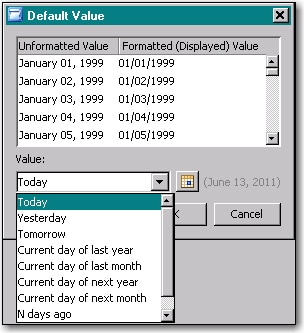
- From the Value list, select the relative time that you want to use as the default. The choices are specific to the Date type that you specified. For example, the following display shows the choices available for Day. (The one option not shown is N days from now.)
- Click OK to return to the New Prompt dialog box.
- (Optional) Deselect the Allow user to specify additional (unformatted) values option.
Operating System and Release Information
| SAS System | SAS Information Map Studio | Microsoft® Windows® for x64 | 4.2 | | 9.2 TS2M0 | |
| Microsoft Windows Server 2003 Datacenter Edition | 4.2 | | 9.2 TS2M0 | |
| Microsoft Windows Server 2003 Enterprise Edition | 4.2 | | 9.2 TS2M0 | |
| Microsoft Windows Server 2003 Standard Edition | 4.2 | | 9.2 TS2M0 | |
| Microsoft Windows Server 2003 for x64 | 4.2 | | 9.2 TS2M0 | |
| Microsoft Windows Server 2008 for x64 | 4.2 | | 9.2 TS2M0 | |
| Microsoft Windows XP Professional | 4.2 | | 9.2 TS2M0 | |
| Windows Vista | 4.2 | | 9.2 TS2M0 | |
| Windows Vista for x64 | 4.2 | | 9.2 TS2M0 | |
*
For software releases that are not yet generally available, the Fixed
Release is the software release in which the problem is planned to be
fixed.
| Date Modified: | 2011-06-13 15:22:25 |
| Date Created: | 2011-06-13 15:01:42 |


