Installation Note 43315: When using Federal Desktop Core Configuration (FDCC) security standards under Windows 7, do NOT select "Automatically log back on after reboot"
 |  |  |  |
Federal agencies that are using the Windows 7 operating system and complying with the United States Government Configuration Baseline (USGCB) desktop security standards need to be aware that using the automatic logon feature of SAS® Deployment Wizard will violate federal desktop security policies.
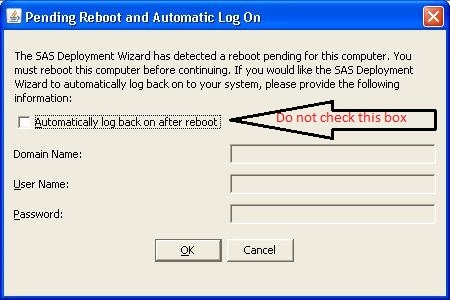
After you start the SAS Deployment Wizard, Microsoft Runtime Components 7.1, which is required by SAS®, is checked and any updates that are needed are installed. The SAS Deployment Wizard then asks for logon credentials and a password so that it can automatically restart the system and log on the installer after the updates are applied. The normal procedure is for the SAS Deployment Wizard to remove the automatic logon registry keys after the system is restarted and after the installer is logged on again.
However, Windows 7 will not allow the automatic logon keys to be removed from the registry after the system is restarted. Note that this is not a problem under Windows XP or Windows Vista. This leaves the system vulnerable to attack and violates the USGCB security policies.
Operating System and Release Information
| Product Family | Product | System | Product Release | SAS Release | ||
| Reported | Fixed* | Reported | Fixed* | |||
| SAS System | Base SAS | Windows 7 Enterprise x64 | 9.3 | 9.3 TS1M0 | ||
| Windows 7 Home Premium x64 | 9.3 | 9.3 TS1M0 | ||||
| Windows 7 Professional x64 | 9.3 | 9.3 TS1M0 | ||||
| Windows 7 Ultimate x64 | 9.3 | 9.3 TS1M0 | ||||
| Type: | Installation Note |
| Priority: | alert |
| Date Modified: | 2011-07-01 11:42:41 |
| Date Created: | 2011-05-19 12:56:00 |