Installation Note 42847: What to do if you have problems logging in using your SAS® profile to download software and hot fixes
 |  |  |  |
The way to log in to your profile is as follows:
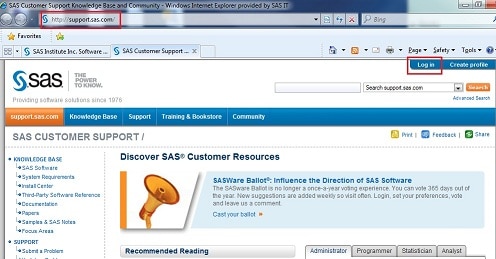
- Navigate to the SAS Support / Downloads & Hot fixes web page.
- At the top of the page, on the right, click the Log in button.
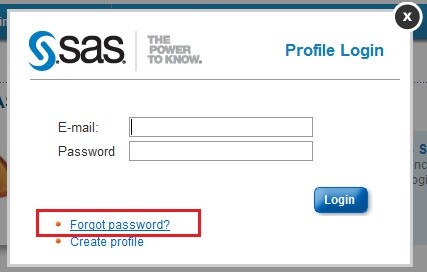
- In the dialog box that appears, enter your e-mail address and password. A “Welcome” message should appear at the top of the page. This indicates that you are now logged in.

If the Login Procedure above Did Not Work
- Click the Log in button at the top of the main SAS CUSTOMER SUPPORT page.
- If you still have issues, click the Forgot password? link at the bottom of the Profile Login dialog box.
- If you receive the message "Registered user not found," send an e-mail message to SASProfileHelp@sas.com and include the error that you received along with the e-mail address that you used.
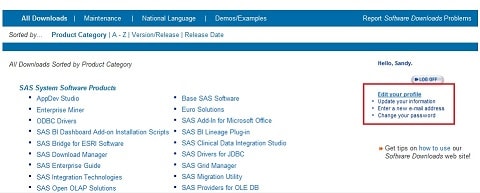
- Important: Your e-mail address must match the address that SAS has in the database. If your e-mail address has changed, modify your profile with the correct information. Click the Edit your profile link shown here:
- Additional step for SAS Site Representatives: You must also change your information at the Address Changes and Site Rep Information site.
Other Known Issues
- When you change your SAS Profile password, change it to something that uses only alphanumeric characters.
- Use the My SAS Profile link to make changes.
- A few non-alphabetic and non-numeric characters are causing issues for some users’ passwords (for example: %).
Operating System and Release Information
| Product Family | Product | System | SAS Release | |
| Reported | Fixed* | |||
| SAS System | Base SAS | CMS | ||
| z/OS | ||||
| Z64 | ||||
| Microsoft® Windows® for 64-Bit Itanium-based Systems | ||||
| Microsoft Windows Server 2003 Datacenter 64-bit Edition | ||||
| Microsoft Windows Server 2003 Enterprise 64-bit Edition | ||||
| Microsoft® Windows® for x64 | ||||
| OS/2 | ||||
| Microsoft Windows 95/98 | ||||
| Microsoft Windows 2000 Advanced Server | ||||
| Microsoft Windows 2000 Datacenter Server | ||||
| Microsoft Windows 2000 Server | ||||
| Microsoft Windows 2000 Professional | ||||
| Microsoft Windows NT Workstation | ||||
| Microsoft Windows Server 2003 Datacenter Edition | ||||
| Microsoft Windows Server 2003 Enterprise Edition | ||||
| Microsoft Windows Server 2003 Standard Edition | ||||
| Microsoft Windows Server 2003 for x64 | ||||
| Microsoft Windows Server 2008 | ||||
| Microsoft Windows Server 2008 for x64 | ||||
| Microsoft Windows XP Professional | ||||
| Windows 7 Enterprise 32 bit | ||||
| Windows 7 Enterprise x64 | ||||
| Windows 7 Home Premium 32 bit | ||||
| Windows 7 Home Premium x64 | ||||
| Windows 7 Professional 32 bit | ||||
| Windows 7 Professional x64 | ||||
| Windows 7 Ultimate 32 bit | ||||
| Windows 7 Ultimate x64 | ||||
| Windows Millennium Edition (Me) | ||||
| Windows Vista | ||||
| Windows Vista for x64 | ||||
| 64-bit Enabled AIX | ||||
| 64-bit Enabled HP-UX | ||||
| 64-bit Enabled Solaris | ||||
| ABI+ for Intel Architecture | ||||
| AIX | ||||
| HP-UX | ||||
| HP-UX IPF | ||||
| Linux | ||||
| Linux for x64 | ||||
| Linux on Itanium | ||||
| OpenVMS Alpha | ||||
| OpenVMS on HP Integrity | ||||
| Solaris | ||||
| Solaris for x64 | ||||
| Tru64 UNIX | ||||
| Type: | Installation Note |
| Priority: | high |
| Date Modified: | 2013-07-10 22:34:59 |
| Date Created: | 2011-04-01 09:30:30 |